AI Chatbot vs AI Agent: The Real Difference, Costs and Risks
AI chatbot vs AI agent: where the line sits, a four level ladder, worked cost per conversation, risk tiers for actions, and how to decide what you need.

Short answer: A chatbot answers; an agent decides what to do next and acts in your systems. Choose a chatbot when the job is answering questions from known content. Choose an agent when finishing the job means changing something, such as a booking, an address or a refund. In our illustrative example an agent conversation costs about 5 cents in model usage against under 1 cent for a chatbot, so the real cost gap is building, testing and controlling the actions: $8,000 to $25,000 for a single task agent.
In this guide
- Where the line actually sits
- A four level ladder
- Chatbot vs agent side by side
- One request, handled both ways
- What a conversation costs to run
- What each costs to build
- Why actions change the risk
- Action tiers and approval rules
- How to test an agent before it acts
- When a chatbot is the right choice
- When you need an agent
- Upgrading from chatbot to agent in stages
- Mistakes we see
- How Vrisic can help
- Sources
Vendors use “chatbot”, “assistant”, “copilot” and “agent” interchangeably, and Gartner has a name for it: agent washing, where existing assistants, robotic process automation and chatbots are rebranded as agentic AI without substantial agentic capability (Gartner). The labels matter less than two questions that decide cost and risk: can the system change something in your business, and who decides the next step, your code or the model? This guide gives you a working definition, a ladder to place any product on, real numbers for running and building each, and rules for when to stop at a chatbot. For the fundamentals, start with what an AI agent is.
Where the line actually sits
The cleanest definition comes from Anthropic’s engineering guide to building agents. It separates two architectures. Workflows are systems where language models and tools are orchestrated through predefined code paths. Agents are systems where the model dynamically directs its own process and tool use (Anthropic). Anthropic’s advice is to find the simplest solution possible and increase complexity only when needed, and it notes that agentic systems usually trade cost and latency for better task performance.
Translated for a buyer, the line has two parts:
- Acting. A chatbot produces text. An agent can also call tools that change state: create a ticket, update a record, send an email, move money.
- Steering. In a chatbot or a workflow, you fixed the steps in code. In an agent, the model chooses which tool to use next, in what order, and when it is finished.
Many useful products sit in between: a chatbot that looks up an order is reading data, not acting, and a workflow that always runs the same five steps is not steering itself. Calling those “agents” is marketing, but calling them “just chatbots” undersells them. That is why a ladder is more useful than two boxes.
A four level ladder
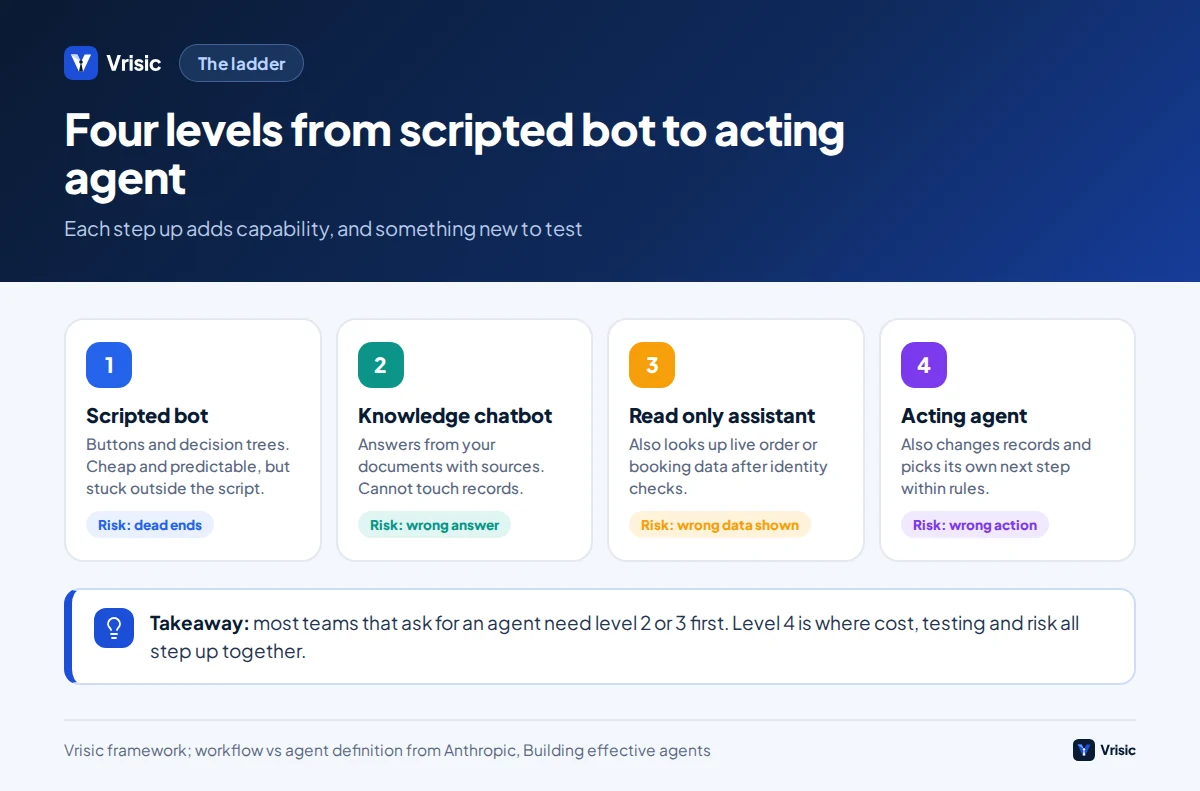
Place any product or proposal on this ladder before you compare prices. Each level adds capability and adds something to test.
- Scripted bot. Buttons and decision trees, sometimes with keyword matching. Predictable and cheap, but cannot handle a question outside the script.
- Knowledge chatbot. A language model answers from your documents using retrieval, with sources. It cannot touch customer records or change anything. The main risk is a wrong or invented answer.
- Read only assistant. The same, plus tools that read live, customer specific data such as order status, booking times or account balances after the user is identified. The risk now includes showing the wrong person’s data.
- Acting agent. The model can also call tools that change state, within rules, and decides its own next step. The risk now includes a wrong action, which can be financial, legal or irreversible.
Most businesses that say they want an agent need level 2 or 3 first. Moving from level 3 to level 4 is the point where cost, testing effort and risk step up together, so make that jump deliberately and one action at a time.
Chatbot vs agent side by side
| Knowledge chatbot (level 2) | Acting agent (level 4) | |
|---|---|---|
| Main job | Answer questions from known content | Complete a task end to end |
| Who picks the next step | Your code, or a single model answer | The model, within rules you set |
| Tools | Search over documents | Search plus read and write tools in your systems |
| Typical failure | A wrong or unsupported answer | A wrong action, or a loop that never finishes |
| Blast radius of one failure | One bad answer | A changed record, a sent email, a refund |
| Model calls per conversation | 1 per turn | Several per turn, with growing context |
| What you must test | Answer accuracy, refusals, sources | All of that, plus each tool call, its arguments and what happens on failure |
| Approval needed | Rarely | For actions above a risk threshold |
| Typical build at Vrisic | At or below the bottom of our single task range (our estimate) | $8,000 to $25,000 single task; $25,000 to $60,000 integrated |
One request, handled both ways
Illustrative example: an online customer writes, “I moved house, can you change the delivery address on order 4417 before it ships?”
The chatbot
A knowledge chatbot finds the relevant policy text, says that addresses can be changed until the order is dispatched, and tells the customer to contact support or use the account page. The answer is correct and the customer still has to do the work. Resolution rate for this kind of request is low because the answer is not the outcome.
The agent
An agent working at level 4 does this:
- Verifies the customer, for example by matching the signed in account or a one time code.
- Calls a tool to fetch order 4417 and checks it belongs to that customer.
- Checks the status. If the order is packed or dispatched, the rule says no change; it explains the options.
- If the status allows it, validates the new address against an address service.
- Calls the update tool with the new address, then re-reads the order to confirm the change.
- Sends a confirmation, writes a note on the order and logs every tool call with its arguments.
Six steps, four tool calls, one irreversible-if-wrong change. The extra value is real, since the customer’s problem is fixed in one conversation. So is the extra risk: if step 2 is skipped, someone can change another customer’s delivery address. The design work is mostly in the rules around the tool, not the model.
What a conversation costs to run
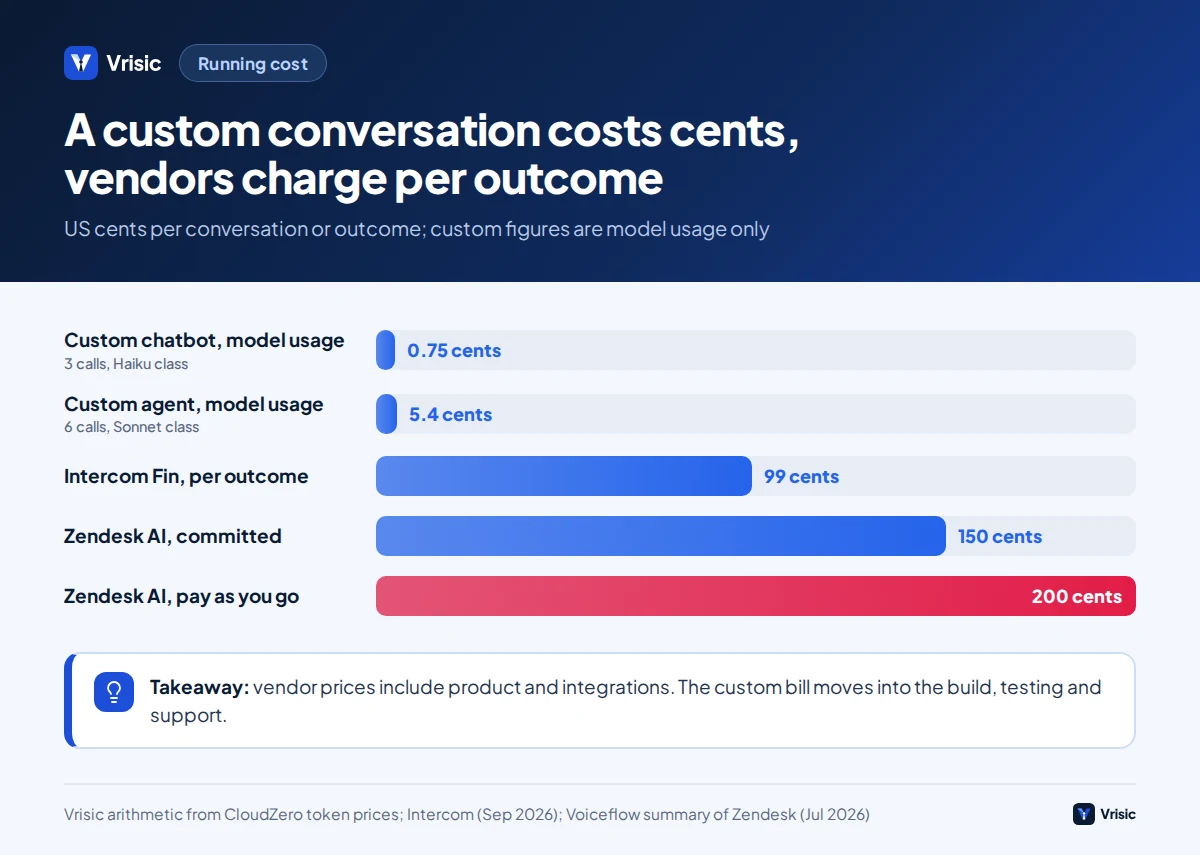
Model cost per conversation is small for both, and the agent is several times higher because it makes more model calls and carries a longer context into each. A third party summary updated 14 September 2026 lists Claude Haiku 4.5 at $1 per million input tokens and $5 per million output tokens, and Claude Sonnet 5 at $2 and $10 (CloudZero). Using those rates, here is our illustrative arithmetic.
| Item | Knowledge chatbot | Acting agent |
|---|---|---|
| Model used | Haiku class | Sonnet class |
| Model calls in a conversation | 3 (one per turn) | 6 (tool decisions plus replies) |
| Tokens per call | 1,500 in, 200 out | 3,000 in, 300 out (context grows with each tool result) |
| Cost per call | $0.0015 + $0.0010 = $0.0025 | $0.0060 + $0.0030 = $0.0090 |
| Cost per conversation | About $0.0075 | About $0.054 |
For comparison, per outcome pricing from help desk vendors is far higher. Intercom lists its Fin agent at $0.99 per outcome, where an outcome means Fin answered and the customer confirmed it helped or left without asking for more, with at most one outcome charged per conversation (Intercom). A July 2026 summary puts Zendesk’s advanced AI agents at about $2 per resolution pay as you go and about $1.50 on committed volume (Voiceflow). Those prices include the product, the integrations and the vendor’s margin, so the comparison is not model cost against model cost. The point is where each bill comes from: with a custom build, a conversation costs cents and you have already paid for the build; with a vendor, you pay per outcome indefinitely.
Model usage is only one line of the operating cost. Add hosting, monitoring, a review queue for approvals and the time to keep tests current. We usually tell clients to expect model usage to be a minority of the annual running cost of an agent.
What each costs to build
At Vrisic, a single task agent typically costs $8,000 to $25,000 and takes 3 to 6 weeks, an integrated agent that works across several of your systems costs $25,000 to $60,000 over 6 to 10 weeks, and a multi agent system costs $60,000 to $150,000 or more over 10 to 16 weeks. A knowledge chatbot with retrieval usually sits at the low end of that spectrum or below it, in our estimate, because there are no write integrations to build or approval flows to test. Our AI agent cost guide breaks the numbers down in detail.
What drives the price between a chatbot and an agent, in order of size:
- Integrations. Each system the agent writes to needs authentication, error handling, retries and idempotency, which means a repeated call must not double the effect.
- Rules and permissions. A written list of what the agent may do, for whom, up to what value.
- Test set and evaluation. Real conversations with correct outcomes, plus a harness that runs them on every change.
- Human approval flow. A queue, notifications and a clear screen for the reviewer.
- Logging. Every input, tool call and result, kept for as long as you need to answer a dispute.
Why actions change the risk
Three pieces of public evidence show what changes when a system moves from answering to acting.
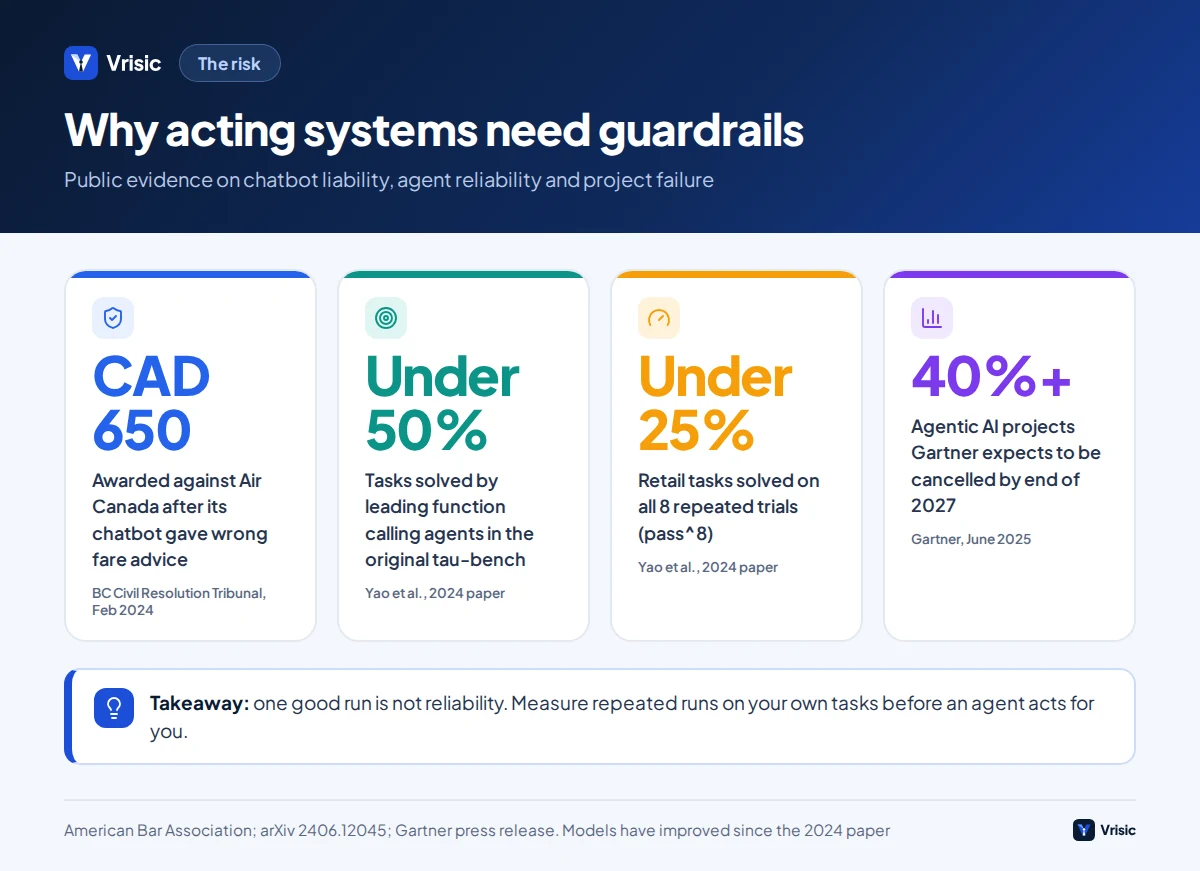
You own what the bot says. In February 2024 a British Columbia tribunal found Air Canada liable for negligent misrepresentation after its website chatbot gave a customer wrong information about bereavement fares. Air Canada argued that the correct policy was on another page and that the chatbot was a separate legal entity responsible for its own actions; the tribunal rejected both and awarded the customer roughly CAD 650 plus interest and fees (American Bar Association). The sum was small; the principle was not. If a chatbot can be wrong in a way that costs money, so can an agent that acts.
Agents are not yet reliable by default. The τ-bench benchmark tests agents in multi turn conversations with a simulated customer, with domain tools and policy rules, and grades the final database state against the goal. In the original paper, state of the art function calling agents such as gpt-4o succeeded on fewer than 50% of tasks, and in the retail domain the measure pass^8, the chance that all eight repeated trials of the same task succeed, was below 25% (Yao et al., arXiv). Models have improved since that 2024 paper, so do not read those figures as today’s state of the art. Read them as the lesson: success on one run is not reliability, and you should measure repeated runs on your own tasks.
Projects fail on cost, value and controls. Gartner predicts more than 40% of agentic AI projects will be cancelled by the end of 2027, citing escalating costs, unclear business value and inadequate risk controls (Gartner). All three are visible before you build, if you ask for a cost per resolved task, a named business metric and a written action policy up front.
Action tiers and approval rules
The simplest control that works is to sort every tool the agent can call into a tier and attach a rule to each tier. We put this in writing before any code, because it forces the business to decide what it is willing to let a model do.
| Tier | Example actions | Rule |
|---|---|---|
| 0. Read public content | Search policies, product data, opening hours | Allowed, with sources shown |
| 1. Read customer data | Order status, booking time, invoice list | Allowed only after identity checks; return only that customer’s records |
| 2. Reversible change | Change address before dispatch, add an order note, reschedule a slot | Allowed with validation, a confirmation message and a log; easy to undo |
| 3. Financial or hard to undo | Refund, cancel after dispatch, apply a discount code | Allowed up to a value cap you set; above it, queue for human approval |
| 4. Never by the agent | Delete an account, change legal terms, override a fraud hold | Not exposed as a tool at all |
Three design habits make these rules hold. Give the agent only the tools it needs, since a tool that does not exist cannot be misused. Make tools hard to misuse, for example by requiring an order identifier and a verified customer together; Anthropic notes that changing a tool’s input format to require absolute file paths eliminated a class of errors in its own coding agent work. And make writes safe to repeat, so a retry cannot refund twice.
How to test an agent before it acts
A chatbot can be reviewed by reading answers. An agent has to be tested by checking outcomes, because two different conversations can reach the same correct end state and one of them can reach a wrong state while sounding perfectly polite.
- Build a test set from real history. Collect 100 to 300 past conversations with the correct final outcome recorded, including refusals, edge cases and attempts to push past policy.
- Grade the end state. Compare the resulting records with the expected ones, as τ-bench does, not just the wording of the reply.
- Repeat each case. Run each task at least five times and report how many of the five all succeed. A system that passes once and fails twice is not ready.
- Test adversarial cases. Wrong customer, missing identifier, contradictory instructions, a request above the refund cap, text in a message that tries to override the rules.
- Review the tool calls. Inspect arguments and order, not only results. A correct outcome from a risky path is a bug.
- Re-run on every change. A new prompt, model or tool description can silently change behaviour.
Anthropic’s guidance on tool design matches this: test tools by running many example inputs and looking at where the model makes mistakes, and write tool descriptions as you would a docstring for a junior developer, with examples, edge cases and boundaries between similar tools (Anthropic). Our guide on how to build an AI agent covers the build side.
When a chatbot is the right choice
- The task is answering questions from content you already have: policies, product specs, onboarding docs, internal handbooks.
- The customer can finish the job themselves once they know the answer.
- Mistakes are tolerable if the bot cites its source and refuses when unsure.
- You do not yet know which actions customers want. A chatbot’s conversation logs show you, at low risk.
- Your systems have no safe write interface, such as an API with permission scopes.
- The expected gain is deflecting questions, not completing transactions.
If the content is large or changes often, the chatbot should retrieve rather than memorise; see our enterprise RAG and AI search work. Anthropic’s own note that optimising single model calls with retrieval and examples is usually enough for many applications applies here.
When you need an agent
- The resolution is an action: book, change, cancel, refund, create, route, reconcile.
- The steps depend on what the system finds along the way, so a fixed script would need dozens of branches.
- Your business has an API or an automation layer the agent can call under permissions you control.
- You can measure success as a completed outcome, such as an order changed or a ticket correctly routed.
- The volume or cost of the manual version is high enough to fund the build and the testing.
- A named person owns the action policy and will review exceptions.
Anthropic singles out customer support as a good fit for agents because it combines conversation with access to external data and actions, such as customer records and refunds, and because success can be measured by user defined resolutions. That is exactly the shape of work where the extra build cost pays back. If the process is a fixed sequence rather than an open conversation, a workflow is often better than an agent, and our workflow automation page covers that case.
Upgrading from chatbot to agent in stages
You do not need to choose once. A staged path limits risk and shows value at each step.
- Weeks 1 to 3: knowledge chatbot. Ground answers in your documents, show sources, refuse when unsure, and log every conversation.
- Review the logs. Count what customers asked for that the bot could not do. The top three requests are your first actions.
- Add read tools. Order status, appointment lookup. Add identity verification and test that one customer can never see another’s data.
- Add one reversible write. For example, an address change before dispatch. Run it in shadow mode first: the agent proposes the change, a person approves, and you compare.
- Raise autonomy gradually. Move the action from approval to automatic once repeated test runs and a month of live approvals show no errors. Keep a value cap and a one click rollback.
- Add the next action. Repeat from step 4. Do not add three actions at once.
Mistakes we see
- Buying an agent to answer questions. You pay for orchestration and testing you do not use.
- Treating a demo as proof. One good run says little. Ask for results across repeated runs on your data.
- Letting the model hold the policy. Refund limits and eligibility rules belong in code that the model cannot talk its way past.
- No identity step before reading customer data. This is the quickest way to create a privacy incident.
- Giving the agent one big “do anything” tool. Narrow tools with validated arguments are safer and easier to test.
- Measuring conversations, not outcomes. A friendly chat that leaves the problem unsolved is a failure. Track outcome per conversation and handover rate.
- No plan for the model changing. A provider update can alter behaviour. Pin versions and re-run tests before moving.
How Vrisic can help
We build both, and we will tell you if a chatbot is enough. After a free scoping call we quote a fixed price. The system runs in your cloud with your own model keys, you own the code, prompts and test data, and there are no per seat fees. See our AI agent development service for how we scope action policies and tests.
If you want to test the idea first, the AI Pilot costs $1,500, runs for 10 business days and is credited against a build started within 60 days. You can also read how we work or book the scoping call.
Sources
- Building effective agents (Anthropic Engineering)
- Gartner Predicts Over 40% of Agentic AI Projects Will Be Canceled by End of 2027 (Gartner, 25 June 2025)
- BC Tribunal Confirms Companies Remain Liable for Information Provided by AI Chatbot (American Bar Association, February 2024)
- τ-bench: A Benchmark for Tool-Agent-User Interaction in Real-World Domains (arXiv, 2024)
- Intercom Pricing: Plans, Features and Costs (Intercom, 24 September 2026)
- Zendesk AI Agents: Pricing, Setup, and Best Alternatives (Voiceflow, updated 6 July 2026)
- Anthropic Claude API Pricing: Every Model, Token Rate, and Cost Lever (CloudZero, updated 14 September 2026)