Invoice Data Extraction: OCR vs LLM and What Accuracy to Expect
Invoice data extraction with OCR vs LLM: benchmark accuracy by field, cost per page, failure modes, validation rules and when a hybrid design wins.

Short answer: OCR only turns pixels into text; a vision LLM or document AI service also decides which text is the total, the date or the IBAN. In a 2025 benchmark, feeding the page image straight to a multimodal model scored 92.7% field accuracy on scanned invoices against 63.9% for the same model reading converted text. By our estimate the model call costs about $0.001 to $0.002 per page on a small model, so the real design question is how many invoices still need a person.
In this guide
- OCR, document AI and LLMs: what each one does
- What the benchmark says about accuracy
- Which fields fail first
- Five pipeline designs compared
- What extraction costs per page
- How each approach fails
- Validation rules that catch what models miss
- Why 97% field accuracy is not 97% of invoices
- How to measure accuracy on your own invoices
- When there is nothing to extract
- Illustrative example: 5,000 invoices a month
- How to choose
- How Vrisic can help
- Sources
Invoice extraction is one of the most common first AI projects because the task repeats, the answer is checkable and the savings are easy to count. It is also where “OCR vs LLM” arguments waste the most time, because the two are not competing for the same job. This guide separates what each layer does, shows real benchmark numbers by field and by input type, prices the options page by page, and explains the design we use when accuracy matters more than a demo. For the wider process around extraction, such as matching, approvals and ERP posting, read our guide to AI invoice processing.
What is the difference between OCR, document AI and an LLM for invoices?
There are three generations of tooling, and most real systems combine them.
- OCR engine. Recognises characters and returns text, usually with positions. Tesseract, the best known open source engine, is licensed under Apache 2.0, recognises more than 100 languages and, in its own documentation, warns that you will often need to improve the image quality to get better results. An OCR engine does not know what an invoice is. To find the total, you add rules or a template: “the number to the right of the word Total”. That works until a supplier changes its layout.
- Document AI services. Cloud services such as Amazon Textract AnalyzeExpense and Azure AI Document Intelligence prebuilt invoice models combine OCR with trained models that label fields (vendor, invoice number, dates, totals, line items) and return confidence scores. They need no template per supplier, and they are priced per page.
- Multimodal LLMs. Models that accept the page image and a written instruction, such as “return these twelve fields as JSON”. They read layout, language and context together, handle layouts they have never seen, and can be asked to follow your rules. They are priced per token, not per page.
A fourth component is often missing from vendor diagrams: deterministic validation. Arithmetic checks, tax rules, checksum tests and a lookup against your vendor master are plain code, not AI, and they catch a large share of the errors any extractor makes. We come back to this below, because it is where accuracy is won.
What does the benchmark data say about extraction accuracy?
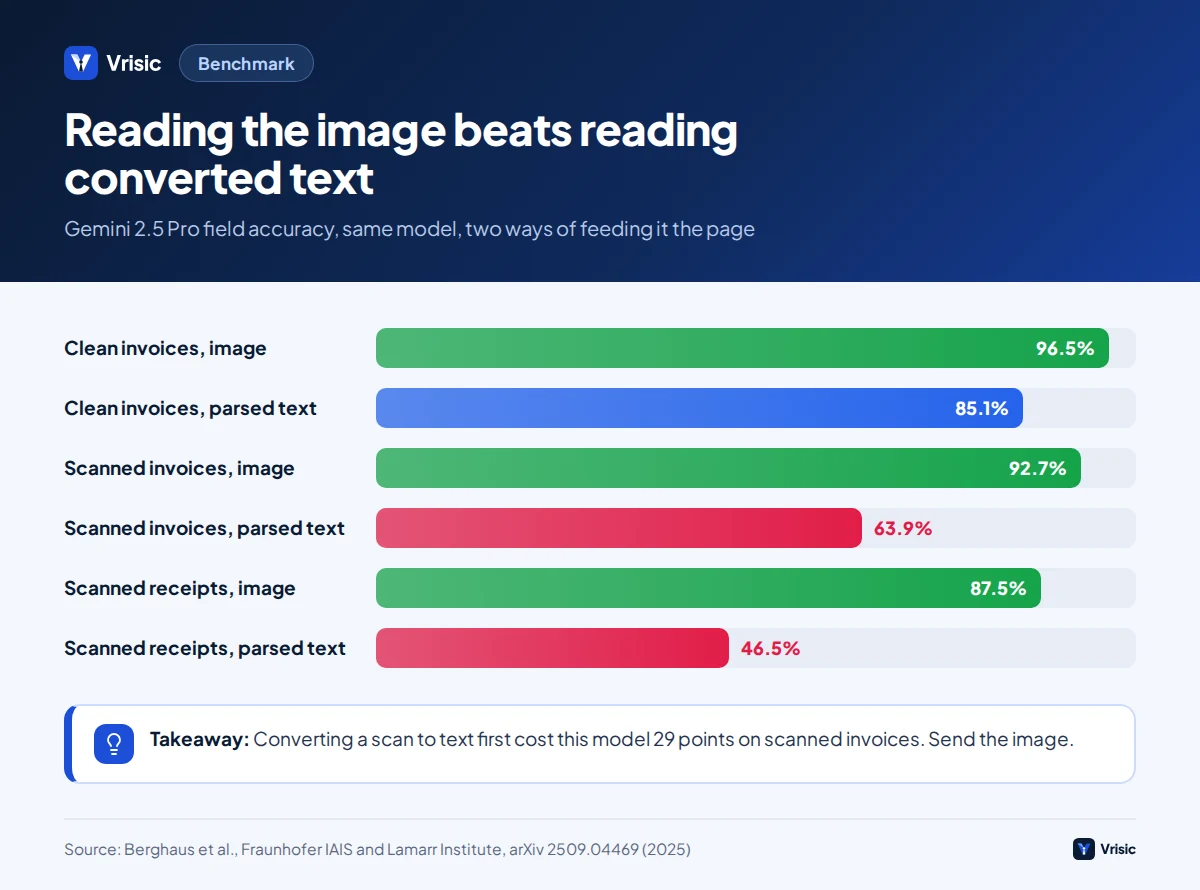
The best public comparison we found is a 2025 study by researchers at Fraunhofer IAIS and the Lamarr Institute. They tested eight models, from OpenAI’s GPT-5 family, Google’s Gemini 2.5 family and open weights Gemma 3, with no training on the documents. Three datasets were used: 500 clean synthetic invoices, 350 scanned invoices with seven annotated fields, and 1,000 scanned receipts. Each model was run two ways: the page image passed directly to the model, or the page first converted to markdown by a parsing tool (Docling) and the text passed to the model (Berghaus et al., arXiv, 2025).
| Model | Receipts, image | Receipts, parsed text | Clean invoices, image | Clean invoices, parsed text | Scanned invoices, image | Scanned invoices, parsed text |
|---|---|---|---|---|---|---|
| Gemini 2.5 Pro | 87.5% | 46.5% | 96.5% | 85.1% | 92.7% | 63.9% |
| Gemini 2.5 Flash-Lite | 85.3% | 44.7% | 95.7% | 84.9% | 91.6% | 61.7% |
| GPT-5 chat | 69.2% | 42.4% | 96.0% | 84.9% | 88.0% | 64.0% |
| GPT-5 mini | 53.9% | 32.6% | 96.3% | 84.9% | 86.9% | 56.0% |
| Gemma 3 12B (open weights) | 66.9% | 41.5% | 84.7% | 84.9% | 82.1% | 61.2% |
| Gemma 3 4B (open weights) | 53.8% | 36.7% | 45.7% | 84.6% | 76.0% | 55.4% |
Overall accuracy per dataset, from Table I of the paper; parsed text means the Docling markdown conversion. The paper reports no cost or latency figures. These models are an older generation than those on sale today, so use the table for relative lessons, not as a forecast for current models on your documents.
Five lessons from the numbers
- Sending the image beat converting to text first, on every scanned dataset and for every model. Parsing to markdown discards layout, stamps and visual relationships. On scanned invoices the gap was 29 points for the best model.
- Clean digital invoices are nearly solved. Five of the eight models passed 95% on synthetic invoices when given the image.
- Scans and receipts are not. Even the best model reached 92.7% on scanned invoices and 87.5% on scanned receipts.
- Model size matters unevenly. The 4B parameter open model collapsed to 45.7% on clean invoices when reading images, but scored 84.6% on the same invoices as parsed text. Small vision models can fail outright, so test them before trusting a cost saving.
- The cheapest Gemini tier was close to the best. Flash-Lite trailed Pro by about one point on both invoice datasets. Bigger is not automatically needed for extraction.
The paper’s authors also report that a fixed text conversion step capped accuracy at roughly 84% to 85% on clean invoices regardless of which model read the text, which suggests the conversion step, not the language model, was the bottleneck.
A caution on the headline numbers: they are accuracy across fields, not across invoices, and they measure academic datasets. Your supplier mix, scan quality and field list will differ. The only figure that counts is the one you measure on your own invoices, which we cover in the measurement section.
Which invoice fields fail first?
Accuracy is not uniform across a document. The same study gives per field results that match what we see in practice: headers and dates are easy, identifiers and tax are not, and anything alphanumeric and unguessable is worst.
| Field (scanned invoices, Gemini 2.5 Pro) | Image input | Parsed text input |
|---|---|---|
| Invoice date | 87.9% | 68.8% |
| Invoice number | 97.3% | 74.6% |
| Total amount | 93.8% | 46.7% |
| Total tax | 97.2% | 36.5% |
On the clean synthetic invoices, the weakest field for nearly every model was the IBAN, at 70.4% for the best one using images. The authors found the typical error was confusing a zero with the letter O or U. A random 22 character string cannot be corrected by context the way a company name can, which is why identifiers need independent checks, not a better prompt.
Fields we treat as high risk in a build, and how we guard them:
- Bank account numbers and IBANs: validate the checksum, compare with the vendor master, and hold any change for a call-back to a number already on file.
- Totals and tax: recompute from the lines; reject if net plus tax does not equal gross within a cent of rounding.
- Dates: pin the date format per supplier country. 04/05/2026 is a different day in the US and UK.
- Line items: quantity, unit and unit price swap places in dense tables; the check is quantity times price equals line total.
- Currency and decimal separators: “1.234,56” and “1,234.56” are the same number written two ways.
Which extraction pipeline designs exist and how do they compare?
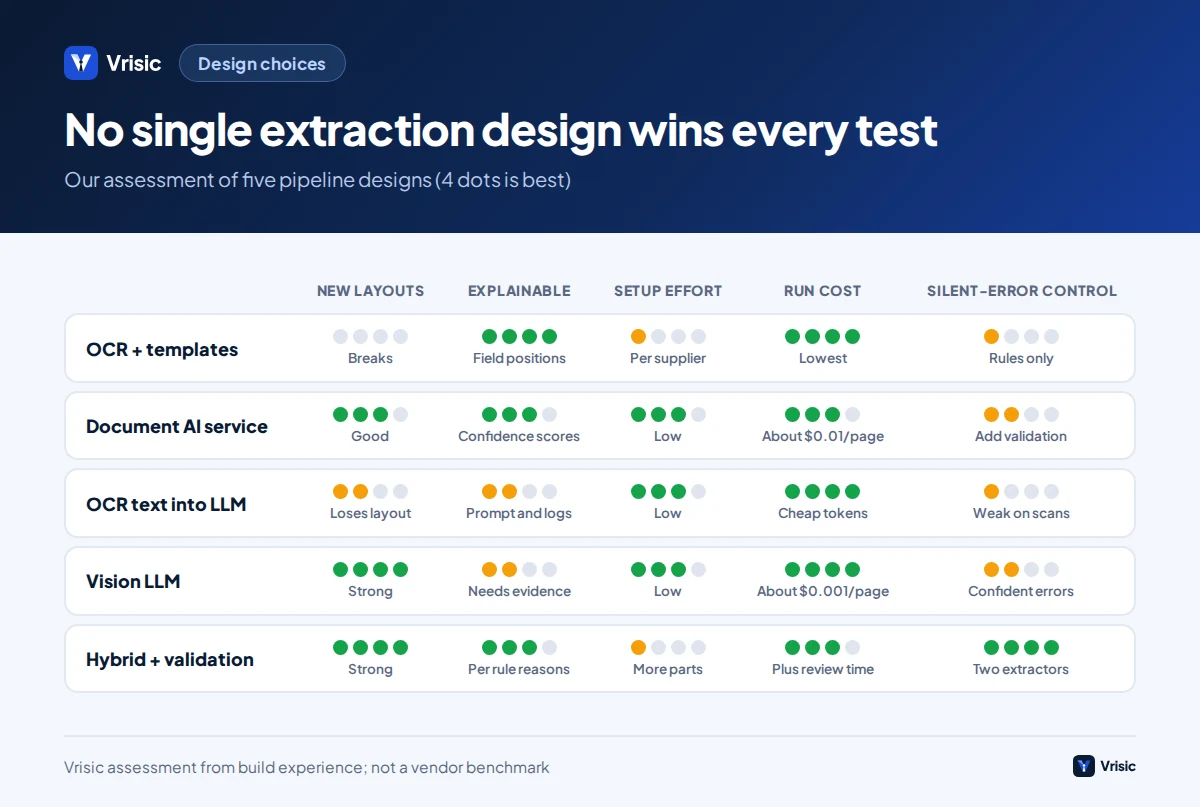
These are the five designs we see, from oldest to newest. None is universally best.
| Design | How it works | Strengths | Weaknesses | Best for |
|---|---|---|---|---|
| 1. OCR plus templates or rules | OCR text, then position or keyword rules per supplier | Cheap, fast, fully explainable, runs offline | A new layout breaks it; a template per supplier to maintain | A few fixed, high volume suppliers |
| 2. Document AI service | Cloud prebuilt invoice model returns labelled fields and confidence | No templates, mature, per page price, confidence scores | Fixed field schema; custom fields need training; data goes to the cloud provider unless you use a private deployment option | Standard header and line fields at moderate to high volume |
| 3. OCR text into an LLM | OCR or parser converts to text, the LLM structures it | Cheap tokens, works with any LLM including self hosted | Loses layout; the benchmark shows large accuracy drops on scans | Text native PDFs, or when only text models are allowed |
| 4. Page image into a vision LLM | Image plus instruction and schema, JSON out | Handles unseen layouts and odd fields; follows your rules; one component | Confidently wrong values; needs validation; token price varies by model | Many suppliers, varied layouts, custom fields |
| 5. Hybrid | Document AI or OCR for positions and confidence, a vision LLM for hard or low confidence cases, validation rules on everything, people on the rest | Highest accuracy per euro; independent signals; graceful fallbacks | More parts to build and monitor | Production AP where errors cost real money |
Design 5 is what we usually recommend once volume passes a few thousand invoices a month, because the two extractors fail in different ways. When a document AI model and a vision LLM agree on a field, the chance that both are wrong in the same way is small. When they disagree, you have found exactly the invoices that deserve a person’s attention. Disagreement is a cheaper and more honest confidence signal than a model’s own self reported confidence.
How much does invoice data extraction cost per page?
Model and service fees are small. They are worth computing anyway, because they let you rule out cost as a reason to pick a weaker approach. Published list prices as of October 2026:
| Option | List price | Per page | Source |
|---|---|---|---|
| Amazon Textract, text detection only | $0.0015 per page, first million pages a month | $0.0015 | AWS |
| Amazon Textract AnalyzeExpense (invoices) | $0.01 per page, first million; $0.008 beyond | $0.01 | AWS |
| Azure Document Intelligence prebuilt invoice | $10 per 1,000 pages (taken from Microsoft’s retail prices API by a third party) | $0.01 | InvoiceExtractor |
| Vision LLM, small tier (OpenAI GPT-5.6 Luna) | $0.20 input, $1.20 output per million tokens | About $0.0011 | CloudZero |
| Vision LLM, small tier (Gemini 3.5 Flash-Lite) | $0.30 input, $2.50 output per million tokens | About $0.0021 | |
| Vision LLM, flagship (OpenAI GPT-6 Astra) | $10 input, $50 output per million tokens | About $0.05 | CloudZero |
The LLM per page figures are our estimate. Assumption: about 2,000 input tokens per page (the image plus our instructions and schema) and 600 output tokens of JSON. For Luna: 2,000 x $0.20 / 1,000,000 = $0.0004, plus 600 x $1.20 / 1,000,000 = $0.00072, giving $0.0011. Image token counts differ by model and resolution, and reasoning models can add hidden output tokens, so measure on a sample. Batch processing is priced at about half by both providers.
At 10,000 pages a month this is $100 for Textract AnalyzeExpense, about $11 for a small vision model, about $21 for Gemini Flash-Lite, and about $500 for a flagship model. Even the highest figure is small compared with the people cost shown in the example below.
The real cost is the review queue
Suppose a reviewer spends 1.5 minutes on each flagged invoice at $35 an hour fully loaded. That is $0.875 per reviewed invoice, which is about 800 times the model cost of a small LLM call and nearly 90 times the Textract page price. A tool that is two points less accurate but sends five percent more invoices to review costs more than any difference in per page fees. Optimise the review rate and the silent error rate first, and the per page price last.
Open source parsers and OCR engines (Tesseract, Docling) have no licence fee, but you pay in engineering and in compute. Docling, an MIT licensed converter from IBM researchers, is reported at roughly 0.6 to 2.5 pages per second on CPU depending on hardware, with its default OCR sometimes taking over 30 seconds a page on a CPU (Docling Technical Report). That is fine for a few thousand pages a month on a small server and slow at scale without a GPU.
How does each approach fail?
Knowing the failure signature tells you which safeguard to build.
| Approach | Typical failure | Looks like | Safeguard |
|---|---|---|---|
| OCR with templates | Wrong field on a new layout, or empty field | Total taken from the subtotal box; missing values | Detect unknown layouts, send them to a fallback extractor |
| OCR engine, poor scan | Character confusion (0 and O, 1 and l, 5 and S) | Invoice number off by one character | Image clean up; checksum and vendor master lookups |
| Document AI service | Field mislabelled or merged; line items split wrongly | Ship-to address read as bill-to; two lines merged into one | Totals recomputation; line count checks against the PO |
| Text only LLM | Missing layout context | Tax amount read from the wrong column; tables garbled | Prefer image input; use only for text native PDFs |
| Vision LLM | Confident, plausible, wrong value | A transposed digit or an invented value for an unreadable field | Second extractor to compare; arithmetic and format validation; require a field to be quoted from the page |
The vision LLM entry deserves a closer look. A structured output mode can force a response to match your JSON schema, so you will never receive a broken object. OpenAI’s documentation describes this as ensuring the response adheres to the supplied schema and prevents invalid enum values (OpenAI). That guarantees the shape of the answer, not that the amount in it is the amount on the page. Treat schema enforcement as a parsing convenience, never as a correctness check.
One technique that helps: ask the model to return, for each critical field, the exact text it read and where. A value that cannot be matched back to text on the page is rejected, which removes most invented values.
Which validation rules catch the errors extraction misses?
Validation is ordinary code, it is cheap and it works across every extractor. A short list does most of the work.
- Arithmetic. Line quantity times unit price equals line amount; lines sum to net; net plus tax equals gross. Allow one cent of rounding per line.
- Tax logic. The tax rate is one your jurisdiction allows for that supplier country; tax equals rate times net within rounding; zero rated or reverse charge invoices carry the right wording.
- Identifier checks. IBAN and VAT or tax numbers pass their format and checksum rules and match the vendor master for that supplier.
- Date sanity. The invoice date is not in the future, not older than your acceptance window, and due date is not before invoice date.
- Duplicate detection. Same supplier, similar number and same amount inside a window, including near matches such as a different prefix or a trailing zero.
- Currency. The currency is one the supplier normally bills in; flag a first ever change.
- PO and receipt match. The PO exists, is open, and covers the lines within tolerance. This is a business check as well as a data check, and is covered in our invoice processing guide.
Every failed rule should return a reason in plain words, such as “net 1,200.00 + tax 240.00 does not equal gross 1,460.00”. A reviewer who sees the reason fixes the invoice in seconds, and your team can count which rules fire most and improve extraction where it matters.
Why does 97% field accuracy not mean 97% of invoices are right?
Because an invoice is only right when every required field is right. If errors were independent, which is a simplifying assumption, document level accuracy is field accuracy raised to the power of the number of fields.
| Field accuracy | Invoices with all 8 fields right | Invoices with all 12 fields right |
|---|---|---|
| 95% | 66.3% | 54.0% |
| 97% | 78.4% | 69.4% |
| 99% | 92.3% | 88.6% |
| 99.5% | 96.1% | 94.2% |
The arithmetic is simple: 0.97 to the power 12 is 0.694. Real errors are correlated, because a bad scan damages several fields at once, so the real figure is usually somewhat better than the table. The principle stands: the gap between 97% and 99% field accuracy is the gap between roughly 7 and 9 invoices in 10 passing untouched. That is why validation rules and a second extractor matter more than a marginally better model, and why line items, which multiply the number of fields, are the hardest part.
The number to manage is the share of invoices that go straight through with no human edit, the touchless rate, together with the silent error rate: invoices posted with a wrong value that nobody caught. A system can raise its touchless rate by lowering its caution, so report both numbers together.
How do you measure extraction accuracy on your own invoices?
Do this before choosing a tool, and repeat it quarterly.
- Build a labelled set of at least 200 invoices. Pull them from the last 3 to 6 months, across your top 30 suppliers plus a random sample of the long tail, and include the worst scans, credit notes and multi page documents. Have a finance person write the correct values. Hold 50 aside and never tune against them.
- Define a match rule per field. Exact match after normalisation for numbers and dates (strip thousands separators, unify date formats). Case and spacing insensitive for names. Exact for identifiers.
- Score each field separately. Report per field and per supplier. A single average hides a field at 70%.
- Score line items properly. Match lines between the extraction and the truth, then score quantity, unit price and amount per matched line. Also count missed and invented lines; models sometimes merge or split rows.
- Score the invoice. What share is correct in every required field? That is the ceiling on touchless processing.
- Count silent errors. Of the wrong invoices, how many would have passed your validation rules and thresholds unflagged? That is the figure that decides how much money is at risk.
- Report the confidence interval. With 200 invoices and 180 correct, the true rate is likely between about 85% and 93%. With 50, it is between about 79% and 96%. Our guide to AI pilots, proofs of concept and MVPs shows how sample size limits what you can claim.
A fair vendor test hands the vendor a set of invoices you chose, keeps the answers, and asks for the output files. If a vendor will only demonstrate on its own samples, treat the accuracy claim as unverified.
When is there nothing to extract?
If a supplier sends a structured e-invoice, you should read the data, not the picture. Structured formats carry the fields as XML, so extraction accuracy is not an issue and validation becomes the main job. Some are hybrids: a ZUGFeRD or Factur-X invoice is a PDF/A-3 file with an XML attachment, so a person sees a normal invoice while software reads the embedded data. The Comfort and Extended profiles of these formats are compliant with the EN 16931 standard (Invoice Navigator). The same source lists Germany’s requirement that all businesses be able to receive structured e-invoices from 1 January 2025, with sending obligations phasing in from 2027.
The practical rule for your pipeline: check for an embedded XML or a Peppol delivery first, use it when present, and fall back to image extraction only for the rest. Plan for both for years, because mandates arrive by country and phase, and suppliers outside them keep sending PDFs. Our AI invoice processing guide covers the UAE, UK, US and EU timelines.
Illustrative example: choosing a design for 5,000 invoices a month
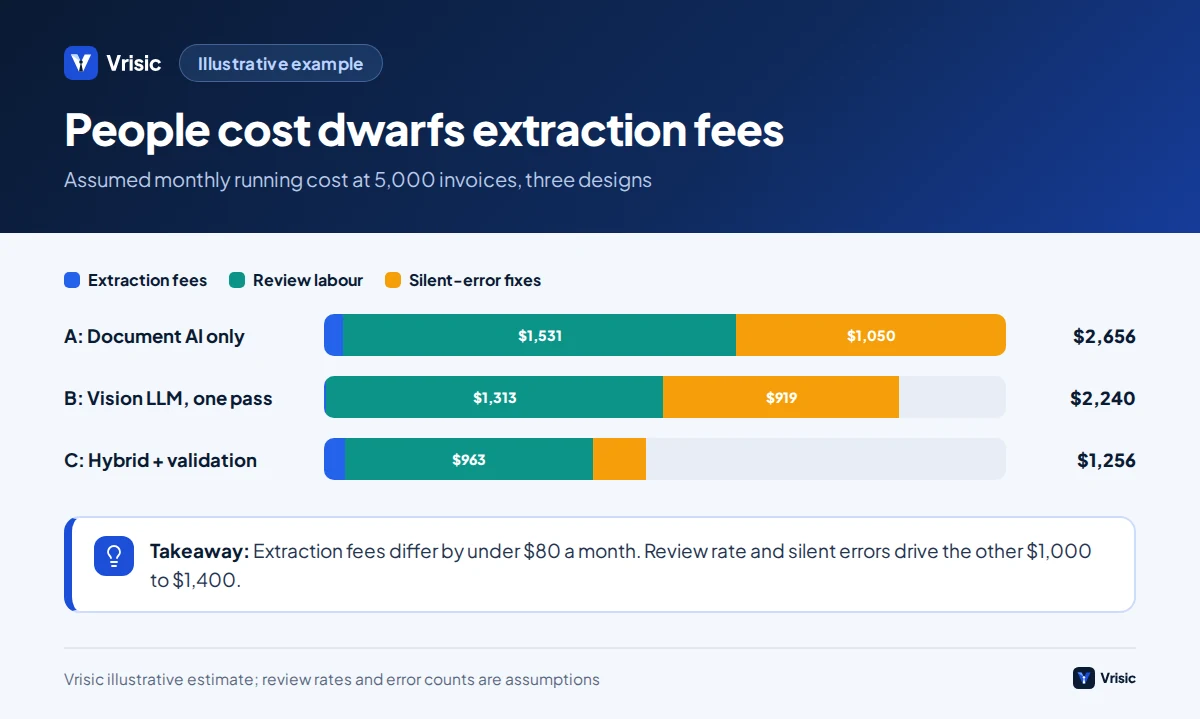
This is an illustrative example with assumed numbers, not a client project. A distributor receives 5,000 invoices a month from 400 suppliers, averaging 1.5 pages. Most arrive as PDFs, about a fifth as phone photos or scans. A reviewer costs $35 an hour and takes 1.5 minutes per flagged invoice. We compare three designs using assumed review rates.
| Line | A: Document AI only | B: Vision LLM, one pass | C: Hybrid with validation |
|---|---|---|---|
| Extraction fee per month | 7,500 pages x $0.01 = $75 | 7,500 pages x $0.0011 = about $8 | $75 plus $8, about $83 |
| Assumed invoices sent to review | 35% (1,750) | 30% (1,500) | 22% (1,100) |
| Review hours | 43.75 | 37.5 | 27.5 |
| Review cost at $35 an hour | $1,531 | $1,313 | $963 |
| Assumed silent errors per month | 40 | 35 | 8 |
| Fix cost at 45 minutes each, $35 an hour | $1,050 | $919 | $210 |
| Total running cost per month | $2,656 | $2,240 | $1,256 |
All review rates and silent error counts above are assumptions chosen to show the arithmetic; none comes from a measured study. On those assumptions, design C saves about $1,000 to $1,400 a month over the single extractor options, while extraction fees differ by under $80. Before committing, we would measure the real review and silent error rates on 200 of your invoices, because those two numbers drive everything. If measured rates for design A turn out close to C, buy the service and skip the build.
The silent errors line also understates risk: a single wrongly paid invoice or a bank detail change that slips through can cost far more than the 45 minutes of clean up we assumed. That is the strongest argument for independent checks over a single pass.
Test extraction on your own invoices Send us 20 representative invoices and we will tell you which design fits, with measured accuracy by field, at no cost.
How should you choose between OCR, document AI and an LLM?
| Your situation | Choose | Reason |
|---|---|---|
| Under 10 suppliers, stable layouts, high volume, offline | OCR with templates, plus validation | Cheapest and fully explainable; maintenance is small |
| Standard header and line fields, hundreds of suppliers, cloud allowed | Document AI service | No templates and a simple per page price; mature confidence scores |
| Varied layouts, custom fields, multiple languages, photos | Vision LLM with validation | Flexibility; handles layouts nobody planned for |
| Errors are costly and volume is above a few thousand a month | Hybrid: two extractors, validation, review queue | Independent signals cut silent errors |
| Data may not leave your network or country | Self hosted vision model or open source pipeline | Check accuracy first; small models can fail on images. See private LLM options |
| Suppliers already send structured e-invoices | Read the XML | No extraction error to manage |
| Under about 500 invoices a month on QuickBooks or Xero | A packaged tool | Build cost will not pay back; see build vs buy |
Whatever you pick, keep the extractor behind an interface. Models improve and prices change every few months; if your pipeline separates extraction, validation, matching and posting, swapping the extractor is an afternoon of work and a re-run of your test set.
How Vrisic can help
We build invoice extraction and the validation and ERP posting around it as part of AI workflow automation. A single workflow, such as extraction and coding into one ERP, typically falls in our $8,000 to $25,000 range for a single task agent and takes 3 to 6 weeks. You get a fixed price after a free scoping call. It runs in your own cloud account with your own model keys, you own the code, prompts and labelled test set, and there are no per seat fees.
The low risk way to find out which design fits is our AI Pilot: $1,500 (£1,200, AED 5,500), 10 business days, run on your own invoices, with the fee credited in full against a build started within 60 days. See how we work or contact us to talk it through.
Sources
- Multi-Modal Vision vs. Text-Based Parsing: Benchmarking LLM Strategies for Invoice Processing (Berghaus, Berger, Hillebrand, Cvejoski and Sifa, Fraunhofer IAIS and Lamarr Institute, arXiv, 2025)
- Amazon Textract pricing (Amazon Web Services)
- Azure Document Intelligence pricing (InvoiceExtractor, citing Microsoft’s retail prices API, August 2026)
- Gemini Developer API pricing (Google AI for Developers)
- OpenAI API pricing in 2026 (CloudZero, updated September 2026)
- Structured model outputs (OpenAI)
- Tesseract Open Source OCR Engine (tesseract-ocr, GitHub)
- Docling Technical Report (IBM Research, arXiv)
- ZUGFeRD 2.3 profiles, validation and Germany mandate guide (Invoice Navigator)
Prices and model names were checked in October 2026 and change often. Per page LLM costs, review rates and the worked example are Vrisic estimates from stated assumptions. This guide is not tax or legal advice.