Build vs Buy AI Software: An Honest Decision Guide With 3 Year Costs
Build vs buy AI, honestly: 2026 SaaS seat prices, a 3 year cost comparison with a custom build, a decision table, the hybrid option and how to avoid lock in.

Short answer: Build vs buy AI comes down to how specific the process is and how many people use it. Buy off the shelf AI for generic tasks and small teams: it is live in weeks and costs $20 to $135 per seat a month. Build when the process is how you compete, data must stay in your environment, or seat fees across many users outgrow a one time build.
In this guide
- The decision table
- What off the shelf AI costs in 2026
- 3 year cost: buy vs build
- Where custom becomes cheaper
- When to buy
- When to build
- The hybrid option
- Vendor lock in and data ownership
- Hidden costs on both sides
- What the research says
- US, UK and UAE notes
- Making the call in two weeks
- How Vrisic can help
- Sources
The build vs buy AI question used to be easy: buying was cheaper and faster, building was for tech companies. In 2026 it is harder, because AI tools are priced per seat or per conversation, foundation models from OpenAI, Anthropic and Google are available to everyone, and a focused custom build can be live in weeks. This guide gives you a decision table, current SaaS prices we checked on vendor pages, a three year cost comparison with clearly labelled example numbers, and an honest view of when you should not build.
A note on bias: Vrisic publishes this guide and we sell custom AI software development. We will still tell you to buy when buying is right, and for most small teams with generic needs it is.
Build vs buy AI: the decision table
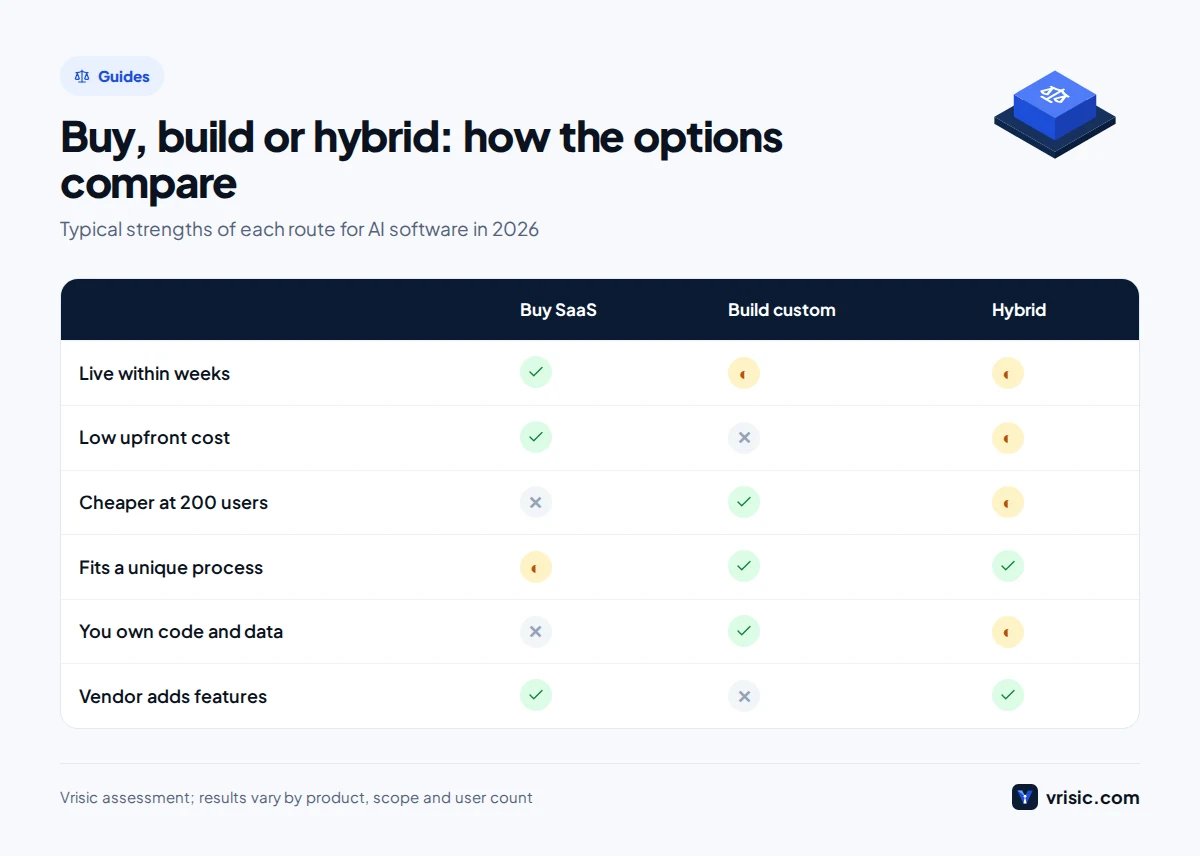
Buy when the task is common to many companies and the user count is small; build when the process is specific to you, the data is sensitive, or the user count is large. Most real situations fall into one of these rows.
| Your situation | Lean towards | Why |
|---|---|---|
| Generic task many companies share: writing help, meeting notes, email drafts | Buy | Vendors spread their development cost over thousands of customers; seats start around $20 a month |
| Fewer than about 25 users on a standard process | Buy | Three years of seats usually costs less than a build plus running costs |
| An idea nobody has tested yet | Buy or pilot | Learn what users need before paying for software around it |
| Already committed to Salesforce, Microsoft 365 or Zendesk | Hybrid | Use the platform’s AI and build only the connections it lacks |
| The process is how you compete: pricing, underwriting, scheduling, quoting | Build | Your advantage should not depend on a vendor’s roadmap |
| Over 100 users on per seat AI pricing | Build or hybrid | Seat costs rise with every hire; a build’s cost mostly does not |
| Data that cannot leave your environment | Build | Run models in your own cloud account or on open source models you host |
| AI must write into an ERP or legacy system no vendor supports | Build the integration layer | Packaged tools stop at the systems they have connectors for |
| Nobody to own the system after launch | Buy | Custom software needs an owner, even with a support plan |
If two rows conflict, the data and ownership rows usually win. A cheap tool you cannot legally use with patient records is not cheap.
What does off the shelf AI cost in 2026?
Business AI tools in 2026 cost roughly $20 to $135 per user per month, and customer service AI adds usage fees of about $1 to $2 per resolved conversation. We checked these prices on each vendor’s pricing page in October 2026; they change often, so confirm before you sign.
| Product | Price as of October 2026 | Pricing model |
|---|---|---|
| Microsoft 365 Copilot | $30 per user per month, paid yearly | Add on; needs a qualifying Microsoft 365 licence |
| Microsoft 365 Copilot Business | $21 per user per month, paid yearly ($18 promotional price until 31 December 2026) | Add on for Microsoft 365 Business plans |
| ChatGPT Business | $20 per user per month billed yearly, $25 monthly | Per seat, two users minimum |
| Claude Team | $20 standard seat or $100 premium seat per month billed yearly | Per seat |
| Intercom with Fin | Seats $29, $85 or $132 per month billed yearly; Fin from $0.99 per outcome | Per seat plus per outcome |
| Zendesk Suite | $55 or $115 per agent per month billed yearly; automated resolutions $1.50 committed or $2.00 pay as you go; Copilot $50 per agent | Per agent plus per resolution |
| Salesforce Agentforce | $2 per conversation, or Flex Credits at $500 per 100,000; user add ons from $125 per month | Per conversation, credits or per user |
Prices are list prices in USD from vendor pages, checked October 2026. Discounts, minimums and regional prices vary.
Two things stand out. General assistants are cheap per seat but do not know your systems unless you connect them. Customer service tools charge per resolution as well as per seat, so the bill grows with your volume, which is good when volume is low and painful when it is high.
The 3 year cost of AI software: buy vs build compared
Over three years, buying is cheaper for small teams and building is usually cheaper once a per seat tool covers more than about 60 users, assuming the custom build fully replaces what the tool does. Here is the arithmetic with clearly labelled example numbers, so you can swap in your own.
Example 1: a specialist AI tool priced per seat
Example assumptions, not a real vendor quote. Buy: a vertical AI tool at $60 per user per month, plus $10,000 of setup and integration in year one. Build: a production custom system at $60,000, which sits inside our $60,000 to $150,000 production platform range, with running costs of $500 a month for hosting, a $1,500 a month support plan, and model usage of about $4 per user per month.
| Users | Buy: 3 year cost | Build: 3 year cost | Cheaper option |
|---|---|---|---|
| 20 | $53,200 | $134,880 | Buy, by about $82,000 |
| 75 | $172,000 | $142,800 | Build, by about $29,000 |
| 200 | $442,000 | $160,800 | Build, by about $281,000 |
The formulas: buy = $10,000 + users × $60 × 36. Build = $60,000 + 36 × ($2,000 + users × $4). The build line barely moves as users grow, because model usage per user is small compared with a seat licence. The buy line climbs with every hire. We have left out renewal price rises, which make buying more expensive, and we have left out the internal time to own a custom system, which makes building more expensive. Both are covered under hidden costs below.
Example 2: a 25 seat customer service team
Here buying wins. Example assumptions using Intercom list prices: 25 agents on the $85 Advanced plan and 1,500 Fin outcomes a month at $0.99. That is $25,500 a year for seats and $17,820 a year for outcomes, or $129,960 over three years.
The custom alternative still needs a help desk, so assume the team drops to the $29 Essential plan ($26,100 over three years) and adds a custom integrated support agent at $45,000, in our $25,000 to $60,000 range for a multi channel agent, with $500 a month of usage and a $1,500 support plan ($72,000). Total: $143,100 over three years. The packaged tool is cheaper, live sooner and maintained by the vendor. We would only build here if the agent needed to do things Fin cannot, such as complex actions in your own order system. Our AI agent development cost guide shows what those builds cost in more detail.
Price both options over three years, with the same scope, before anyone argues about features. The answer is often obvious once the numbers sit side by side.
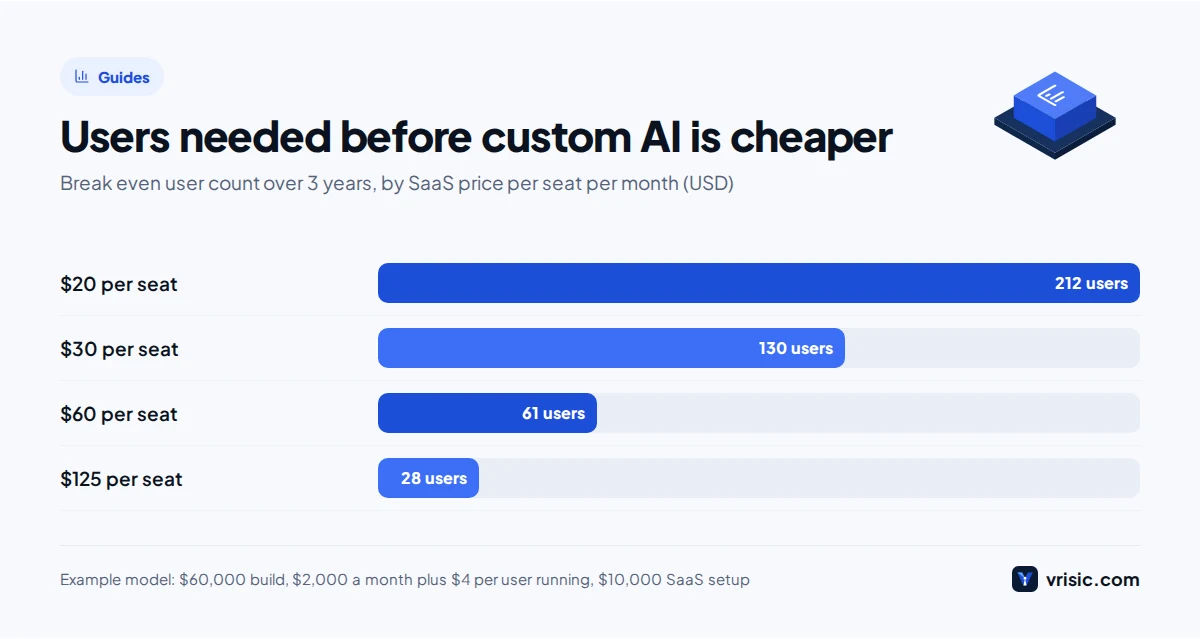
At how many users does custom AI become cheaper?
Using the Example 1 cost model, custom AI becomes cheaper than per seat SaaS at about 212 users for a $20 seat, 130 users for a $30 seat, 61 users for a $60 seat and 28 users for a $125 seat. The higher the seat price, the sooner a build pays off.
Read this chart with care. A $20 general assistant such as ChatGPT Business or Claude Team does far more than a narrow custom system, so comparing them is only fair when the custom build replaces the specific job your team uses the tool for. Where per seat pricing really hurts is specialist tools at $60 to $150 a seat used by large teams for one well defined process. To test your own process rather than a seat count, run the numbers through our AI ROI calculator, which works out payback from hours saved.
When should you buy off the shelf AI?
Buy when a packaged product already does at least 80% of what you need and the remaining gaps are not where you make money. Specifically, buy when:
- The task is generic. Drafting, summarising, meeting notes and general research are solved problems.
- The team is small. Under about 25 users, three years of seats rarely reaches the cost of a production build.
- Speed matters more than fit. A tool can be live this month; a custom build takes weeks to months.
- Nobody can own it. If no one inside the business will be responsible for a custom system, buy.
- The vendor’s roadmap matches yours. You benefit from features you did not pay to build.
- Your data terms are met. The vendor offers the hosting region, data use terms and agreements you need.
Our opinion: for most teams under 20 people with a common need, we would not build. Buy the tool, measure how it is used for three months, and revisit only if it clearly falls short.
When should you build custom AI software?
Build when the AI must follow a process that is specific to your business, connect to systems no vendor supports, keep data inside your environment, or serve enough users that seat fees outgrow a one time build. Specifically, build when:
- The process is your advantage. How you price, quote, schedule or assess risk should not be the same as your competitors who buy the same tool.
- The AI must act in your systems. Writing into an ERP, an in house database or an older desktop application usually needs custom work; see our AI legacy modernization service for systems that need more than a connector.
- Data must stay with you. Custom systems can run in your own cloud account, and where privacy demands it, on open source models hosted inside your environment. Our guide to private, self hosted LLMs explains the options.
- User numbers are large. Past the break even seat count above, every new hire makes the SaaS option more expensive.
- You need to choose the model. A custom build can switch between OpenAI, Anthropic, Google or Llama models as prices and quality change.
- Answers must come from your own documents with permissions. Search that respects who can see which file is a common reason to build; see our enterprise RAG and AI search work.
Send us the SaaS quote you are weighing Forward the vendor proposal and your user count, and within three business days we will send a written three year comparison with the custom alternative, including where we think buying wins.
The hybrid option: buy the platform, build the integration layer
The hybrid option means you buy a mature platform for the commodity parts and build only a thin custom layer that connects it to your data and systems. For many mid market companies it is the best answer, because it combines a vendor’s maintained product with the fit of custom work.
Typical hybrid patterns we see:
- Help desk plus custom actions. Keep Zendesk or Intercom for tickets, and build the tools their AI agent calls to check orders, issue refunds or update bookings in your own systems.
- Microsoft 365 Copilot plus your data. Keep Copilot for documents and email, and build connectors so it can answer from your ERP, project system or a database it cannot reach on its own.
- CRM AI plus a custom pipeline. Use the CRM’s built in assistant for notes and drafts, and build the document extraction or scoring step that is specific to your sales process.
- Model APIs plus your application. Buy model access from OpenAI, Anthropic, Google or a cloud provider such as AWS Bedrock or Azure OpenAI, and build the application, retrieval and workflow around it. This is how most custom AI is built today.
The integration layer is often built using standards such as the Model Context Protocol, so the same connectors work with more than one AI product. On our price sheet, connecting AI to one system typically costs $10,000 to $30,000 and multi system integration $30,000 to $80,000; our AI integration page covers what that work includes. Typical ranges; you get one fixed price in writing after a free scoping call.
How do you avoid vendor lock in and keep data ownership?
You avoid lock in by controlling three things in writing: who can use your data, how you get it out, and what happens to the price at renewal. This applies whether you buy a SaaS tool or hire someone to build.
If you buy
- Data use. Get the vendor’s terms on whether your prompts, documents and conversations are used to train models, and for how long they are kept.
- Export. Confirm you can export conversations, knowledge articles, configurations and logs in a standard format, not only a PDF report.
- Hosting region. Check where data is stored and processed, which matters under UK GDPR and the UAE Personal Data Protection Law.
- Renewal terms. Ask for a cap on price rises and on per resolution or per credit rates, which can change between terms.
- Exit. Agree how long you keep access after cancelling and how deletion is confirmed.
If you build
- Code ownership. The contract should assign the code, prompts, evaluation sets and documentation to you, in your own repository.
- Your cloud account. Deploy in a cloud account in your company’s name, so the developer can be replaced without a migration.
- Model independence. Keep model calls behind one internal interface so switching providers is a configuration change, not a rewrite.
- Documentation and handover. Ask for runbooks and a handover session, so another team can maintain the system.
Lock in with a custom build is still possible: if only one developer understands it, you are as tied to them as to any vendor. That is why we document and hand over everything as standard, and you can see how on our how we work page.
Hidden costs on both sides
Both options have costs that rarely appear in the first quote. Buying hides costs in growth and add ons; building hides them in ownership and maintenance.
| Hidden cost | When you buy | When you build |
|---|---|---|
| Growth | Every new user adds a seat; usage fees grow with volume | Model usage grows with volume, but slowly per user |
| Integration | Connecting the tool to your systems is often a separate project | Included in the build scope |
| Upgrades | Plan changes or required tiers to keep features | Model version changes need testing and small fixes |
| Ownership | An admin to manage seats, settings and content | A product owner plus support, from $1,500 a month on our plans |
| Running cost | Included in seats, except usage fees | Hosting and model usage, typically 15% to 30% of the build a year |
| Fit gaps | Staff work around what the tool cannot do | Changes need a change request or more budget |
For a fuller breakdown of build and running costs by project type, see our guide to what AI development costs.
What does the research say about build vs buy success?
The best known 2025 study found that buying AI tools from specialised vendors and building through partnerships succeeded about 67% of the time, while internal builds succeeded about one third as often. That comes from MIT’s Project NANDA report, as reported by Fortune in August 2025, which also found that 95% of generative AI pilots showed no measurable profit and loss impact and that the biggest returns came from back office automation.
Two honest readings. First, “internal builds” here means companies building on their own, often generic tools that a vendor already sells, so the finding is a warning against building what you could buy. Second, outside partners, including firms like ours, sit on the more successful side of that split, so treat our own interest with the same scepticism you would any vendor’s. The practical lesson holds either way: build only the part that is specific to you, with people who have shipped it before.
Build vs buy in the US, UK and UAE
The economics are similar in all three markets; the deciding factor is often where data must live and which agreements the vendor will sign.
- United States. Healthcare buyers need a Business Associate Agreement under HIPAA; check that your SaaS plan includes one before comparing prices. State privacy laws such as CCPA/CPRA add deletion and access duties. More on our US page.
- United Kingdom. Some vendors price in pounds; Agentforce, for example, lists £1.60 per conversation. Confirm UK or EU hosting and a data processing agreement under UK GDPR. See our UK page.
- United Arab Emirates. Arabic and English quality and data residency decide many projects. Many SaaS tools do not offer UAE hosting, while a custom build can run in Azure UAE North or the AWS Middle East (UAE) region under Federal Decree Law No. 45 of 2021, or DIFC and ADGM rules. See our UAE page.
How to make the build or buy AI software decision in two weeks
You can make a sound build or buy decision in about two weeks by testing the best tools on real work, pricing both options over three years and scoring fit against the few requirements that matter.
- Write down five must haves. The systems it must connect to, the data rules, the users, the volume and the accuracy you need.
- Trial two or three tools on real work. Use your own documents, tickets or calls, not the vendor demo.
- Get a custom quote for the same scope. Ask for build and running costs separately, in writing.
- Price both over three years. Use the formulas above with your user count and expected growth.
- Score fit and risk. Which must haves does each option miss, and what happens to your data on exit?
- Decide, and plan the exit. Whichever you choose, write down how you would leave it.
Not sure the custom route will work? Test it first Our 10 day AI Pilot builds a working prototype on your data for $1,500, so you compare a real system against the SaaS trial instead of a slide deck.
How Vrisic can help
We build custom AI software and the integration layer around tools you already own, on your cloud account, with the code, data and documentation handed over to you. We are a remote team based in India, working US, UK and UAE business hours, and we will tell you when buying is the better choice. If you want to see who else does this work, our guide to AI software development companies lists other firms.
The low risk way to start is the AI Pilot: $1,500 (£1,200, AED 5,500), 10 business days, a working prototype on your data, fully credited against a build within 60 days. Or message us on WhatsApp at +91 63777 67206 with the tool you are considering and your user count.
Sources
- Microsoft, Microsoft 365 Copilot enterprise pricing, checked October 2026
- Microsoft, Microsoft 365 Copilot business pricing, checked October 2026
- OpenAI, ChatGPT Business pricing, checked October 2026
- Anthropic, Claude pricing, checked October 2026
- Intercom, pricing, checked October 2026
- Zendesk, pricing, checked October 2026
- Salesforce, Agentforce pricing, checked October 2026
- Fortune, reporting on MIT Project NANDA, The GenAI Divide, August 2025