AI Agent Builder vs Custom Development: Costs, Limits and When to Switch
Agent builder platforms vs custom development: usage pricing, lock-in, data control and a worked cost crossover, with rules for when to switch.

Short answer: Use an agent builder when the job is standard, the data is low risk and volume is modest, because you can have a working agent in days for tens of dollars a month. Move to custom development when the agent must act inside your own systems, when data rules limit where it can run, or when usage based fees start to dominate. In our illustrative example the crossover sits at roughly 9,000 agent runs a month for a $25,000 build.
In this guide
- What counts as a builder and what counts as custom
- The builder landscape and how each one charges
- How usage pricing grows: a worked example
- Where the cost lines cross
- Lock in is real: the Agent Builder wind down
- Data, security and audit control
- Where builders break in practice
- When a builder is the right choice
- When custom development is the right choice
- Decision table
- A safe path from builder to custom
- Mistakes we see
- How Vrisic can help
- Sources
Agent builders promise a working agent in an afternoon, and for simple jobs that promise holds. The real question is what happens in month six, when the agent touches your ERP, handles ten times the volume, or needs to prove to an auditor what it did. We build custom AI agents, so we have a stake in this question. We will try to be fair about it: for many jobs a builder is the better answer, and we say which ones below.
What counts as an agent builder and what counts as custom development?
An agent builder is a hosted product where you assemble an agent from menus, templates and connectors, and the vendor runs it. Custom development means engineers write the agent’s code, tools and tests, and it runs in infrastructure you control. There is a middle ground, covered later, but the two ends differ on four things that matter more than the label.
- Who runs it. A builder runs on the vendor’s platform. Custom code runs in your cloud account.
- What you own. In a builder you own your prompts and configuration at best, and often cannot export the logic. In custom work you own the code, prompts and test data.
- How you pay. Builders charge per seat, per credit or per run. Custom work is a one off build plus hosting and model usage at cost.
- What it can touch. Builders reach what they have connectors for. Custom agents reach anything with an API, a database or a file drop.
Workflow tools that added AI steps, such as Zapier and n8n, sit in the builder camp for this comparison. If you want a primer on what makes something an agent at all, start with what an AI agent is, and for the narrower automation versus agent question see AI automation tools vs custom software.
What does the builder landscape look like and how does each charge?
Builder pricing falls into three patterns: credits that burn as the agent works, a flat plan with an activity cap, and standard model rates with the builder thrown in. The table lists published figures we checked in October 2026. Vendors change prices often, so treat it as a snapshot.
| Builder | Published pricing (October 2026) | What to watch |
|---|---|---|
| Microsoft Copilot Studio | $200 per pack of 25,000 Copilot Credits a month, billed annually; pay as you go $0.01 per credit; unused credits do not roll over | A generative answer costs 2 credits, an agent action 5, tenant graph grounding 10, text AI tools 1 to 100 per 10 responses by tier |
| Zapier Agents | Free 400 activities a month; Pro $400 a year (about $33 a month) for 1,500 activities | Activities count actions, web browsing and knowledge lookups; Zapier MCP calls use 2 tasks each on the Zaps side |
| Lindy | Plus $29.99, Pro $99.99, Max $199.99 per user per month for 3,000, 15,000 and 35,000 credits (as of September 2026, per a third party review) | Credits are pooled, reset monthly, and agents pause at zero with no overage billing; per task use ranges from 2 to 2,500 credits |
| n8n | Cloud from €20 a month for 2,500 executions up to €667 for 40,000; a self hosted Community Edition under the Sustainable Use License (third party summary, updated October 2026) | An execution is one full workflow run; SSO, audit logs and external secrets need a paid licence key even when self hosted |
| Salesforce Agentforce | Flex Credits at $500 per 100,000; one action uses 20 credits, or $0.10 (announced May 2025) | Best when your data and users already live in Salesforce |
| OpenAI Agent Builder | No separate fee at launch, only standard API model rates | Being wound down; see the section on lock in |
Sources are listed at the end. Third party figures for Lindy and n8n come from independent reviews, not the vendors’ own pages, so confirm them on the vendor site before you plan around them.
Two details in that table change real budgets. First, credit models bill the work the agent does, not the people who use it, so a successful agent costs more as adoption grows. Second, “agents pause at zero” means a live customer process can stop mid month. Ask every vendor what happens when you run out.
How does usage based pricing grow? A worked example
This is an illustrative example, not a client project. Imagine an internal support agent that answers an employee question and then performs three actions, for example looking up an order, checking stock and drafting a reply. On Copilot Studio rates that is one generative answer (2 credits) plus three agent actions (3 x 5 = 15 credits), or 17 credits per run.
| Runs a month | Credits | Pay as you go at $0.01 | Per run |
|---|---|---|---|
| 2,000 | 34,000 | $340 | $0.17 |
| 6,000 | 102,000 | $1,020 | $0.17 |
| 20,000 | 340,000 | $3,400 | $0.17 |
| 60,000 | 1,020,000 | $10,200 | $0.17 |
The cost per run is flat, so the bill is a straight line through the origin. Credit packs soften it a little: at 102,000 credits you would buy four packs ($800) and cover the remainder, or five packs ($1,000) with room to grow. The point is the shape. Nothing in the pricing rewards your volume, and a month with a bug that loops can burn credits fast, which is why you want spend caps and alerts before launch, whichever route you choose.
Employees with a Microsoft 365 Copilot licence ($30 per user per month) can use employee facing agents at no credit charge, subject to fair usage limits, which can flip this arithmetic for internal use. That is a good example of why a quote should be built from your actual user mix, not from the headline rate.
Where do the builder and custom cost lines cross?
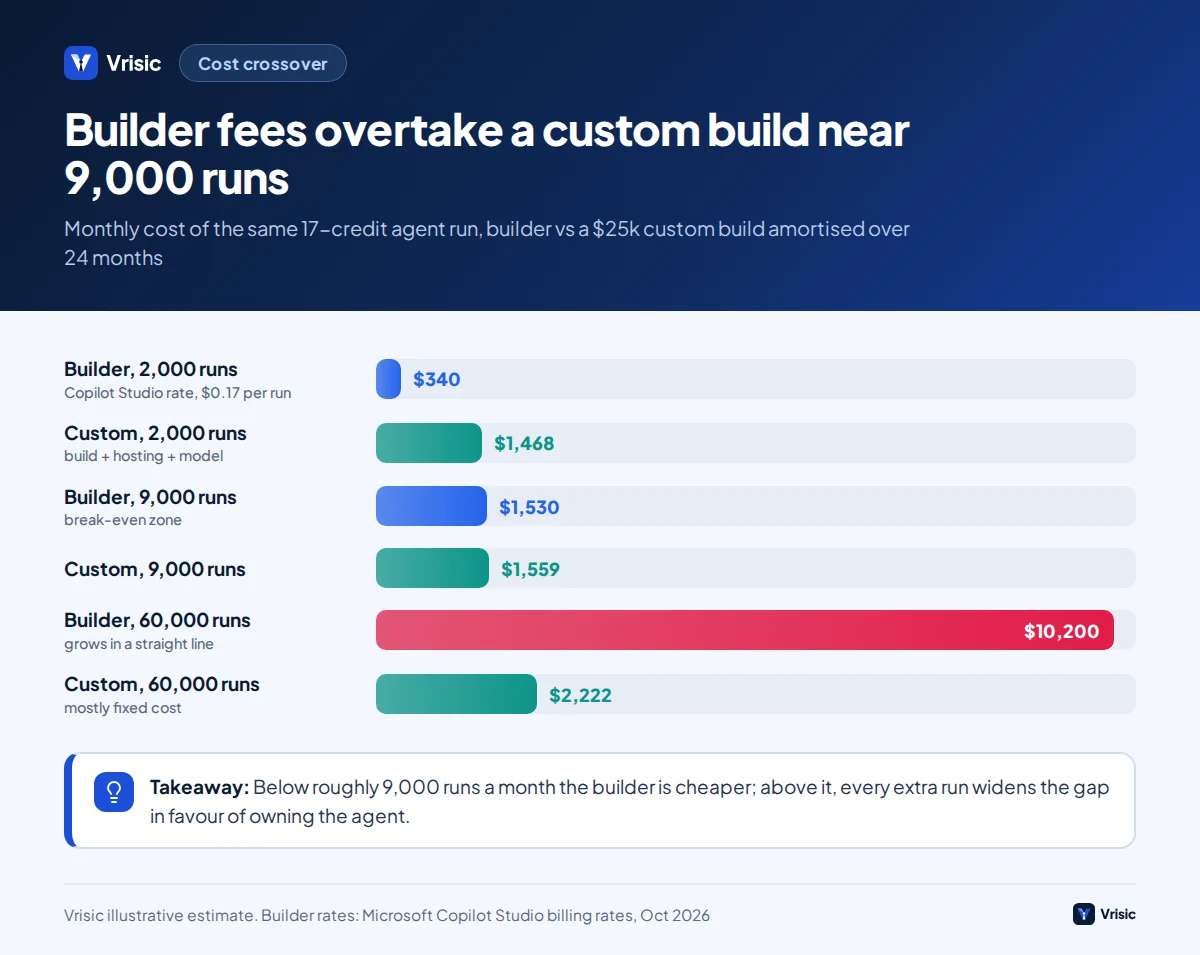
For the same 17 step run, a custom agent costs mostly a fixed amount to build and host, plus a few cents of model usage. The crossover depends on build price, how long you amortise it and your volume. Here are the assumptions, so you can change them.
- Build price: $25,000, the low end of our integrated agent range ($25,000 to $60,000, 6 to 10 weeks).
- Amortisation: 24 months, or $1,042 a month.
- Hosting and monitoring: about $400 a month in your own cloud account (our estimate, varies with architecture).
- Model usage per run: about 8,000 input and 1,000 output tokens. At an assumed $1 per million input and $5 per million output tokens, that is $0.008 + $0.005 = $0.013 per run. Model prices differ a lot, so check your provider’s current rates.
| Runs a month | Builder (credits) | Custom, all in | Cheaper |
|---|---|---|---|
| 2,000 | $340 | $1,042 + $400 + $26 = $1,468 | Builder |
| 9,000 | $1,530 | $1,042 + $400 + $117 = $1,559 | About equal |
| 60,000 | $10,200 | $1,042 + $400 + $780 = $2,222 | Custom, by about $8,000 a month |
The break even is the fixed custom cost divided by the per run saving: ($1,042 + $400) / ($0.17 – $0.013) is about 9,200 runs a month. Below that, the builder is cheaper on pure running cost. Above it, every extra run widens the gap.
This ignores two things that move the answer. Staff time to maintain a builder agent is not free, and a builder may simply be unable to do the job. It also ignores the free first months a custom build gives you if you skip amortisation. Treat the 9,000 figure as a way to think, not a promise.
If the arithmetic is close, volume growth decides. An agent that is a success tends to get more work, not less, which pushes you right along the curve. See our AI agent development cost guide for how build prices are formed and our ROI calculator guide for the savings side.
Is lock in a real risk? The OpenAI Agent Builder wind down
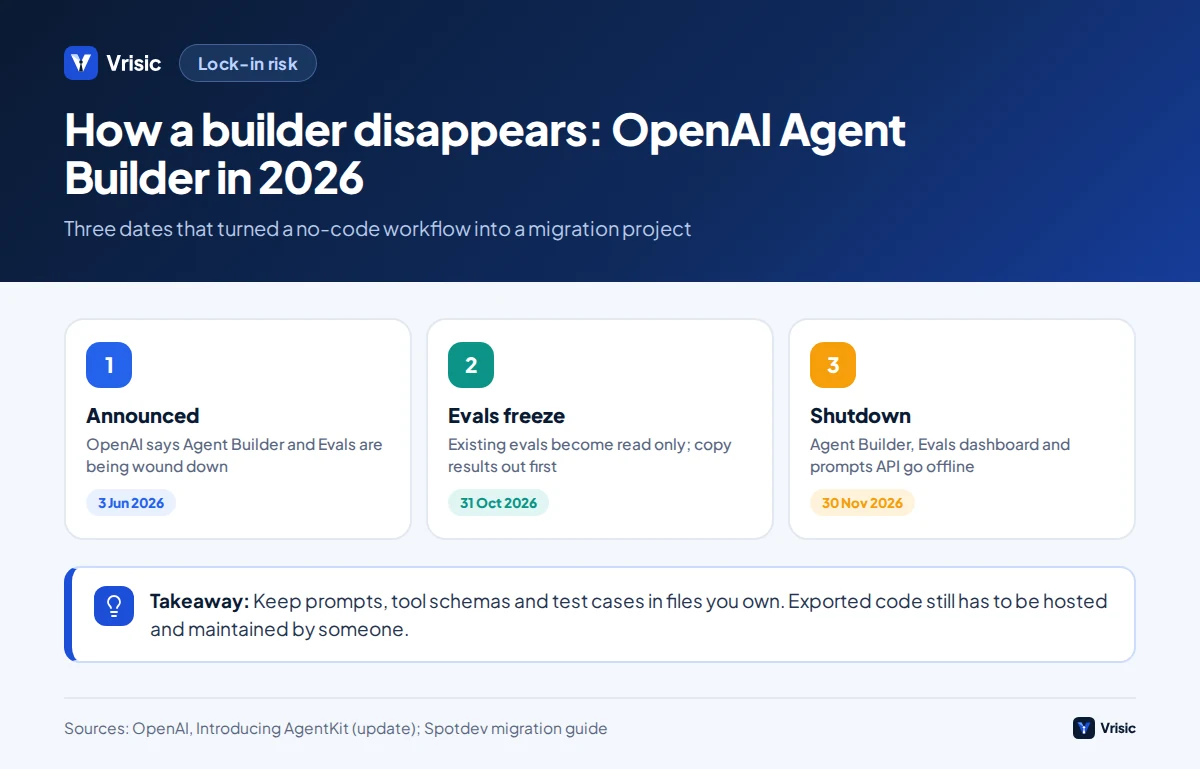
Yes, and 2026 supplied a clean example. OpenAI launched AgentKit in 2025 with Agent Builder, a visual canvas for multi agent workflows, billed at standard API rates. An update on its page dated 3 June 2026 says OpenAI is winding down Agent Builder and Evals, and that they will not be available from 30 November 2026. OpenAI points users to the Agents SDK for code based workflows and to Workspace Agents in ChatGPT for natural language use cases.
An independent migration guide lists the dates: existing evals become read only on 31 October 2026, and Agent Builder, the Evals dashboard and the reusable prompts API shut on 30 November. It also notes that a ChatKit widget pointing at a workflow by ID would stay on your site after the workflow stopped, leaving customers talking to nothing. A Code option generates Agents SDK code from a workflow, but the guide calls that a starting point, since the exported code still has to be hosted, monitored and owned by someone.
We are not saying builders are unreliable. Any vendor product can be retired, repriced or restricted, and that is the whole risk. The practical lessons are:
- Keep prompts, tool definitions and test cases in files you own, not only in the vendor’s dashboard.
- Keep business rules out of the builder when you can. Put them in a small service your agent calls.
- Ask what the export looks like before you build, and test it once.
- Check the contract for notice periods on retiring features.
What changes with data, security and audit control?
In a builder, your data and prompts pass through the vendor’s platform and its model providers. In a custom build, you pick the model provider, the region and the logging, and the agent runs inside your cloud account with your own model API keys. Neither is automatically safer. A well run vendor with SOC 2 reports can be a better steward of data than a rushed custom build.
What differs is how much of the control sits with you. Questions to ask any builder vendor:
- Where is data stored and processed, and can we choose the region?
- Is our data used to train any model? Under what plan?
- Can we see a complete log of every model call and tool call, and export it?
- How do we limit what each agent can do, by tool, by record and by amount?
- Who can create agents, and can we review them before they go live?
That last question matters more than it sounds. Gartner predicts that over 40% of agentic AI projects will be canceled by the end of 2027, attributing it to escalating costs, unclear business value or inadequate risk controls. Easy builders make it easy for many people to create agents, and the risk controls then become a governance project of their own. If your sector has strict rules, such as healthcare or finance, see our notes on private and self hosted AI.
Where do agent builders break in practice?
Builders fail at the edges of the job, not the middle. These are the patterns we expect you to hit, in rough order of how often they appear.
1. The system you need has no connector
Builders ship connectors to popular SaaS products. Your ERP, a niche industry system or an internal database often has none. You can sometimes bridge with a generic HTTP action, but authentication, pagination, retries and error handling then become your problem inside a visual canvas, which is the worst place to debug them.
2. You cannot test it properly
A serious agent needs a test set of real cases, run automatically before every change, with scores. Some builders offer evaluation features, and OpenAI’s now retiring Evals was one. Most offer manual chat testing. Without a regression suite, every prompt tweak is a gamble, and quality drifts as models are updated underneath you.
3. Business rules live in prompts
Rules such as “refund up to $50 without approval” are safest as code, not as a sentence the model may or may not follow. Builders push you to put everything in instructions, because that is what they offer. Custom builds put deterministic rules in code and use the model for language and judgement. Read our guide to building an AI agent for that split.
4. Costs are hard to predict
Credits per action vary with context length, tool choice and retries. Lindy’s published estimates run from 2 to 250 credits for everyday tasks and up to 2,500 for large builds. A third party review advises measuring real usage rather than trusting those bands, and we agree. Run a week of real traffic and extrapolate.
5. Governance and sprawl
If anyone can build an agent, soon someone has built one that emails customers with a stale policy. Builders vary in how well they let you inventory agents, review changes and revoke access.
6. Latency, concurrency and rate limits
Flat plans cap executions or concurrent runs; n8n’s Starter plan lists 5 concurrent runs and Pro 20. A launch day spike can queue. This is rarely an issue in a pilot and often an issue in production.
When is an agent builder the right choice?
Choose a builder when most of the following hold. This is not a consolation prize; for many teams it is the correct decision.
- The task is standard. FAQ answers, meeting summaries, lead routing, drafting replies from a knowledge base.
- Your systems are covered by connectors. If everything lives in Microsoft 365, Salesforce, HubSpot or Google Workspace, the vendor’s own agent tooling is hard to beat on integration.
- Volume is under a few thousand runs a month, well below the crossover.
- The data is low risk, or your vendor contract already covers it.
- You are still learning. Building three small agents on a platform teaches you what your real requirements are for far less than a custom discovery phase.
- A mistake is cheap and reversible. A wrong internal summary is an annoyance. A wrong refund is not.
If you are choosing between a chatbot and an agent first, our piece on chatbot vs agent may save you from buying the wrong thing.
When is custom development the right choice?
Choose custom when one or more of these is true, and especially when two are.
- The agent must write to your systems of record such as an ERP, a claims system or a booking engine, with idempotent writes and approvals.
- Data must stay in your account or country, or you need a private model.
- Volume is high enough that per run fees exceed the fixed cost of owning the agent.
- Accuracy has a price. You need a test set, scoring and regression checks as a release gate.
- The workflow is your edge. If the logic is what makes your business different, renting it from a vendor is a strategic choice, not just a technical one.
- You need several agents to share tools, memory and rules, which usually means code. See AI agent frameworks compared.
The trade off is real: a custom build costs real money up front, takes weeks, and needs someone on your side to own it. Our single task agents run $8,000 to $25,000 over 3 to 6 weeks, integrated agents $25,000 to $60,000 over 6 to 10 weeks, and multi agent systems $60,000 to $150,000 and up over 10 to 16 weeks, each at a fixed price after a free scoping call.
Decision table: which route fits your situation?
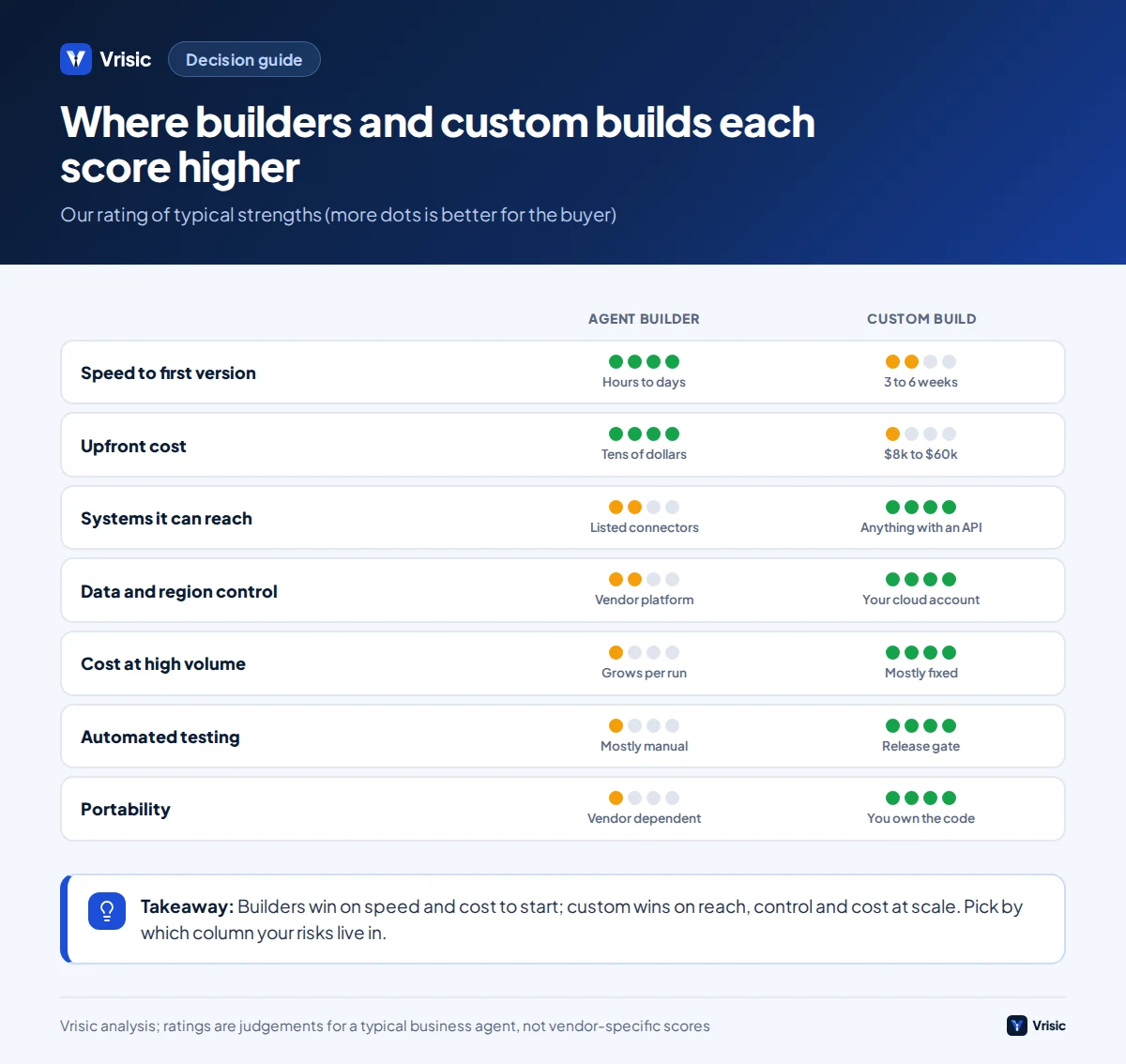
| Your situation | Recommendation |
|---|---|
| Exploring an idea, no integration, low risk | Builder. Prove value in days. |
| Everything lives in Microsoft 365 or Salesforce | Start with that vendor’s own agent tooling. |
| Under 5,000 runs a month and standard connectors | Builder, with spend alerts. |
| 10,000+ runs a month and usage fees climbing | Price a custom build. Likely cheaper within a year or two. |
| Agent must update ERP, CRM or an internal system | Custom, or builder plus a small custom API service. |
| Regulated data or regional hosting requirement | Custom in your cloud, possibly with a private model. |
| You already built on a builder and it works | Leave it. Switch only when a limit above bites. |
| Agent is core to your product | Custom. You should own the logic you sell. |
Get an honest build or buy view Tell us the task, your systems and monthly volume, and we will say whether a builder would serve you, with arithmetic like the above using your numbers.
What is a safe path from builder to custom?
The best strategy is often both, in order. Prototype on a builder, record what you learn, then rebuild only the parts that hit limits. Done well, the platform phase is a cheap discovery exercise rather than a trap.
- Prototype on the builder (1 to 3 weeks). Aim to learn the real cases, not to polish.
- Capture portable assets from day one. Export prompts to files, write tool inputs and outputs as plain schemas, and save every real conversation or case that went wrong as a test.
- Measure real usage for a month. Credits per run, failure rate, human override rate and the systems it could not reach.
- Decide with numbers. Run the crossover arithmetic above with your own cost per run. If the builder is still cheaper and does the job, stop there.
- Rebuild the pieces that hurt. Often a hybrid is best: keep the builder as the front door, and move the integration or rules into a small custom service it calls through an API. Our AI integration work often looks like this.
An AI Pilot can serve as step one or step four: ten business days, run on your own data, with a written recommendation on whether to stay on a builder or build.
What mistakes do teams make when choosing?
- Comparing the headline price, not the price at your volume. Always compute cost per run.
- Ignoring the people cost. A builder agent still needs someone to test, tune and watch it.
- Building custom before you know the process. Writing code for a workflow you have not yet validated is the expensive way to learn.
- Staying on a builder out of inertia. A prototype that quietly became production, with no tests and no export plan, is a risk item.
- Treating a demo as proof. Run it on 50 to 100 of your real cases and count failures before you commit either way.
- Trusting vendor labels. Gartner estimates that only about 130 of the thousands of agentic AI vendors are real and warns of vendors rebranding chatbots and RPA tools as agentic. Ask to see the agent do your task.
How Vrisic can help
We build custom agents on a fixed price after a free scoping call. They run in your own cloud account with your own model keys, you own the code, prompts and test data, and there are no per seat fees. We are a remote team in India working US, UK and UAE hours, and we will tell you plainly when a builder is the cheaper route. You can read how we work first.
If you want evidence before committing, the AI Pilot costs $1,500 (£1,200, AED 5,500), runs 10 business days, and is credited in full against a build started within 60 days. You can also book a free scoping call or message us on WhatsApp at +91 63777 67206.
Sources
- Microsoft Copilot Studio licensing guidance (Microsoft), accessed October 2026
- Copilot Studio billing rates and management (Microsoft Learn), accessed October 2026
- Zapier pricing, including Agents (Zapier), accessed October 2026
- Lindy Pricing: Plans, Costs, and Limits Explained (JetAdmin), pricing as of September 2026
- n8n Pricing: Every Tier, True Cost, and When Self-Hosting Wins (Toolradar), updated October 2026
- Salesforce introduces flexible Agentforce pricing (Salesforce), May 2025
- Introducing AgentKit, with June 2026 update on Agent Builder (OpenAI)
- Agent Builder is winding down: what to do with a no-code agent you already built (Spotdev)
- Gartner predicts over 40% of agentic AI projects will be canceled by end of 2027 (Gartner), June 2025
Prices and product status were checked in October 2026 and change often. Worked examples are Vrisic estimates with the assumptions shown. This guide is not legal or procurement advice.