AI ROI Calculator: Work Out Payback Before You Automate a Process
Free AI ROI calculator plus the method behind it: payback months, 3 year ROI, two worked examples, hidden costs, error costs and when AI ROI turns negative.

Short answer: An AI ROI calculator compares what a process costs you in staff time today with what it costs to build and run AI for it. Annual saving is hours per week × 52 × loaded hourly cost × the share AI handles. Subtract yearly running costs, divide the build cost by the monthly net benefit to get payback, and aim for under 12 months on a single process.
In this guide
- How this AI ROI calculator works
- The five formulas behind it
- Getting the inputs right
- Two worked examples
- Hidden costs
- What AI errors cost
- Benefits you should not count
- When ROI is negative
- What a good payback looks like
- Measuring real ROI after launch
- US, UK and UAE notes
- How Vrisic can help
- Sources
This AI ROI calculator is built for one decision: should you automate one specific process with AI, and how quickly will it pay for itself? It is aimed at operations and finance leaders who need a number they can defend in a budget meeting, not a vendor’s best case. Enter five numbers above and you get annual saving, net benefit, payback in months and three year ROI. Below, we show the exact formulas, two worked examples you can check by hand, and the honest adjustments that most ROI tools leave out: hidden costs, the cost of AI mistakes, and the benefits you should refuse to count.
If you already know the process you want to automate, our AI workflow automation service page explains what a typical build covers. If you are still deciding between a tool and a custom build, read our build vs buy guide for AI software first, because that choice changes the build cost you enter here.
How this AI ROI calculator works
The calculator measures the ROI of AI automation as staff time saved, valued at what that time really costs you, minus what you pay to build and run the system. It deliberately ignores revenue upside and soft benefits, so the answer is conservative. If the case works on time savings alone, anything else is a bonus.
| Input | Symbol | What to enter | Where to find it |
|---|---|---|---|
| Hours per week on the process | H | Total team hours, not per person | A two week time log or system timestamps |
| Loaded hourly cost | C | Wage plus benefits, payroll taxes and overhead per hour | Payroll or finance; roughly wage × 1.3 to 1.5 |
| Share of the work AI can handle | A | Percent of those hours that genuinely disappear | A pilot on real data, or a cautious estimate |
| One time build cost | B | Fixed price quote plus your own setup costs | Vendor quote or an internal estimate |
| Monthly running cost | R | Model usage, hosting, monitoring and support | Vendor estimate; we bill usage at cost |
Every input is something you can measure or get in writing, unlike claims such as “staff will be 30% more productive”.
How to calculate AI ROI: the five formulas
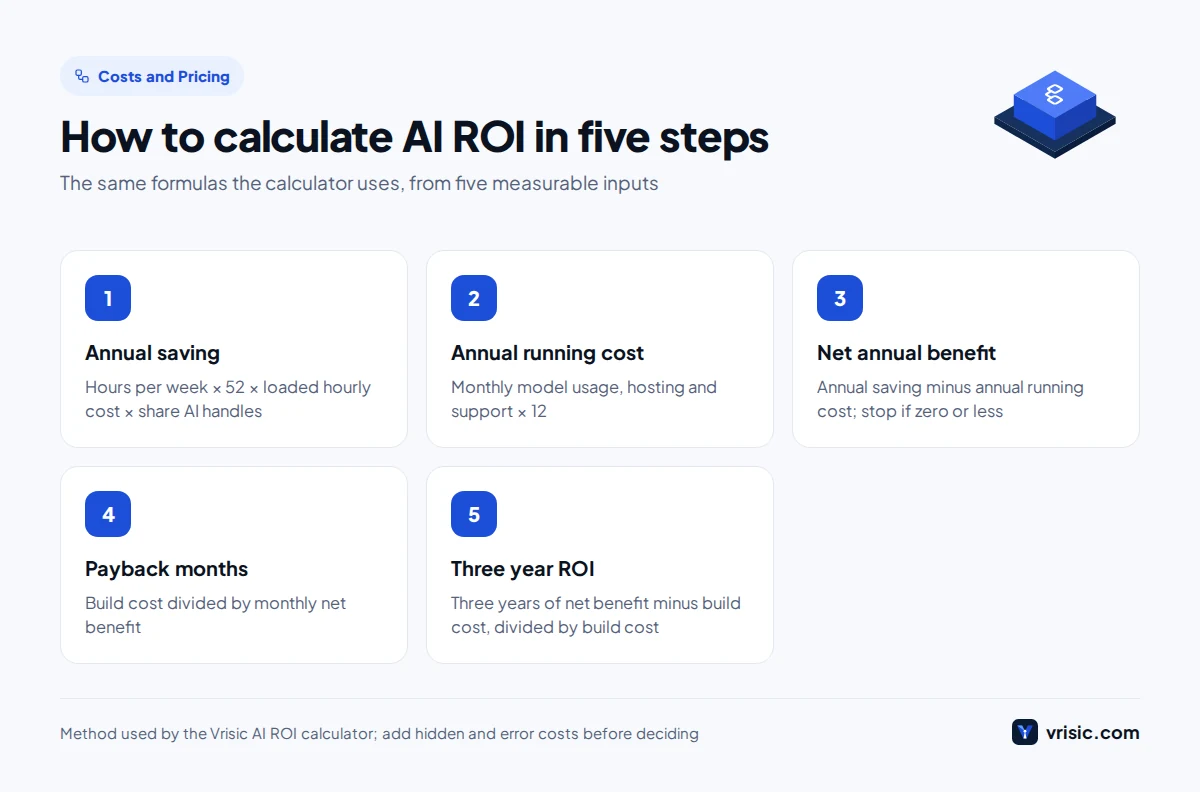
You calculate AI ROI with five steps: annual saving, annual running cost, net annual benefit, payback months and three year ROI. Each one uses only the five inputs above, so you can do it on paper or in a spreadsheet and get the same answer as the calculator.
- Annual saving = H × 52 × C × A. The value of the hours AI removes in a year.
- Annual running cost = R × 12. What you pay every year to keep the system working.
- Net annual benefit = annual saving minus annual running cost. If this is zero or negative, stop: the project never pays back.
- Payback months = B ÷ (net annual benefit ÷ 12). How long until the build cost is recovered.
- Three year ROI = (3 × net annual benefit minus B) ÷ B. The return on the build money over three years, as a percentage.
Why three years? Most AI systems need meaningful rework within that window as models, processes and the surrounding software change, so counting benefits beyond year three flatters the case. If finance wants net present value, use the net annual benefit as the yearly cash flow with your own discount rate.
Payback answers “how soon do we get our money back?” ROI answers “how much do we make on it?” A project with a 4 month payback and a 60% ROI is usually a better bet than one with a 20 month payback and a 200% ROI, because the short payback carries far less risk.
AI ROI calculator inputs: getting the numbers right
The answer is only as good as the five inputs, and the two that people get wrong most often are hours per week and the share AI can handle. Here is how to set each one honestly.
Hours per week (H)
Measure, do not guess. Ask everyone who touches the process to log their time for two weeks, in 15 minute blocks, against a short list of tasks. Better still, pull timestamps from the system: when an invoice arrived, when it was coded, when it was approved. Include rework and chasing, because AI often removes those too.
Loaded hourly cost (C)
Use the full cost of an hour, not the wage. In the US, the Bureau of Labor Statistics reports that benefits made up 30.0% of private industry compensation costs in June 2026, with total compensation averaging $46.89 per hour worked (BLS, 2026). Add a share of office, software and management overhead and a multiplier of 1.3 to 1.5 times the hourly wage is a sensible range. Do not use the cost of your most senior person unless they really do the work.
Share AI can handle (A)
This is the hours that genuinely disappear, after counting the time people still spend reviewing AI output and handling exceptions. If AI processes 80% of invoices but a person checks every one for a minute, the real share is lower than 80%. For document heavy back office work we usually see 40% to 70% in a first release; for phone and front desk work, 25% to 50% is a more honest starting point. A short pilot on your own data is the only way to replace these estimates with facts.
Build cost (B)
Use a fixed price quote where you can, and add your internal costs: staff time for workshops and testing, security review and any licence upgrades. On our price sheet one automated workflow is typically $5,000 to $20,000 and a department automation $20,000 to $60,000; our full guide to AI development cost covers larger platforms. These are typical ranges; you get one fixed price in writing after a free scoping call.
Running cost (R)
Running cost covers model usage, hosting, monitoring and support. Published guides put yearly running costs at roughly 10% to 30% of the build (Avenga, 2026). For a small automation, usage and hosting may be a few hundred dollars a month; a managed support plan from us starts at $1,500 per month and is optional.
Two worked examples of AI automation ROI
The two example scenarios below are illustrations, not client projects. They use the same five formulas as the calculator so you can check every number. One pays back quickly; the other is marginal and turns negative with a small change in one input.
Example A: an accounts payable team
A US distributor’s accounts payable team of four spends 60 hours a week keying supplier invoices into the ERP, matching them to purchase orders and chasing missing details. The plan: AI reads each invoice, extracts the fields, matches lines to the purchase order and posts clean ones for one click approval. Exceptions go to a person. Our separate guide to AI invoice processing covers how that pipeline works.
| Input or result | Value | Working |
|---|---|---|
| Hours per week (H) | 60 | From a two week time log |
| Loaded hourly cost (C) | $36 | About $26 wage × 1.4 |
| Share AI handles (A) | 50% | After review and exceptions |
| Build cost (B) | $28,000 | ERP integration plus extraction and matching |
| Monthly running cost (R) | $1,200 | Usage, hosting, monitoring |
| Annual saving | $56,160 | 60 × 52 × $36 × 0.5 |
| Annual running cost | $14,400 | $1,200 × 12 |
| Net annual benefit | $41,760 | $56,160 minus $14,400 |
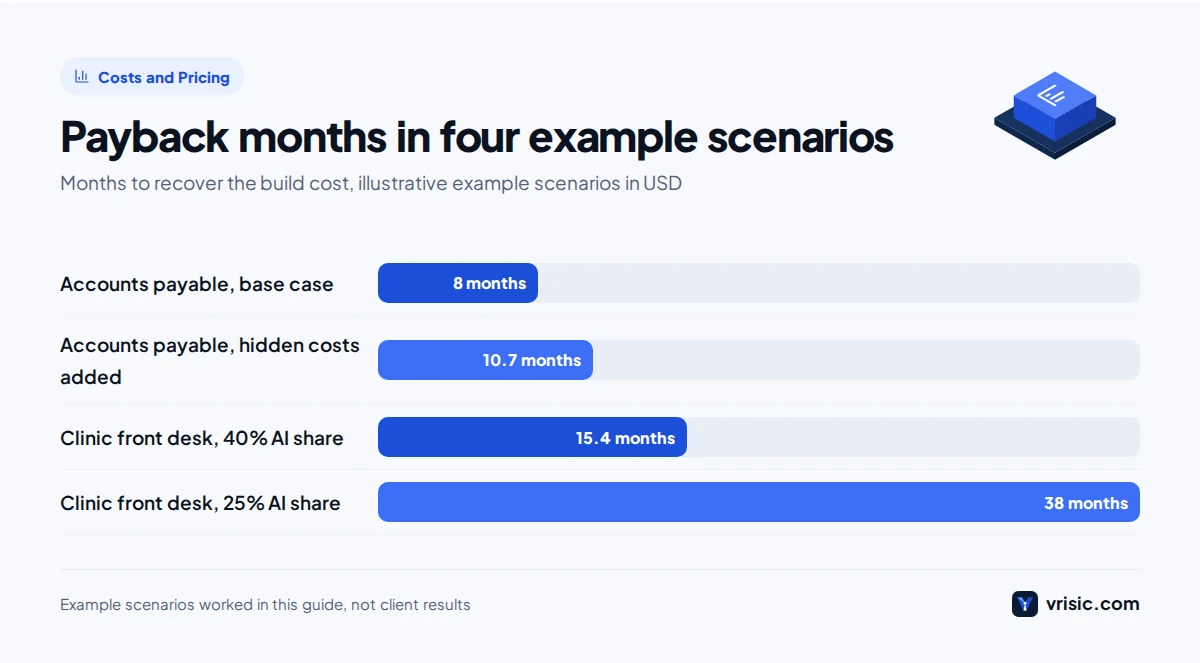
| Payback | 8.0 months | $28,000 ÷ $3,480 per month |
| Three year ROI | 347% | ($125,280 minus $28,000) ÷ $28,000 |
In pounds, the same case is a £22,400 build against a net benefit of about £33,400 a year; in the UAE, about AED 103,000 against AED 153,000 a year. Payback and ROI are ratios, so they only change if your local wage, volume or running cost differ, which they usually do.
Example B: a clinic front desk
A US outpatient clinic’s front desk spends 45 hours a week answering calls, booking and moving appointments, and sending reminders. The plan: an AI voice receptionist answers routine calls, books into the practice system and hands anything clinical or unusual to staff. Usage on voice systems is typically 8 to 25 US cents per minute in our estimates, which is where most of the running cost comes from. See our pages on voice AI development and AI for healthcare providers for how we handle consent, scripts and HIPAA requirements.
| Input or result | Value | Working |
|---|---|---|
| Hours per week (H) | 45 | Phone and scheduling time only |
| Loaded hourly cost (C) | $24 | About $18 wage × 1.35 |
| Share AI handles (A) | 40% | Routine bookings, changes and reminders |
| Build cost (B) | $18,000 | Single line receptionist with booking integration |
| Monthly running cost (R) | $700 | Voice minutes, telephony, hosting |
| Annual saving | $22,464 | 45 × 52 × $24 × 0.4 |
| Annual running cost | $8,400 | $700 × 12 |
| Net annual benefit | $14,064 | $22,464 minus $8,400 |
| Payback | 15.4 months | $18,000 ÷ $1,172 per month |
| Three year ROI | 134% | ($42,192 minus $18,000) ÷ $18,000 |
In the UK that is a £14,400 build against about £11,250 a year of net benefit; in the UAE, AED 66,000 against about AED 51,600. This case is worth doing, but only just, and it is very sensitive to the AI share. Drop A from 40% to 25% and the annual saving falls to $14,040, the net benefit to $5,640, payback stretches to 38 months and three year ROI becomes minus 6%. That is why we would pilot this one before committing to the full build. Our AI receptionist cost breakdown shows where the minutes go.
Send us your five numbers, get a second opinion free Email the hours, cost, AI share, quote and running cost from your calculation and we will tell you within two business days which input looks optimistic and what a realistic payback is.
Hidden costs that shrink the ROI of AI automation
In our experience, hidden costs add 15% to 30% to the real first year cost of an AI automation, and almost none of them appear in a vendor quote. Put them into B and R before you trust the result.
- Your team’s time during the build. Process owners write test cases, review outputs and approve the rollout. Two to four hours a week each, for the length of the project, is typical.
- Exception handling. The cases AI cannot handle tend to be the hard ones, so the remaining work takes longer per item than before.
- Integration licences. Some ERPs, CRMs and practice systems charge for API access or higher usage tiers.
- Security and compliance review. Data protection impact assessments, penetration tests and vendor questionnaires take time and sometimes money.
- Model changes. Providers retire model versions. Each upgrade needs a test run and occasionally prompt changes.
- Usage growth. Volumes rise and staff find new uses. Set spend alerts on day one.
- Training and process change. New procedures, updated job descriptions and a few weeks of running both ways.
Here is Example A again with a cautious allowance: $6,000 of internal time added to the build, and $300 a month added to running cost for exception handling and monitoring.
| Measure | Base case | With hidden costs |
|---|---|---|
| Build cost | $28,000 | $34,000 |
| Monthly running cost | $1,200 | $1,500 |
| Net annual benefit | $41,760 | $38,160 |
| Payback | 8.0 months | 10.7 months |
| Three year ROI | 347% | 237% |
The case still works. A business case that only survives without hidden costs is not a business case.
What do AI errors cost, and how do you include them?
Every AI system makes some mistakes, and the cost of those mistakes belongs in the ROI calculation. The simple way is to add an error line to the monthly running cost: expected errors per month × cost to find and fix one. The calculator does not have a separate error field, so add the figure to R.
What one error costs depends on where it is caught:
- Caught by a reviewer before it leaves the building. A minute or two of staff time. Cheap, and already partly counted in your AI share.
- Caught downstream. A wrongly coded invoice found at month end close costs an hour of investigation and a journal correction.
- Reaches a customer or supplier. A duplicate payment, a missed appointment or a wrong answer to a patient. These can cost hundreds of dollars each, plus goodwill.
A worked line for Example A: 2,000 invoices a month, a 1% error rate that slips past review, and $40 to fix each one is 20 × $40 = $800 a month. That is real money, and it is why we design for errors to be caught early: confidence thresholds, duplicate checks against payment history, and a human in the loop on anything above a value limit. If you cannot cap the cost of an error, for example in clinical advice or legal commitments, keep AI to drafting and let a person decide.
Which soft benefits should you not count?
Leave out any benefit you cannot measure in money before and after launch. Soft benefits are real, but putting them in the ROI calculation is how projects get approved on numbers nobody can later prove.
| Benefit people like to claim | Why we leave it out | When it can count |
|---|---|---|
| “Staff can focus on higher value work” | Freed time only saves money if it is redeployed or avoids a hire | When you can name the hire you will not make or the new work that gets done |
| Better employee morale | Hard to value and slow to show | Only through measured staff turnover and its replacement cost |
| Faster decisions | Speed rarely converts to cash directly | When faster cycle time earns early payment discounts or avoids late fees |
| Higher customer satisfaction | Survey scores are not revenue | When tied to measured retention or repeat orders |
| More revenue from answered calls | Easy to overstate | When call logs show recovered bookings and their value |
| “Competitive advantage” | Not measurable | Never in the calculation; keep it for the strategy discussion |
Use soft benefits as tie breakers, not as the reason to approve a project. The key caveat sits in the first row: if the hours saved do not lead to fewer overtime hours, a hire you avoid, or more output from the same team, the saving exists only on paper.
When is AI ROI negative?
AI ROI is negative when the net annual benefit is too small to repay the build within the life of the system, which in practice means low volume, a low automatable share, or high running costs. These are the patterns we see most.
- Low volume. Under about 10 hours a week of work, even a $5,000 automation struggles to pay back unless the hourly cost is high.
- Too much judgement. If most cases need a person to think, the real AI share stays below 20%.
- The process is about to change. Automating a workflow that a new ERP will replace next year wastes the build.
- Expensive mistakes. Where one error costs more than a month of savings, the review burden eats the benefit.
- High usage costs. Long documents, long calls or large models can make running cost close to the saving.
- A cheap tool already does it. If an off the shelf product covers the need for a small monthly fee, a custom build rarely wins on ROI.
Our honest view: for a team under about 10 people with one generic process, such as email triage or meeting notes, buy a tool and do not build. Custom AI makes sense when volume is high, the process is specific to your business, or the work runs through systems a packaged tool cannot reach. The AI integration route, adding AI to the systems you already run, is often the cheapest way to get a positive number.
What payback period is good for AI?
For a single, well scoped process automation, a payback period under 12 months is a good target, 12 to 24 months is acceptable with a pilot first, and over 24 months needs a strategic reason. Broad AI programmes take much longer.
The published data shows how different broad programmes are. Deloitte’s 2025 survey of 1,854 senior executives in Europe and the Middle East found most respondents reported satisfactory ROI on a typical AI use case within two to four years, against seven to 12 months for typical technology investments, and only 6% reported payback in under a year (Deloitte, 2025). MIT’s Project NANDA research in 2025 reported that 95% of generative AI pilots showed no measurable profit and loss impact, and found the biggest returns in back office automation rather than sales and marketing tools (Fortune on MIT NANDA, 2025).
The lesson is not that AI does not pay. Broad, loosely defined deployments rarely show a return, while narrow automations with a measured baseline can.
How to measure real AI ROI after launch
You measure real AI ROI by comparing the same metrics before and after launch: a baseline taken before the build, and the same measurements at 30, 60 and 90 days live. Without a baseline, every ROI claim afterwards is an opinion.
Step 1: take a baseline before you build
Run a two to four week time study on the current process. Record volume (invoices, calls, tickets), time per item, error or rework rate, and cycle time from arrival to completion. Use system timestamps where you can and short staff time logs where you cannot. Write the numbers down and get the process owner to sign them off.
Step 2: build measurement into the system
Ask your developer to log every item the AI touches: whether it went straight through, needed a correction, or was handed to a person. We build this into every automation as standard, using tracing tools such as Langfuse or OpenTelemetry, so the ROI report comes from data rather than a survey.
Step 3: compare like for like
| Metric | How to measure | What it tells you |
|---|---|---|
| Straight through rate | Items completed with no human touch ÷ total | Your real AI share (A) |
| Time per item | Timestamps or a repeat time study | Whether exceptions got slower |
| Hours on the process | Repeat the baseline time log | Your real H after launch |
| Error rate | Sample 50 to 100 items a month | Error cost to add to R |
| Running cost | Cloud and model bills | Your real R |
| Where freed time went | Overtime, hires avoided, new output | Whether the saving is cash or paper |
Step 4: rerun the calculation at 90 days
Put the measured values back into the calculator. If the result is worse than the plan, the gap tells you where to work: a low straight through rate usually means extraction or matching rules need tuning, while high running cost usually means a cheaper model can take the simpler cases.
Prove the AI share on your own data in 10 business days Our $1,500 AI Pilot runs your real documents or calls through a working prototype and reports the straight through rate, error rate and running cost, so your ROI uses measured inputs instead of guesses.
AI ROI in the US, UK and UAE
The formulas are the same everywhere; what changes is the loaded hourly cost and the compliance work in the build.
- United States. Loaded costs are high, which shortens payback. Use BLS benefit shares as a check. Healthcare work adds HIPAA requirements to the build, covered on our US page.
- United Kingdom. Employer National Insurance is 15% on earnings above £5,000 a year in 2026 to 2027 (GOV.UK, 2026), plus pension contributions. Allow for a data protection impact assessment under UK GDPR. See our UK page.
- United Arab Emirates. Include visa, medical insurance and end of service gratuity in the loaded cost. Arabic and English support and hosting in a UAE cloud region can add to the build. See our UAE page.
How Vrisic can help
We build custom AI automations and add AI to the systems you already run, on your own cloud account, with the code and data handed over to you. We are a remote team based in India working US, UK and UAE business hours. Every project starts with a free scoping call and a written fixed price that separates build and expected running costs, so the B and R in your calculation are numbers you can hold us to. You can see how scoping and handover work on our how we work page, and our custom AI software development page covers larger platforms.
If you are not sure the AI share is real for your process, start with the AI Pilot: $1,500 (£1,200, AED 5,500), 10 business days, on your own data, and fully credited against a build within 60 days. Or send us your numbers on WhatsApp at +91 63777 67206 and we will tell you honestly whether it is worth building.
Sources
- US Bureau of Labor Statistics, Employer Costs for Employee Compensation, June 2026
- Deloitte, AI ROI: the paradox of rising investment and elusive returns, 2025
- Fortune, reporting on MIT Project NANDA, The GenAI Divide, August 2025
- Avenga, AI development cost, July 2026
- GOV.UK, Rates and thresholds for employers 2026 to 2027, 2026