AI CRM Integration Services: How to Add AI to Your CRM
AI CRM integration services explained: five use cases, three integration patterns, API limits, vendor AI prices, costs and a 30 day rollout for your CRM.

Short answer: You can add AI to Salesforce, HubSpot, Zoho, Dynamics 365 or Pipedrive without replacing it, in three ways: the vendor’s own AI add on, middleware that calls the CRM’s API and webhooks, or a custom agent with tool access. Vendor add ons are fastest but priced per user or per action. Custom AI integration with one existing system typically costs $10,000 to $30,000 over 3 to 6 weeks, with running costs of 15 to 30 percent of the build per year.
In this guide
- Five AI use cases that work on a CRM
- Three integration patterns
- What the CRM vendors charge for AI
- Data quality before anything else
- Permissions and audit
- API limits and licence costs
- Build or buy
- What custom AI CRM integration costs
- Worked example: 25 seat sales team
- A 30 day rollout plan
- What to test before go live
- Risks and how to contain them
- How Vrisic can help
- Sources
Most companies with 20 to 500 people already have a CRM that works well enough. What they want is for it to stop depending on people typing notes, chasing duplicates and guessing which lead to call next. AI CRM integration services connect an AI model to the CRM you already run so it can read records, write summaries, score and enrich leads, and in some cases update fields on its own. This guide covers what is realistic, the three ways to wire it up, what the vendors charge, the API limits that catch teams out, and what a custom build costs. We build these integrations at Vrisic, so we say plainly when the vendor’s own AI is the better choice. Our AI development cost guide covers the general case.
Which AI use cases actually work on a CRM?
Five use cases account for most of the value we see in CRM projects: call and email summaries, lead scoring, data enrichment and cleanup, next best action, and support triage. They work because the CRM already holds the context, and each one has a clear check: a person can look at the output and say whether it is right.
- Summaries of calls, meetings and email threads. The AI reads a transcript or thread and writes a short note on the contact or deal: what was agreed, who is involved, what happens next. This saves the most rep time with the lowest risk.
- Lead scoring. A model ranks new leads by likelihood to convert, using your history of won and lost deals plus signals such as company size, source and engagement. It needs a few hundred closed deals with consistent outcomes to be worth building.
- Enrichment and cleanup. The AI fills missing fields (industry, size, role), standardises job titles and company names, and flags likely duplicates. This is where agents most often write to records, so it needs the strictest controls.
- Next best action. Based on deal stage, last contact and open tasks, the AI suggests a follow up and drafts it. The rep decides. Suggestions are only as good as the activity data behind them.
- Support triage. Incoming cases are classified, matched to the account, given a priority and routed, with a draft reply from your knowledge base. Our guide to what an AI agent is explains where this shades into agents that act on their own.
What are the three ways to integrate AI with a CRM?
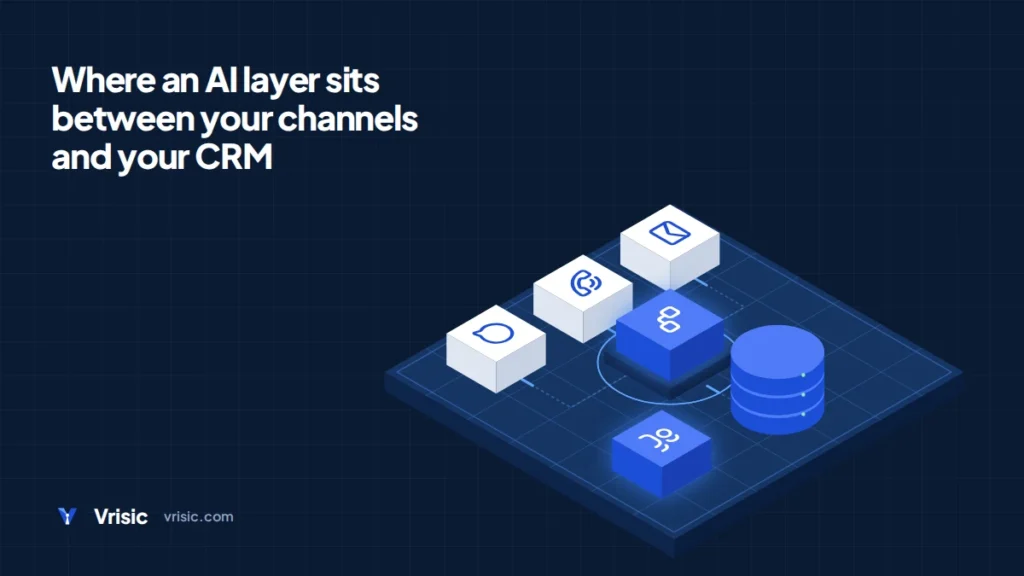
You can use the CRM vendor’s native AI add on, build middleware that connects the CRM’s API and webhooks to a language model, or build a custom agent that has tools to read and write the CRM under rules you define. The right one depends on how unusual your process is and how much control you need.
| Pattern | How it works | Best for | Watch out for |
|---|---|---|---|
| Native AI add on | Switch on the vendor’s assistant inside the CRM | Standard processes, small teams, fast start | Per user or per action pricing; limited say over prompts, models and data flow |
| API and webhook middleware | A service listens for CRM events, calls a model, writes the result back | One or two well defined jobs such as summaries or scoring | API call volume; retries and failures need handling |
| Custom agent with tool access | An agent decides which tools to call (search, read, update, create task) within permissions you set | Multi step work across the CRM and other systems | Needs approval steps, logging and thorough testing |
Middleware is the workhorse. An event such as “call recorded” or “deal moved to proposal” triggers a function, the function gathers the relevant records, the model produces a result in a fixed format, and the function validates it before writing. The model never talks to the CRM directly. A custom agent goes a step further by letting the model choose among tools, which is more flexible and needs more guardrails. Start with middleware and move to an agent only when the work needs several steps. Our AI integration and AI agent development pages describe how we approach each, and the AI agent development cost guide has the price detail.
What do the CRM vendors charge for their own AI?
Vendor AI pricing falls into three models: a flat monthly add on per user, a charge per action or credit, and a charge per outcome. The figures below come from each vendor’s own pages as of October 2026. Check them again before you budget, because vendors change AI pricing often.
| CRM | AI product and pricing model | Published figure |
|---|---|---|
| Salesforce | Agentforce add ons per user; Flex Credits for agent actions | $125 per user per month for Sales, Service, Field Service and Operations add ons; $150 for Industries add ons; Flex Credits $500 per 100,000; one Agentforce action uses 20 credits, or $0.10; a voice action uses 30 credits, or $0.15 |
| HubSpot | Breeze agents priced per outcome, paid in HubSpot Credits | Customer Agent $0.50 per resolved conversation (50 credits); Prospecting Agent $1.00 per lead recommended for outreach (100 credits); Professional and Enterprise customers; from 14 April 2026 |
| Dynamics 365 | Copilot features bundled into higher plans | Sales Professional $65 per user per month without Copilot; Sales Enterprise $105 and Sales Premium $150, both with Copilot; paid yearly |
| Zoho CRM | Zia features by edition | Limited Zia features on Standard; most Zia features, the Zia writing assistant and Zia Agents on Professional, Enterprise and Ultimate |
| Pipedrive | Not checked | We did not verify current Pipedrive AI pricing and give no figure |
Prices in US dollars as of October 2026 from the vendor pages linked in Sources. Vendor pages say prices are for information and subject to change. Vrisic has no commercial relationship with any of these vendors.
The shape matters more than the number. A per user add on is predictable but you pay for everyone, including people who rarely use it. Per action and per outcome pricing is cheap at low volume and can climb quickly when an agent runs on every record. At $0.10 per Agentforce action, an agent that touches 20,000 records a month costs $2,000 a month before any other charge. HubSpot’s outcome pricing is easier to reason about for support, since you pay only when a conversation is resolved.
How clean does CRM data need to be before adding AI?
Clean enough that a new hire could trust it. AI does not fix bad data; it reads it faster and writes new data on top of it. Before any build, we check five things, and they take a few days.
- Duplicates. Count duplicate contacts and companies. If the rate is high, merge first, or an enrichment agent will make the mess larger.
- Required fields. How often is each field the AI will touch filled in?
- Stage definitions. Lead scoring and next best action both depend on stages that mean the same thing to every rep.
- Outcome history. Won and lost reasons recorded consistently, with enough closed deals to learn from.
- Activity capture. Calls and emails actually logged to the right record, since summaries and suggestions use them.
If a field is empty on more than half of records, do not build a feature that depends on it. Fill it first, with AI assisted cleanup if you like, and review a sample by hand.
How should permissions and audit work for an AI that touches the CRM?
Treat the AI as a new user with the narrowest role that does the job. Give it its own integration user rather than borrowing a person’s login, so every change it makes is attributable and can be reversed.
- Least privilege. Grant access only to the objects and fields the feature needs. A summariser needs read access to activities and write access to one notes field, nothing more.
- Respect existing sharing rules. If the AI answers questions from CRM data, it must not show a rep records they could not open themselves. Build the check into the integration, not the prompt.
- Write controls. Allow the AI to write only to named fields. For anything that changes ownership, stage, amount or contact details, require a person to approve.
- Audit trail. Log the input records, the prompt version, the model output, what was written and who approved it. Keep the log outside the CRM as well, so you can inspect it if the CRM is slow.
- Undo. Store the previous value of every field the AI changes.
Our security page sets out how we handle access, secrets and client data on projects like this.
Which API limits and licence costs affect an AI integration?
Every major CRM caps API use, and AI features can use a lot of calls because each summary, enrichment or score is several reads and a write. For most 20 to 500 person companies the limits are generous, but you should do the arithmetic before you build, particularly if you plan a one off clean up of tens of thousands of records. Figures are from each vendor’s developer documentation as of October 2026.
| CRM | Published limit | What it means in practice |
|---|---|---|
| Salesforce | Enterprise and Professional editions: 100,000 requests per 24 hours plus 1,000 per Salesforce license; Unlimited and Performance: 100,000 plus 5,000 per license; extra API call add ons can be purchased | An org with 15 Enterprise licenses has 115,000 a day; the limit is shared by every integration and managed package |
| HubSpot | Privately distributed apps: 100 requests per 10 seconds per app on Free and Starter, 190 on Professional and Enterprise; daily limit 250,000 on Free and Starter, 625,000 on Professional, 1,000,000 on Enterprise; API Limit Increase raises it by 1,000,000 a day, up to two purchases | The burst limit, not the daily limit, is usually what a bulk job hits first |
| Zoho CRM | Paid editions: 50,000 credits per rolling 24 hours plus a per user amount (1,000 per user on Enterprise, 2,000 on Ultimate); one credit per call, one credit per 10 records for bulk insert, update and upsert | Bulk writes are cheap; cap on Enterprise is 5,000,000 credits |
| Dynamics 365 | Service protection: 6,000 requests in a 5 minute window per user, with 20 minutes of combined execution time; entitlement of 40,000 requests per 24 hours per paid Sales licence | Limits apply per user, so an integration user needs its own licence and a retry plan |
| Pipedrive | Not checked | We did not verify Pipedrive’s limits and give no figures |
Two practical points follow. First, a design that listens for CRM events through webhooks, rather than polling every few minutes, uses far fewer calls. Second, an integration that reads and writes in batches is safer than one that handles each record alone.
Licence cost is the other piece. Some CRMs expect an API user to hold a paid licence, and a few AI features sit on higher plans only. Dynamics 365 Sales Professional has no Copilot, so moving to Enterprise adds $40 per user per month ($105 less $65), which is $12,000 a year across 25 users.
Should you build custom AI integrations or buy the vendor’s AI?
Buy the vendor’s AI when your process is standard and the feature exists. Build when your process is unusual, when the work spans systems, or when the vendor’s pricing grows faster than the value. Both answers are often right at different times.
| Question | Vendor AI add on | Custom integration |
|---|---|---|
| Time to start | Days | 3 to 6 weeks |
| Fits your own process and fields | partly | yes |
| Works across the CRM and other systems | partly | yes |
| Choice of model and where data is processed | no | yes |
| Cost grows with every seat or action | yes | partly |
| You own the code and logs | no | yes |
Native AI is the better choice for a team of 15 reps that wants call summaries and email drafts and does nothing unusual: it is already inside the tool and the vendor maintains it. Custom work earns its place when you need an AI that matches leads against an internal pricing sheet, updates the CRM and your ERP together, follows approval rules specific to your company, or runs in your own cloud account for data control. A hybrid is common: keep the vendor’s assistant for rep productivity and build a custom integration for the one workflow it cannot handle. If you are weighing the CRM against a ground up replacement, our AI legacy modernization page covers that different project.
What does custom AI CRM integration cost?
Our typical price for connecting AI to one existing system such as a CRM is $10,000 to $30,000 over 3 to 6 weeks. Work across several systems is $30,000 to $80,000. A single AI workflow, such as lead enrichment with approvals, is $5,000 to $20,000.
| Project | USD | GBP | AED | Timeline |
|---|---|---|---|---|
| One AI workflow on the CRM | $5,000 to $20,000 | £4,000 to £16,000 | AED 18,500 to AED 73,500 | 2 to 4 weeks |
| AI integration with one existing system | $10,000 to $30,000 | £8,000 to £24,000 | AED 37,000 to AED 110,000 | 3 to 6 weeks |
| AI across several systems | $30,000 to $80,000 | £24,000 to £64,000 | AED 110,000 to AED 294,000 | 6 to 12 weeks |
Typical ranges, fixed price in writing after scoping. Running costs, which cover model usage, hosting, monitoring and fixes, are usually 15 to 30 percent of the build per year. Model usage is billed at cost. GBP and AED figures use the conversion we use on all our pricing.
What moves the price: the number of objects and fields touched, whether the AI writes or only reads, how many systems sit on either side, how messy the data is, and how much approval and audit logic you need. A read only summariser is at the bottom of the range. An agent that creates records, updates fields and notifies other systems is at the top.
See it on your own CRM data first Our AI Pilot builds a working version of one use case, such as call summaries or lead scoring, on your own data in 10 business days for $1,500.
Worked example: a 25 seat sales team on Salesforce
This is an example with stated assumptions, not a client. A company has 25 sales users on Salesforce Enterprise Edition. It wants call summaries, lead enrichment and a daily next best action list.
Option 1: the vendor add on
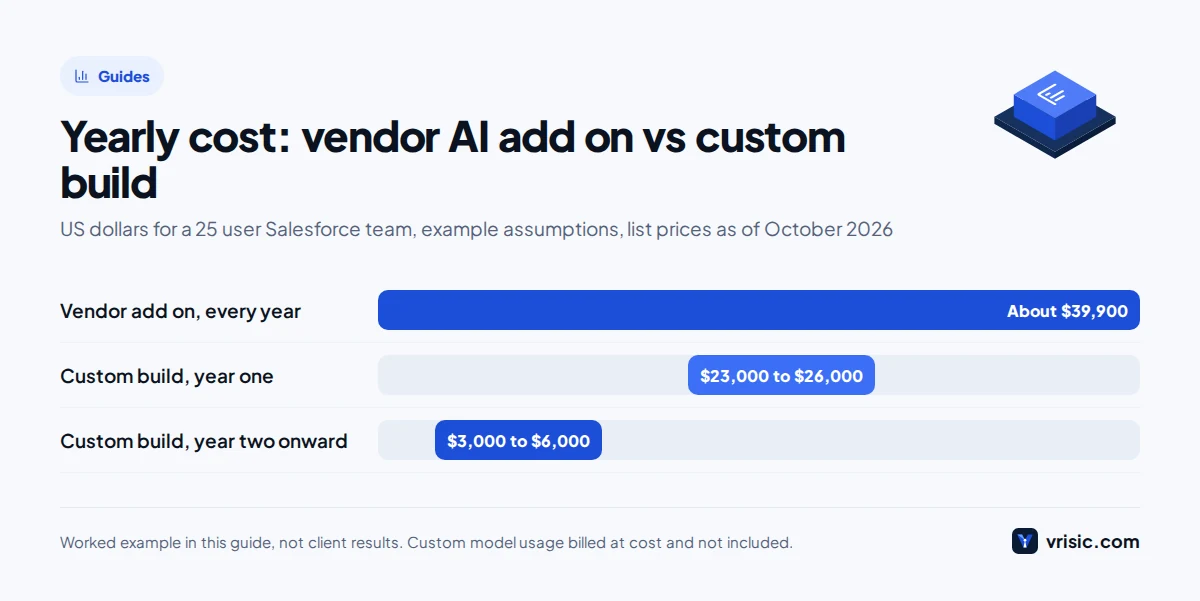
- Agentforce add on at the published $125 per user per month: 25 users × $125 × 12 months = $37,500 a year
- Any Flex Credits for agent actions are extra: 2,000 actions a month × $0.10 = $200 a month, or $2,400 a year
- Total: about $39,900 a year, before any discount you negotiate
Option 2: custom middleware integration
- Build at the middle of the one system range: $20,000
- Running costs at 15 to 30 percent of build: $3,000 to $6,000 a year
- Year one: $23,000 to $26,000. Year two onward: $3,000 to $6,000, plus model usage
Does it fit inside the API limit?
- Salesforce limit: 100,000 + (25 × 1,000) = 125,000 requests per 24 hours
- Enrichment: 300 new leads a day × 6 calls each = 1,800 calls
- Summaries: 400 calls and emails a day × 3 calls each = 1,200 calls
- Total: 3,000 calls a day, which is 2.4 percent of 125,000
Verdict: on these assumptions the custom route costs less in year one unless the build runs above roughly $31,000 to $35,000 (where build plus running costs pass $39,900), and it costs far less from year two. But the add on also gives 25 reps a general assistant inside the CRM, which the custom build does not. If the team only needs these three jobs, build. If reps will use a broad assistant daily, buy. Change the user count and the answer changes, so use your own numbers. Our AI ROI calculator guide shows how to value the time saved.
What does a 30 day rollout look like?
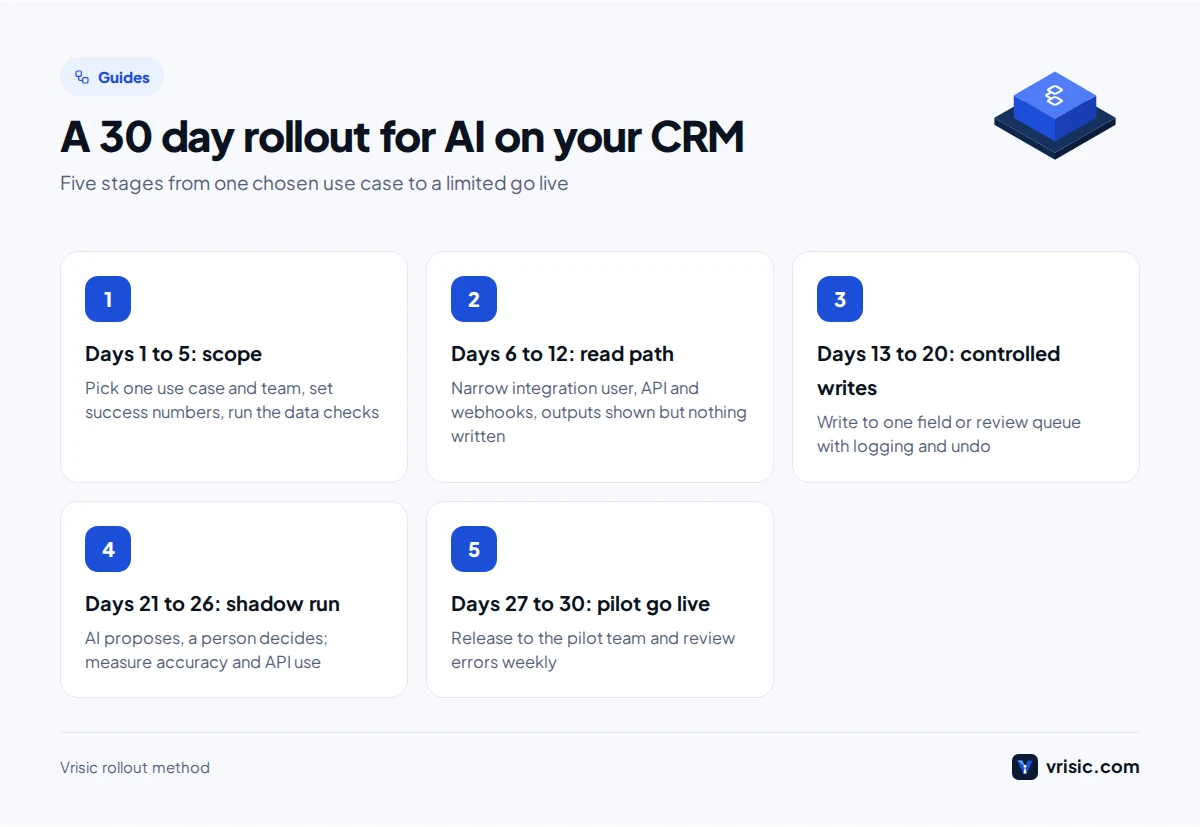
A first use case can be live for a small group in 30 days. The plan below keeps the first release narrow on purpose.
- Days 1 to 5: scope and data check. Pick one use case and one team. Write down the fields involved, the rules, and what success means in numbers, such as minutes saved per call or share of leads with a title filled. Run the data checks above.
- Days 6 to 12: build the read path. Create the integration user with narrow permissions, connect to the API and webhooks, and produce outputs without writing anything. Show them to two or three reps.
- Days 13 to 20: add controlled writes. Write to a single field or a review queue, with logging and undo. Compare output against hand made answers on a sample of real records.
- Days 21 to 26: test and shadow run. Run on live data in shadow mode, where the AI proposes and a person decides, and measure accuracy and API use.
- Days 27 to 30: pilot go live. Release to the pilot team, brief them on what to check, and set a weekly review of errors for the first month.
What should you test before go live?
Test accuracy on real records, behaviour on bad inputs, and what happens when the CRM or the model fails. Build a test set of at least 100 real records with the correct answer written down by someone who knows the account, and re score it after every prompt or model change.
- Accuracy. Share of summaries a rep accepts without edits; share of enriched fields that match a manual check; for scoring, how the top scored leads actually converted against the rest.
- Edge cases. Empty records, long email threads, mixed languages and two contacts with the same name.
- Failure modes. Model timeout, CRM rate limit response, and a webhook delivered twice. Each should retry safely and never create a duplicate.
What are the main risks, and how do you contain them?
The three risks that matter most are wrong field updates, duplicate records and personal data exposure. Each has a known control.
Hallucinated field updates
Models sometimes state things with confidence that are not in the source. If one writes a wrong industry or deal amount, it spreads into reports. Controls: have the model return structured output that you validate against allowed values; require it to quote the source text for each value; write to a staging field or review queue first; and require approval for high value fields.
Duplicate records
Agents that create contacts or companies can duplicate what is already there, especially when a webhook is delivered twice. Controls: search before create, use a stable external ID as a match key, make each write safe to repeat, and run a weekly duplicate report in the first months.
Personal data
CRM records hold names, emails, phone numbers and call content. Decide before you build what goes to the model, where it is processed, whether the provider keeps it, and who can see logs. Send only the fields the task needs. We did not verify country specific data residency rules for this guide, so check the current law for the UK, UAE or any US state you operate in with your legal adviser, and ask each vendor in writing where AI features process data. Our US, UK and UAE pages describe how we work in each market.
How Vrisic can help
We build AI integrations for existing systems, including CRMs, and we are honest about the setup: Vrisic is a senior remote team based in India, working US, UK and UAE hours, with no offices abroad. We price in writing before work starts, build in your own cloud account, and you own the code and the data. We will sign an NDA on request. If the vendor’s own AI does the job, we will say so on the first call. For other work see AI workflow automation and custom AI software development.
The low risk way to start is the AI Pilot: $1,500 (£1,200, AED 5,500), a working version on your own CRM data in 10 business days, fully credited to the build if you continue within 60 days. Running costs are usually 15 to 30 percent of the build per year. Tell us which CRM and which use case and we will reply with a scoped plan.
Sources
- Salesforce, Agentforce pricing, as of October 2026
- Salesforce, API request limits and allocations, as of October 2026
- HubSpot, Customer Agent and Prospecting Agent outcome based pricing, April 2026
- HubSpot, API usage guidelines and limits, as of October 2026
- Microsoft, Dynamics 365 Sales pricing, as of October 2026
- Microsoft Learn, service protection API limits, as of October 2026
- Microsoft Learn, Power Platform request limits and allocations, as of October 2026
- Zoho CRM, API limits and credits, as of October 2026
- Zoho CRM, edition comparison, as of October 2026