AI Customer Support Automation for Ecommerce: What to Automate, What Not To, and What It Costs
What to automate in ecommerce support with AI: order status, returns, product questions, handover rules, vendor vs custom cost maths and an 8 week rollout.

Short answer: Automate the repeat questions whose answer sits in your own data first: order status, delivery windows, return rules and product facts. Keep money decisions above a set value, complaints, fraud and anything the system is unsure about with a person. Buy a vendor tool below roughly 3,000 conversations a month; custom starts to pay back around 10,000, in our illustrative model, where $40,000 is recovered in 8 to 14 months.
In this guide
- Sizing the opportunity
- What to automate, assist or keep human
- Order status, the first thing to automate
- Returns and exchanges
- Product questions without made up answers
- Handover rules that keep customers
- How the system fits together
- Metrics that matter
- Vendor tool or custom build: the maths
- An 8 week rollout
- What public cases teach
- Mistakes we see
- How Vrisic can help
- Sources
Support volume grows with orders, but the questions barely change. Where is my order, can I return this, does it fit, can you change my address. Most of those have a correct answer sitting in your order system, carrier feed or policy page, which is exactly the situation where AI works well. The trouble starts at the edges: a refund the system should not approve, a customer who is angry, a product claim nobody verified. This guide covers what to automate and in what order, how to build the controls that keep it safe, what a vendor tool and a custom build each cost at different volumes, and how to roll it out in eight weeks. See also our page on AI for ecommerce and the chatbot vs agent guide for the difference between answering and acting.
Sizing the opportunity
Start with your own data: export 90 days of tickets, tag the top reasons and count them. Public figures help you sanity check what you find, though most are vendor estimates and should be treated that way.
- Order status. ShippyPro estimates that “where is my order” contacts make up 40 to 60% of inbound ecommerce support contacts for retailers without proactive notifications, and puts direct handling cost at £4.50 to £8.00 a contact, with chat at the low end and phone above it. The article cites no external study for these numbers, so they are the vendor’s own estimates (ShippyPro).
- Returns. NRF’s 2025 returns survey estimates retailers will see 15.8% of annual sales returned, about $849.9 billion, and 19.3% of online sales. It also reports that 9% of returns are fraudulent, and that 71% of consumers are less likely to shop again with a retailer after a poor returns experience (NRF).
Illustrative example of sizing: a store receives 3,000 support conversations a month. If 45% are order status and 15% are return starts, that is 1,800 conversations about information you already hold. Resolving 40% of all conversations without a person means 1,200 resolved contacts. At £4.50 to £8.00 a contact, the direct handling cost of those contacts is £5,400 to £9,600 a month, which is the pool of cost you are trying to reduce. Your own handling cost will differ, so replace these inputs with yours.
The real prize is often not cost. A 24 hour reply queue for “where is my order” costs sales when the customer buys elsewhere or disputes the charge. An answer in seconds, at 2 a.m., is the product.
What to automate, assist or keep human
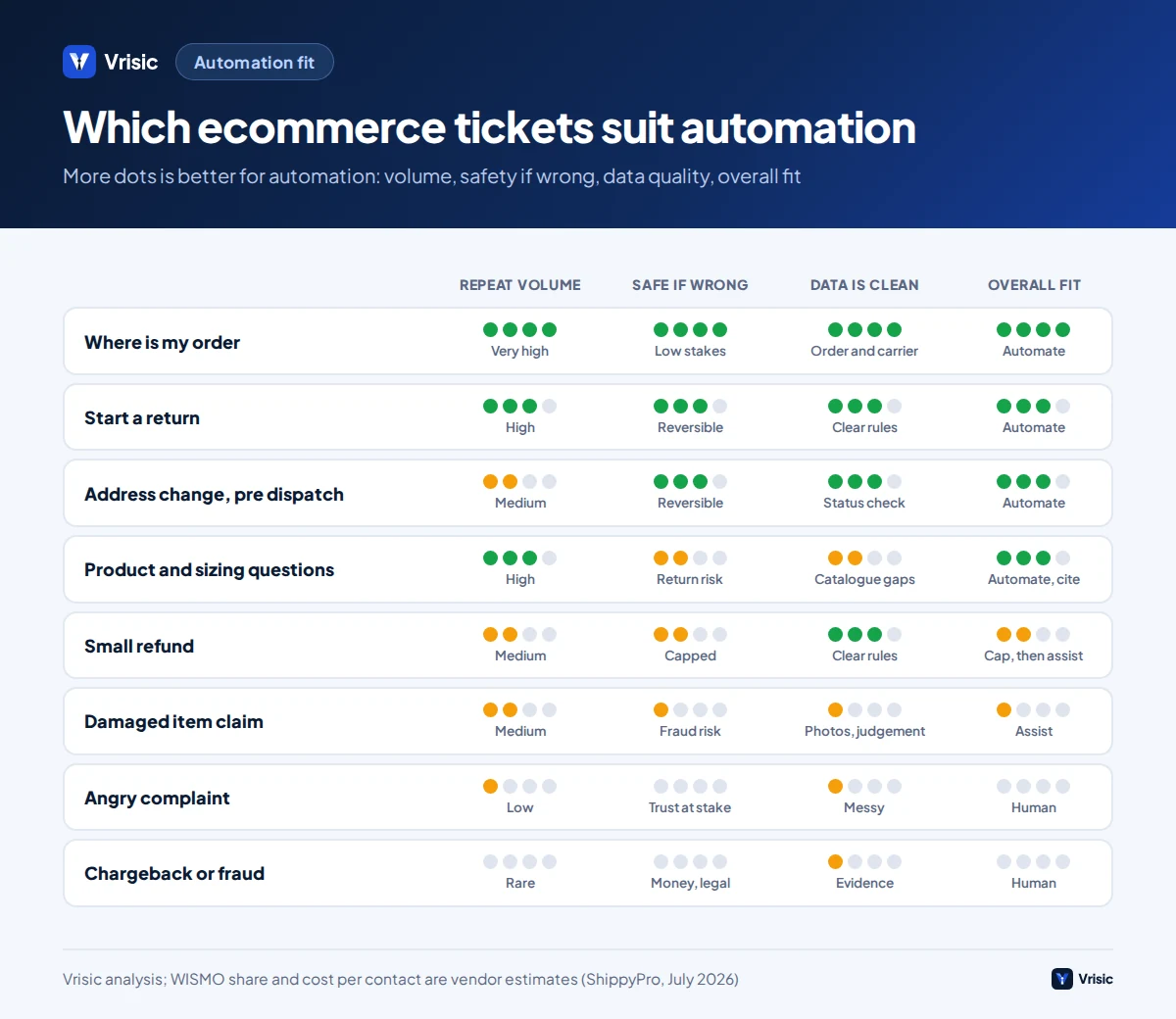
Sort every ticket type into one of three groups. Automate means the system resolves it alone. Assist means it drafts and a person approves. Human means the system gathers details and hands over.
| Ticket type | Group | Why | Condition |
|---|---|---|---|
| Where is my order | Automate | Answer is in the order and carrier data | Customer verified by order number and email |
| Delivery times and costs | Automate | Fixed policy and rate tables | Answer from current rules, not memory |
| Product facts: size, material, compatibility | Automate | Answer is in the catalogue | Refuse when the catalogue is silent |
| Start a return | Automate | Rules based and reversible | Inside the return window and item eligible |
| Change address before dispatch | Automate | Reversible while unshipped | Order status is unfulfilled; address validated |
| Refund of a small amount | Assist or automate | Financial but bounded | Below your value cap; logged; one per order |
| Refund above the cap | Assist | Money at risk | Person approves from a prepared summary |
| Damaged or wrong item | Assist | Needs photo review and carrier claim | System collects photos and order details first |
| Complaints and upset customers | Human | Tone and judgement matter | Hand over at the first sign of frustration |
| Chargebacks, suspected fraud, legal or safety | Human | High stakes, evidence rules | Never decided by the model |
The pattern is that the system acts alone only where the answer is in your data and a mistake is cheap to undo. The further a ticket moves toward money, emotion or evidence, the earlier a person steps in.
Order status, the first thing to automate
Order status is the best first target because the answer is a fact, the customer wants speed more than warmth and success is easy to verify. A good build covers more than a single lookup:
- Verify the customer. Require the order number plus the email or postcode on the order, or a signed in account. Without this, anyone can read anyone’s delivery address.
- Read the order and fulfilment status from your store platform, not from a cached copy.
- Read the carrier tracking and translate carrier jargon into a plain sentence with a date.
- Apply rules for exceptions. Tracking stuck for five days, delivery marked complete but not received, or an address failure each have a defined next step.
- Offer the right action. Reship, refund, or open a carrier claim, subject to the tiers above.
- Write back a note to the order and the helpdesk ticket so a person sees the full history.
Illustrative example: a customer writes “my parcel says delivered but it is not here”. A lookup bot repeats the tracking line and stops. A well built assistant checks the delivered time and location note, tells the customer the usual next steps in your policy (check neighbours, wait 24 hours), and if the customer confirms it has not arrived, creates a carrier claim and offers a reship or refund according to your rules. The conversation ends with an outcome, which is what counts.
Sending proactive delivery updates by email or text removes a large share of these questions before they are asked, and is cheaper than answering them. Do both.
Returns and exchanges
Returns are where support and money meet, so automate the rules and the paperwork but control the payouts.
What the assistant can do
- Check the order date against the return window and the item against exclusions such as final sale or hygiene products.
- Offer the cheapest compliant option first: exchange, store credit or refund, in the order your policy prefers.
- Generate the return label and instructions.
- Record the reason code so merchandising sees why items come back.
What it must not do alone
- Release a refund before the item is received or scanned, unless your policy and risk model allow instant refunds.
- Decide an unusual exception, such as a return outside the window.
- Accept a claim of a damaged or empty parcel without evidence checks.
The fraud numbers justify the caution. NRF reports that 9% of returns in 2025 were fraudulent, with overstated quantity (71% of retailers that track incidents), empty box returns (65%) and decoy returns such as counterfeits (64%) the most common types, and that 85% of retailers say they use AI to detect or prevent return fraud (NRF). A chatbot that says yes to every return becomes a fraud channel. At the same time, 82% of consumers cite free returns as a major purchase consideration and 76% prefer a return option with an instant refund or exchange, so a slow, grudging process costs you repeat orders. Balance the two with risk based rules: instant exchange for low value and trusted customers, hold the refund until the scan for the rest.
Legal rules to encode
In the EU, consumers can cancel most distance purchases within 14 days without giving a reason; for goods the period runs from delivery, and consumers normally pay the cost of returning goods unless the seller offers to or failed to disclose it (Your Europe). Shopify’s help centre adds that merchants selling online to EU consumers must provide a clearly visible electronic withdrawal function, available from places such as the account or order status page, under EU Directive 2023/2673, effective 19 June 2026 (Shopify Help Center). In practice, make sure an AI assistant never becomes a barrier between the customer and that function: if a customer states they wish to withdraw, route them to it or process it. Rules differ by country and product type, so have your legal adviser review the policy text the assistant uses.
Product questions without made up answers
“Will this fit a 1.5 metre sofa?” or “Is it safe for sensitive skin?” are sales questions with a legal edge. An assistant that guesses can create a return, a complaint or a claim. In February 2024 a British Columbia tribunal held Air Canada liable for what its website chatbot told a customer about fares, rejecting the argument that the correct policy was on another page and that the chatbot was a separate legal entity (American Bar Association). The same logic will be argued about a store’s chatbot.
Controls we put in place for product questions:
- Answer only from retrieved catalogue and policy text. Each answer cites the field or page it came from. This is retrieval augmented generation, covered in our RAG vs fine tuning guide.
- Refuse when the data is silent. “I do not have the weight limit for this model” is a good answer. A guess is not.
- Block regulated claims. No medical, safety, allergy or legal claims beyond text you have approved.
- Keep the catalogue clean. Many wrong answers come from missing or contradictory product data, not from the model. Fixing the data is usually the cheapest accuracy gain.
- Link to the product page so the customer can verify.
Handover rules that keep customers
A bad handover is worse than no automation: the customer explains everything again to a person who has no context. Define the triggers and the package in advance.
Triggers
- The customer asks for a person, in any wording. Honour it immediately.
- Negative sentiment, repeated rephrasing or two failed attempts at the same question.
- A request in tier “assist” or “human” in the table above.
- Low retrieval confidence, or no relevant source found.
- Order value above a threshold, VIP or repeat customers you want a person to handle.
The handover package
- A three line summary of the issue and what the assistant already tried.
- The verified customer and order details.
- The proposed action, if any, with the rule it relies on.
- The full transcript, linked.
- Outside staffed hours: a promise of the next reply time you can keep, not a vague “soon”.
How the system fits together
A support assistant for a store is a small set of well defined parts, not a single clever model.
- Channels. Website chat, email, and possibly messaging apps, all feeding one conversation record.
- Identity step. Order number plus email, or a signed in session, before any customer data is read.
- Tools. Narrow, validated functions: get order, get tracking, check return eligibility, create return label, change address, issue refund up to a cap, create ticket.
- Knowledge. Catalogue, shipping and returns policy, FAQs, retrieved at answer time with sources.
- Policy engine. Code that enforces refund caps, windows and exclusions. The model proposes; the code decides.
- Helpdesk. Every conversation and handover written back so staff work in one place.
- Logging and review. Inputs, tool calls and outputs stored, with a weekly sample reviewed by a person.
See our guide to AI CRM integration for the data plumbing and our AI agent development service for how the tools and rules are built and tested.
Metrics that matter
Define resolution carefully, because vendors do not agree. Intercom counts an outcome when its Fin agent answers and the customer either confirms it helped or leaves without requesting more help, charging at most one outcome per conversation (Intercom). Gorgias counts an automated interaction when AI or automation fully handles a thread and no human touches it within 72 hours (Drag). “Left without asking for more” can include customers who gave up, so audit it.
| Metric | How to measure | Why it matters |
|---|---|---|
| Resolved without human | Conversations closed with the outcome achieved and no human touch for 72 hours | The real saving |
| Wrong answer rate | Weekly sample of 50 to 100 conversations graded by a person against policy | The risk number; target near zero for policy and price statements |
| Handover rate and reasons | Share handed over, grouped by trigger | Shows what to build next |
| Reopen rate | Same customer, same order, contacts again within 7 days | Catches false resolutions |
| Customer satisfaction | Post conversation rating, split bot only vs handed over | Quality check |
| Time to first useful answer | Seconds to a correct answer | The customer experience gain |
| Cost per resolved conversation | All AI and support costs divided by resolved conversations | Compare with your current cost per contact |
| Refund and fraud leakage | Refund value issued by the assistant against policy, and reversal rate | Tests the guardrails |
Vendor tool or custom build: the maths
Several helpdesk vendors now charge per automated resolution. Published prices as of September and October 2026:
- Intercom Fin: $0.99 per outcome on every plan, plus seats from $29 per seat per month billed annually on Essential (Intercom).
- Zendesk AI agents (advanced): about $2 per resolution pay as you go and about $1.50 on committed volume (Voiceflow).
- Gorgias AI Agent: about $0.90 per automated interaction on annual billing and $1.00 monthly within the prepaid allowance, then $1.50 beyond it, on top of ticket based helpdesk plans such as Pro at $360 a month for 2,000 tickets (Drag).
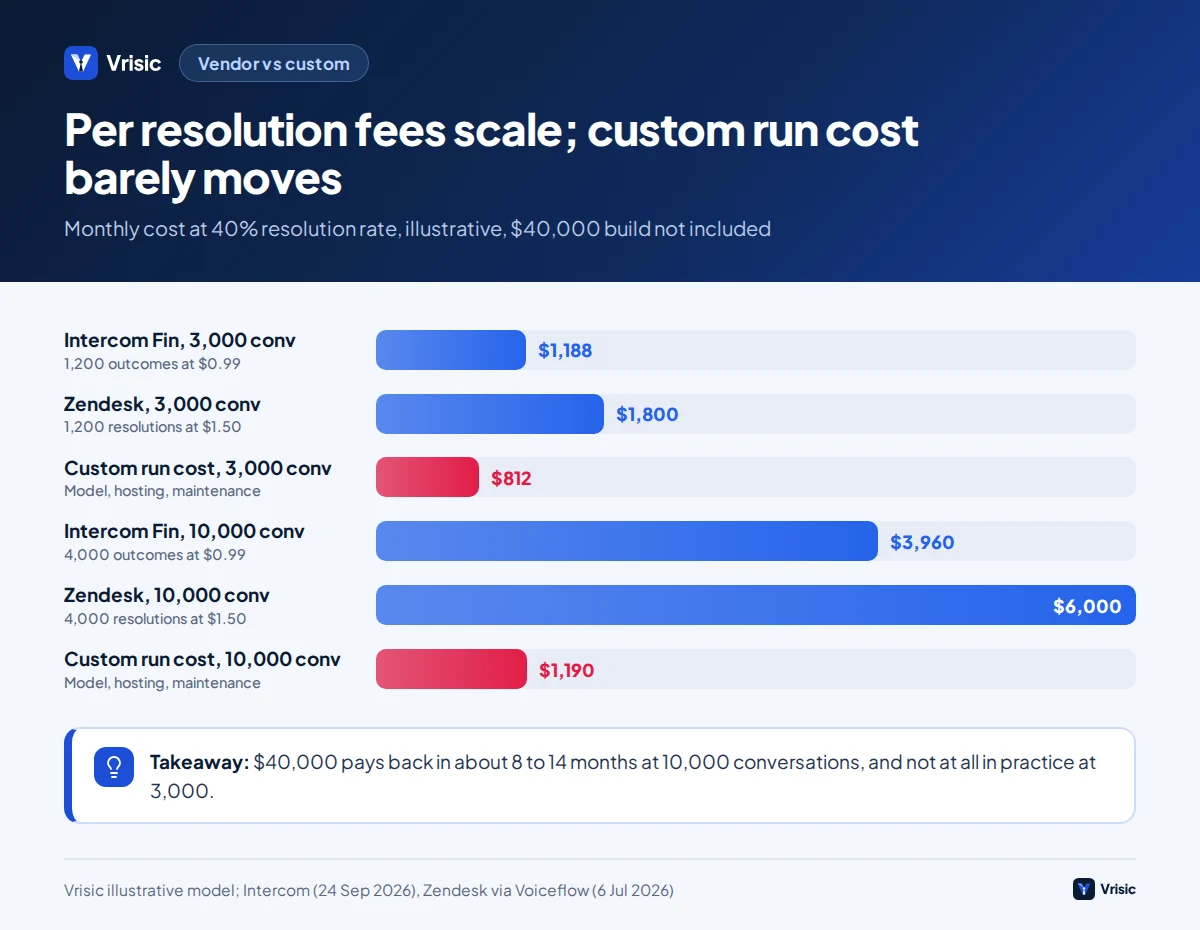
A custom build typically costs $25,000 to $60,000 at Vrisic for an integrated agent working across your store, carrier and helpdesk, over 6 to 10 weeks. Our AI agent cost guide explains the range. Here is an illustrative model with its assumptions stated. We assume 40% of conversations are resolved by the assistant, a $40,000 build, model usage of about $0.054 per conversation (our estimate from public token prices, see the chatbot vs agent guide), $150 a month for hosting and monitoring, and $500 a month for maintenance, which is 15% of the build per year.
| 3,000 conversations a month | 10,000 conversations a month | |
|---|---|---|
| Resolved by AI (40%) | 1,200 | 4,000 |
| Intercom Fin at $0.99 per outcome | $1,188 a month | $3,960 a month |
| Zendesk AI at $1.50 committed | $1,800 a month | $6,000 a month |
| Custom run cost: model, hosting, maintenance | $162 + $150 + $500 = $812 a month | $540 + $150 + $500 = $1,190 a month |
| Monthly saving versus Intercom | $376 | $2,770 |
| Payback of $40,000 versus Intercom | About 106 months | About 14 months |
| Monthly saving versus Zendesk committed | $988 | $4,810 |
| Payback of $40,000 versus Zendesk | About 40 months | About 8 months |
Illustrative model using the assumptions above. It excludes helpdesk seats, which you pay either way, and the staff time saved, which is the same under both options.
The honest reading: at 3,000 conversations a month a vendor tool is cheaper and faster to start, and a custom build does not pay back in any planning horizon. At 10,000 a month, or with a complex catalogue, several order systems or strict data residency, custom pays back within about a year and keeps the cost curve flat as you grow. Between the two, the deciding factors are not price:
- Integration depth. Do you need the assistant to act in an ERP, a warehouse system, a subscription platform or a loyalty system the vendor does not connect to?
- Rules. Do your refund, bundle or B2B pricing rules need to be coded exactly?
- Data location and control. Do conversations have to stay in your cloud account?
- Languages and channels. Does the vendor handle the languages and messaging apps you actually sell in?
- Lock in. Per resolution pricing can rise with your volume and vendor terms; check the notice period for price changes.
An 8 week rollout
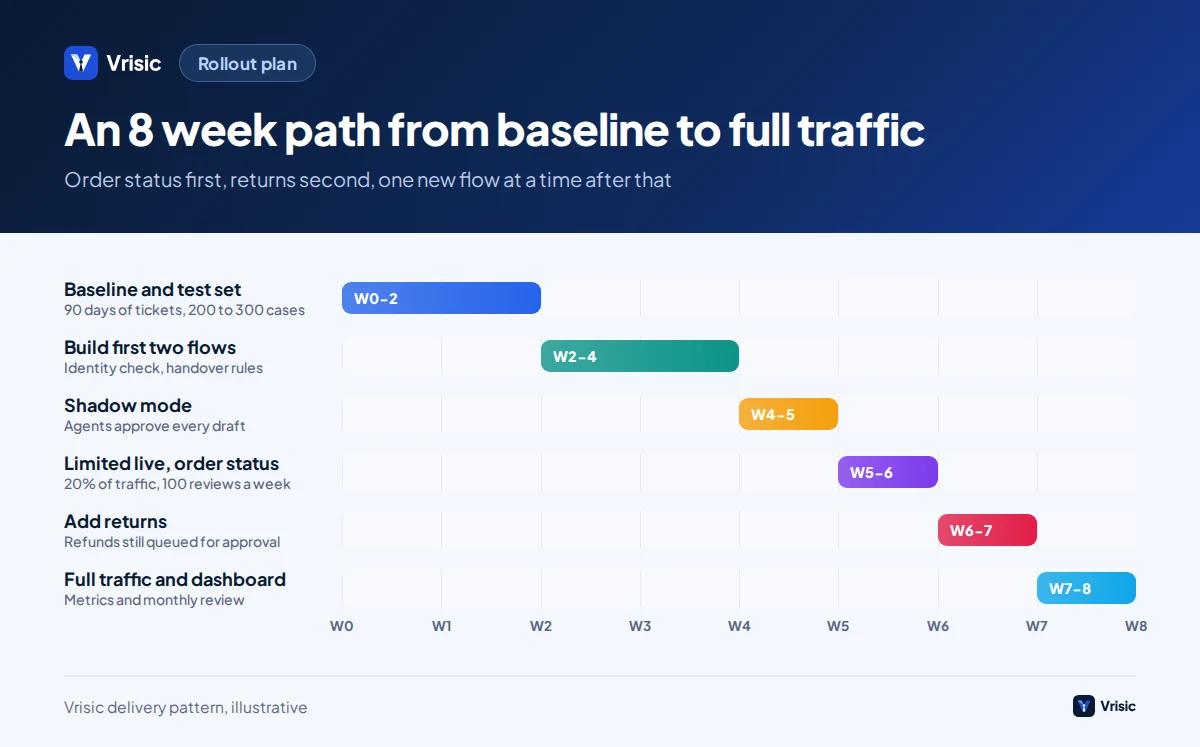
- Weeks 1 and 2: baseline. Export 90 days of tickets, tag reasons, measure first response time, handling time and cost per contact. Collect 200 to 300 real conversations with correct outcomes as a test set.
- Weeks 2 to 4: build the first two flows. Order status with identity check, and delivery and returns policy answers with sources. Write the escalation triggers.
- Weeks 4 to 5: shadow mode. The assistant drafts replies that agents see and approve or edit. Compare drafts with final replies and fix gaps.
- Weeks 5 to 6: limited live. Turn on automatic replies for order status only, for one channel or 20% of traffic. Review 100 conversations a week.
- Weeks 6 to 7: add returns. Return eligibility and label creation, with refunds still queued for approval.
- Weeks 7 to 8: widen and set the dashboard. Raise traffic to 100% on the proven flows, add the metrics table above and a monthly review slot.
Then add one flow at a time, such as small refunds or address changes, each with its own test cases and cap.
What public cases teach
Klarna published the most cited figures. In February 2024 it said its AI assistant handled 2.3 million conversations in its first month, two thirds of its customer service chats, did the work of 700 full time agents and cut resolution time from 11 minutes to under 2. In June 2025 its chief executive said human customer service would always be a premium option, and in 2025 filings Klarna described a dual track with AI and human support. All of Klarna’s figures are self reported and unaudited (Metaroles summary of Klarna statements). Two lessons apply to a store: the volume of routine contacts can be large, and a human route must stay easy to reach.
The Air Canada decision, covered above, adds a third: you own what your assistant says.
Mistakes we see
- Starting with the hardest tickets. Begin with order status and policy questions, where the data is clean.
- No identity check. This turns a chatbot into a data leak.
- Putting refund limits in the prompt. Limits belong in code the model cannot override.
- Hiding the human option. It drives satisfaction down and complaints up.
- Trusting the vendor’s resolution number. Audit a sample against your own definition.
- Ignoring bad catalogue data. The assistant can only be as accurate as your product fields.
- Launching without a test set. You cannot tell whether an update helped or hurt.
- Forgetting peak season. Test with a volume spike and a carrier delay scenario before your busiest weeks.
How Vrisic can help
We build custom support assistants that connect to your store, carriers and helpdesk, and we will say so if a vendor tool is the better fit for your volume. After a free scoping call we quote a fixed price. The system runs in your cloud with your own model keys, you own the code, prompts and test data, and there are no per seat fees.
If you want evidence before committing, the AI Pilot costs $1,500, runs for 10 business days and is credited against a build started within 60 days. You can also read how we work or book the scoping call.
Sources
- WISMO: What It Means and How to Reduce It (ShippyPro, 21 July 2026; vendor estimates)
- Consumers Expected to Return Nearly $850 Billion in Merchandise in 2025 (NRF and Happy Returns)
- Returning goods and cancelling a purchase (Your Europe, European Union)
- EU right of withdrawal (Shopify Help Center)
- BC Tribunal Confirms Companies Remain Liable for Information Provided by AI Chatbot (American Bar Association, February 2024)
- Intercom Pricing: Plans, Features and Costs (Intercom, 24 September 2026)
- Zendesk AI Agents: Pricing, Setup, and Best Alternatives (Voiceflow, updated 6 July 2026)
- Gorgias Pricing 2026: Plans, AI Agent Costs, and the Ticket Meter (Drag, checked 14 October 2026)
- Klarna’s AI Agent and the Customer Service Job: What the Numbers Show (Metaroles; summarises Klarna’s own statements)