AI Intake for Law Firms: What It Can Do, Ethics Rules and Costs
AI intake for law firms done safely: what it may and may not do, ABA and Oregon guidance, a script template, Clio and Lawmatics fit, cost and a pilot plan.

Short answer: AI intake for law firms means an AI agent that answers calls and web chats, collects the facts of a new matter, captures conflict check data, books consultations and passes urgent calls to a person. It should never give legal advice, accept a case or imply that a lawyer has taken one on. A single task intake agent typically costs $8,000 to $25,000 to build, and a subscription product may be enough for a small firm. This is general information, not legal advice.
In this guide
- What AI intake should and should not do
- The ethics rules that apply
- Data handling and confidentiality
- UK and UAE considerations
- Connecting to Clio, MyCase, Lawmatics or your CRM
- A template intake script outline
- What AI intake costs
- A worked example with arithmetic
- When a subscription is the better choice
- How to run a pilot
- How Vrisic can help
- Sources
Most small and mid size firms lose new matters the same way: the phone rings after 5pm, the caller gets voicemail and rings the next firm. An agent picks up, asks the questions your intake coordinator would ask, records the answers in your case system and books a consultation or hands the call to a person. The caller is a prospective client, and everything the system says is the firm’s communication. See our page on AI for law firms and our explainer on what an AI agent is for background.
This article is general information about technology and public guidance. It is not legal advice, and Vrisic is a software company, not a law firm. Rules differ by state and country, so confirm with your own bar or ethics counsel before you deploy anything.
What should AI intake do, and what should it never do?
AI intake should collect information, apply the firm’s screening rules and route the caller. It should not give legal advice, say whether the firm will take the case, quote fees the firm has not approved, or sound as if a lawyer has agreed to act. Those limits are how you avoid forming an attorney client relationship by accident.
Good jobs for AI intake: answering every call and chat, including evenings and weekends; collecting contact details and basic facts in your form’s order; capturing conflict check data (the caller’s full name, other parties, related businesses and insurers); screening against your criteria; booking consultations into the right calendar; routing urgent calls such as a client in custody or a person served with court papers to a named human; and writing a summary into your case system for review.
Jobs it should not do: give legal advice, including “you have plenty of time to file”; accept or decline a matter; send an engagement letter on its own; promise outcomes, timelines or prices; handle a crisis alone; or contact people who have not contacted the firm. A practical rule: the AI can say what happens next, but a person owns every decision that matters, including acceptance and any judgement about limitation periods.
Which ethics rules apply to AI intake?
No rule is called “AI intake”. The ABA Model Rules that matter are 1.1 (competence), 1.6 (confidentiality), 1.18 (prospective clients), 5.3 (nonlawyer assistance) and 7.3 (solicitation), read with the ABA’s July 2024 opinion on generative AI and, in Oregon, a 2026 opinion on chatbots and AI agents. State rules differ from the Model Rules, so treat this as a map, not a ruling.
ABA Formal Opinion 512 (July 29, 2024)
The ABA’s announcement says Opinion 512 addresses lawyers’ use of generative AI under competence (Rule 1.1), confidentiality (Rule 1.6), communication (Rule 1.4) and fees (Rule 1.5). A published summary says supervisory lawyers must set clear policies, train staff and oversee outside AI providers, and that engagement letter boilerplate does not supply informed consent for self learning tools. I could not open the full opinion, so read it yourself.
Rules 1.1 and 1.6: competence and confidentiality
Rule 1.1 requires the legal knowledge, skill, thoroughness and preparation reasonably necessary for the representation, which for intake means understanding what the tool does, where it fails and how its output is checked. Rule 1.6(a) bars revealing information relating to the representation without informed consent, implied authorisation or an exception, and Rule 1.6(c) requires reasonable efforts to prevent inadvertent or unauthorized disclosure of, or access to, that information.
Rule 1.18: prospective clients
This is the rule firms underestimate. Under Rule 1.18(a), a person who gives a lawyer information about the possibility of forming a client lawyer relationship is a prospective client. Under 1.18(b), even if no relationship follows, a lawyer who has received and reviewed that information generally may not use or reveal it. Under 1.18(c), the lawyer can be barred from representing someone with materially adverse interests in the same or a substantially related matter, and the bar can extend to the whole firm unless an exception applies. The ABA comment, as reproduced in New Hampshire’s version, says a consultation generally occurs when a lawyer invites information about a possible representation and a person responds, and that clear warnings limiting the lawyer’s obligations can matter. An intake agent invites information, so what it collects can create conflicts, and its opening disclosure is part of your protection.
Rule 5.3: supervising nonlawyer assistance
Rule 5.3 requires a partner or lawyer with comparable managerial authority to make reasonable efforts to ensure the firm has measures giving reasonable assurance that a nonlawyer’s conduct fits the lawyer’s obligations, and a lawyer with direct supervisory authority to make the same efforts. Oregon’s opinion treats the vendor, rather than the software, as the party to supervise. Either way: write a policy, test the system, review its output and keep a named lawyer accountable.
Rule 7.3: solicitation
Inbound intake is not solicitation, because the caller contacted you. The risk is using AI to start contact. Model Rule 7.3(b) bars soliciting employment by live person to person contact when a significant motive is pecuniary gain unless an exception applies, such as a prior professional relationship. ABA Formal Opinion 501 (April 2022) focused on in person and telephone contact. The Model Rule text does not address automated outreach and some states define solicitation more widely, so do not let an agent contact people who have not contacted you without advice from your bar.
Oregon Formal Opinion 2026-208
Approved in February 2026, this is the closest thing to a rule on AI intake. It answers “yes, qualified” to whether lawyers may use chatbots with clients and potential clients. It says a chatbot that sounds like a lawyer could lead a person to reasonably believe a relationship exists, so a responsible lawyer should promptly review interactions; prospective client information is covered by Rule 1.18 and should be entered promptly into the conflict system; chatbots must not give legal advice; websites and chatbots should carry clear disclaimers, and one that does not identify itself as automated could be misleading; and autonomous actions such as sending an engagement letter should need lawyer approval. It also asks for due diligence on encryption, separation of client data from training data and the vendor’s integrations. It binds Oregon lawyers only, but it is a useful checklist for anyone.
How should an AI intake system handle client data?
Treat every intake call as confidential from the first word. You cannot outsource the duty, only the work.
- No training on your data. Get it in writing that audio, transcripts and summaries are not used to train any model, at the voice platform, the model provider and any transcription service. Terms differ by provider and plan, so read them.
- Where it runs. A system in your own cloud account, with you owning the data, is easier to defend and audit. See private and self hosted AI and our security page.
- Retention and access. Delete recordings and transcripts on a schedule, limit who can open intake records and log access.
- Disclosure. Say at the start that this is an automated assistant, that the call may be recorded and that it gives no legal advice. Recording consent rules vary by state.
- The vendor chain. List every party that touches the data. Oregon’s opinion warns that integrations can expose information beyond what a vendor’s own policies say.
- Human review. A named person reviews flagged calls and a weekly sample.
Want a second pair of eyes on your intake flow? Send us your intake questions and call routing, and we will mark where an agent could help and where a person must stay in the loop.
What about the UK and the UAE?
For England and Wales, the Solicitors Regulation Authority said in its November 2023 Risk Outlook news release that firms must maintain confidentiality when using AI, guarding against exposure to third parties and keeping information secure within the firm and with the system provider, and that solicitors stay accountable to clients whether or not they use external AI. A trade press report from August 2026 says the SRA has since warned that client information should only go into AI systems with appropriate safeguards. I could not open that notice, so check the SRA site for current wording.
I found no source I could open and verify for Law Society guidance on AI intake, or for UAE professional conduct or data rules on it, so this article makes no claims about them. Take local advice on professional rules, data residency and call recording before you build. We are a remote team in India with no offices abroad, so we build to the requirements your advisers set. See our pages for US and UK clients.
How does AI intake connect to Clio, MyCase, Lawmatics or a CRM?
The agent should write its work into the system your staff already use, as a lead or contact with a summary, not leave it in a separate inbox.
- Clio Grow. Clio’s developer documentation describes a Lead Inbox API: a JSON POST that creates a lead with a first name, last name, message, source and referring URL, and optionally email and phone, authenticated with the Grow user’s inbox token. The page calls this a legacy approach and points to the Clio Platform API for newer integrations.
- Lawmatics. Its pricing page lists integrations with Clio, 8am MyCase, Filevine, Smokeball, CARET Legal and PracticePanther, and it has a Zapier app. It does not say which plans include API access, so ask.
- MyCase and others. I did not verify MyCase’s API, so we would scope it in a pilot.
- A general CRM or calendar. Most have APIs or webhooks. Our AI integration service covers connecting an agent to systems you already run.
Write named fields for parties, dates and practice area plus a plain English summary, so conflict checks do not depend on reading prose, and never let the agent overwrite fields a person has edited. Searching your own policies is a separate build, covered under enterprise AI search.
What does a good AI intake script look like? A template outline
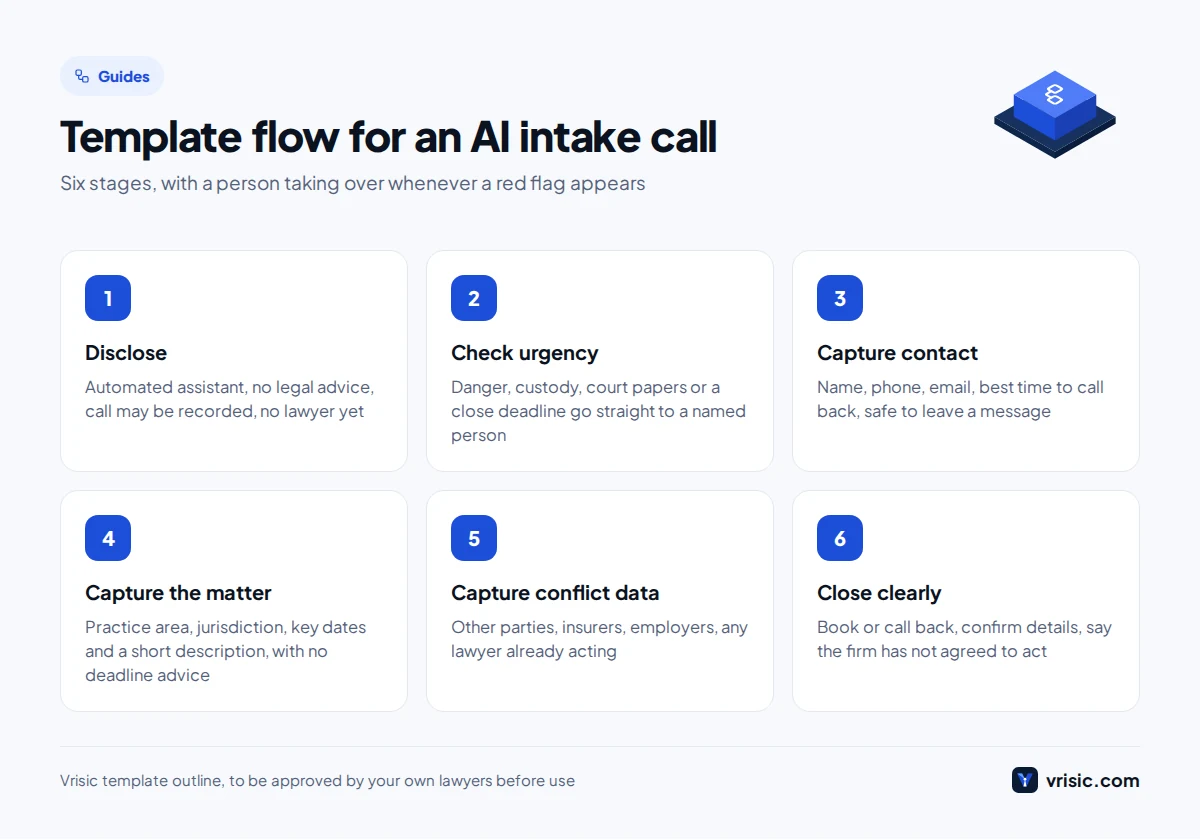
A good script is a decision flow, not a speech. It opens with disclosure, checks urgency first, collects facts in a fixed order, hands red flags to a person and ends by saying what happens next. Below is a template to adapt, not a script we have used for any firm. Have your lawyers approve the wording for your practice area and jurisdiction. Our voice AI development team builds agents from outlines like this.
- Disclosure. “You have reached the intake assistant for [Firm]. I am an automated assistant, not a lawyer, and I cannot give legal advice. This call may be recorded. Speaking with me does not make [Firm] your lawyer. May I ask a few questions so the right person can follow up?”
- Urgency check. Anyone in danger? Anyone in custody? Court papers served or a hearing in the next few days? If yes, give the emergency or on call route, transfer to the named human and stop screening.
- Contact details. Full name, phone, email, best time for a call back, and whether it is safe to leave a message.
- Matter basics. What happened, in a sentence or two; the practice area the caller thinks applies; the city, state or country where it happened or where the caller lives.
- Dates. Date of the incident, of any notice or court document received, and any date the caller says something is due. The agent records dates and never states or comments on a deadline.
- Conflict data. Names of everyone involved, including the other side, insurers, employers and any lawyer already acting, and whether the caller has spoken to another firm.
- Practice area questions. Use only what your own intake form asks, for example treatment and insurer for personal injury, children and existing orders for family, pending notices for immigration, charge and court date for criminal defence, and whether a will exists for estates.
- Red flags to a person. Danger, a close deadline, a minor or a person lacking capacity, a caller already represented, someone approaching several firms, an adverse party who is an existing client, an abusive or confused caller, or any request for advice.
- If asked for advice. “I cannot give legal advice, but I can pass your details to the team and book a consultation with a lawyer.”
- Close. Offer a slot or call back, confirm the details, and say the firm has not agreed to act and a team member will review.
Afterwards the agent writes a structured record to your case system and flags red flag items for whoever reviews intake each morning. It never closes a matter, sends an engagement letter or says the firm is or is not taking the case.
What does AI intake cost?
A custom voice or chat intake agent from Vrisic typically costs $8,000 to $25,000 for a single task agent and $25,000 to $60,000 when integrated with your case system, calendar and review workflow. That is roughly £6,400 to £20,000 (AED 29,000 to AED 92,000) for the single task and £20,000 to £48,000 (AED 92,000 to AED 220,000) for the integrated build. You get a fixed price in writing, you own the code and the data, and it runs in your own cloud account.
| Option | What it typically costs | What you get |
|---|---|---|
| Vrisic AI Pilot | $1,500 (£1,200, AED 5,500) | Working version on your own intake questions in 10 business days, credited to the build if you continue within 60 days |
| Custom single task agent | $8,000 to $25,000 | One call or chat flow, your rules, hand off to a person |
| Custom integrated agent | $25,000 to $60,000 | Writes to your case system, books calendars, review dashboard |
| Clio | Starter from $49 per user per month; Grow is included on the Elite plan, an add on for Core and Signature | Case management with lead and intake tools |
| Lawmatics | Custom quote; 3 user minimum on Essential and Premium, 5 on Enterprise | Intake, automation and booking; Merlin AI add ons sold separately |
Clio prices are US dollars from Clio’s pricing page as of October 2026, which gives a starting price only for Starter. Lawmatics publishes plan features but no prices as of October 2026. Vrisic ranges are typical, not a quote. Voice, model and phone usage is billed at cost; our typical estimate is 8 to 25 US cents per minute. Our AI receptionist cost guide and AI agent development cost guide show how those numbers are built.
What could it be worth? A worked example with arithmetic
This is an example on assumptions we chose for illustration, not a client result. Replace every assumption with your own call logs before you decide.
Assumptions: a small personal injury firm gets 400 inbound calls a month; 35% go to voicemail after hours or while staff are busy; 60% of those callers hang up without leaving a message; the agent engages half of them; 20% of engaged callers are viable matters; 25% of viable callers sign; the average fee is $4,000 and we count only 50% of it as contribution; the build costs $25,000; calls average 4 minutes at 8 to 25 US cents per minute.
- Missed calls: 400 × 35% = 140 a month. Callers who left no message: 140 × 60% = 84.
- Engaged by the agent: 84 × 50% = 42. Viable: 42 × 20% = 8.4. Signed: 8.4 × 25% = 2.1 a month.
- Contribution: 2.1 × $4,000 × 50% = $4,200 a month.
- Usage: 400 × 4 = 1,600 minutes, at $0.08 to $0.25 = $128 to $400. We use $400.
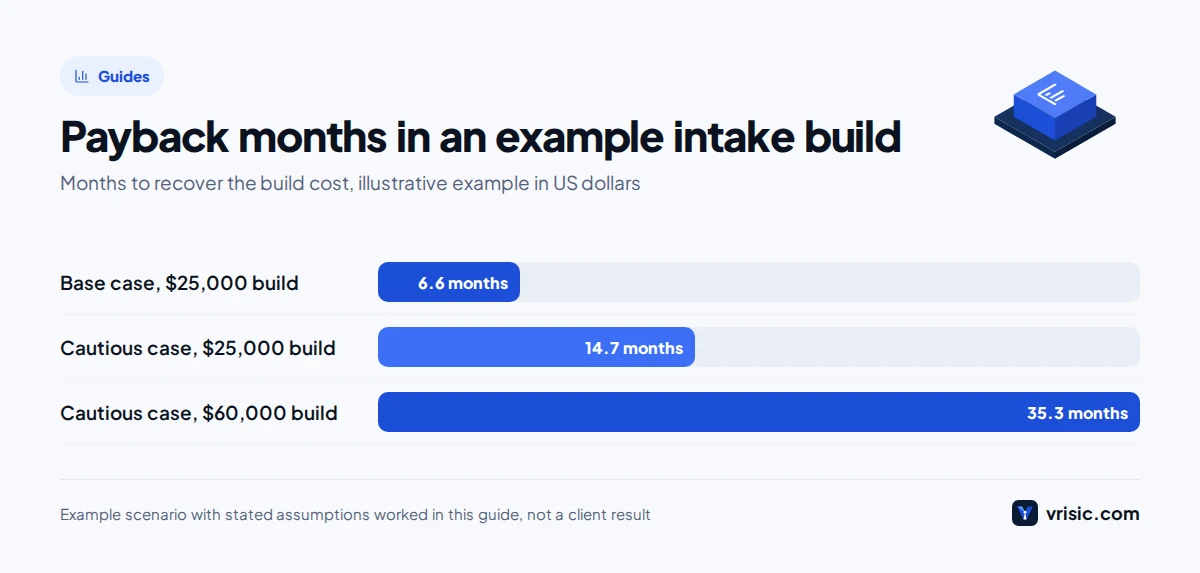
- Net benefit: $4,200 minus $400 = $3,800 a month. Payback: $25,000 ÷ $3,800 = about 6.6 months.
Cautious case: if half as many callers sign (1.05 matters), contribution is 1.05 × $4,000 × 50% = $2,100, net benefit is $2,100 minus $400 = $1,700, and payback is $25,000 ÷ $1,700 = about 14.7 months. With a $60,000 integrated build and the same cautious result, payback is $60,000 ÷ $1,700 = about 35.3 months, so justify integration by volume, not ambition. Fees often arrive months after signing, so cash payback is slower. If the numbers only work on optimistic assumptions, run a pilot first.
When is a subscription product the better choice?
If you are a small firm with one intake flow, no unusual systems and a case management vendor that already offers intake or AI features, start there. It will be cheaper, quicker and supported. Lawmatics sells AI add ons called Merlin Qualify, Engage and Copilot; I could not verify what they do or cost, so ask for a demo on your own scripts and written answers on data use. A subscription AI receptionist, covered in our cost guide, may suffice for after hours calls.
A custom build makes sense when you need detailed screening across several practice areas, must write into a system no product supports, want it in your own cloud account for confidentiality, need several languages, or want exact control over what the agent says. Otherwise save the money; our build versus buy guide has the general test.
How should a law firm pilot AI intake?
- Start small. One practice area and one channel, such as after hours calls for one team.
- Write the rules first. A lawyer approves the form, red flags and disclosure before building.
- Test on role played calls. Include angry callers, accents, requests for advice and an emergency.
- Keep a person watching. A named lawyer or intake lead reviews every call for two weeks.
- Measure and set stop rules. Track calls answered, complete records, correct urgent routing and consultations booked. One advice incident or missed urgent call means pause and review.
- Decide with numbers. Put your results into the example above and our AI ROI calculator.
How Vrisic can help
We build custom voice and chat AI agents, including intake agents, that follow your rules, hand over to your people and write into your systems. We are a senior remote team based in India working US, UK and UAE hours, with no offices abroad. You get a fixed price in writing, you own the code and the data, it runs in your own cloud account, and we sign an NDA on request.
The low risk start is our AI Pilot: $1,500 (£1,200, AED 5,500) for a working version on your own intake questions in 10 business days, fully credited to the build if you continue within 60 days. If a subscription fits, we will say so. You can also send us your intake process.
Sources
- American Bar Association, ABA issues guidance on lawyers’ use of AI tools, July 2024
- Summary of ABA Formal Opinion 512 (Ezel)
- New Hampshire Rule 1.18, with ABA comments
- ABA Model Rule 5.3
- ABA Model Rule 1.6
- ABA Model Rule 7.3
- ABA, live person solicitation guidance (Formal Opinion 501), April 2022
- Oregon State Bar Formal Opinion 2026-208, February 2026
- NWSidebar, New Oregon State Bar Opinion on Using AI Agents for Client Intake, March 2026
- Solicitors Regulation Authority, Risk Outlook AI news release, November 2023
- Legal Cheek, SRA warns over AI misuse, August 2026
- Clio pricing, as of October 2026
- Clio developer docs, Lead Inbox API
- Lawmatics pricing and plans, as of October 2026