AI Receptionist for HVAC Contractors: Triage, Booking and Cost in 2026
An AI receptionist for HVAC contractors in 2026: emergency triage rules, booking into ServiceTitan, Jobber or Housecall Pro, real prices and a worked example.

Short answer: An AI receptionist for HVAC contractors answers every call during heat waves and first freezes, sorts no heat and no cooling emergencies from routine requests, books into your field service software and hands urgent calls to a person. As of October 2026, Jobber’s add on costs $29 a month for 30 conversations, and a custom build costs $10,000 to $30,000 plus about 8 to 25 US cents a minute. Use what your software offers first and build only when it cannot follow your rules.
In this guide
- Why HVAC phones are different
- What missed calls look like
- Emergency triage rules
- Maintenance plans and renewals
- Booking into your field service software
- Routing across HVAC, electrical, handyman and inspections
- After hours: AI or an on call technician
- What it costs in 2026
- A worked example
- How to test before you commit
- Handing off to a human
- When a subscription is the better choice
- How Vrisic can help
- Sources
Most AI receptionist advice is written for dentists and law firms. An HVAC business has a different phone problem. Calls arrive in waves that no schedule predicts, many of them are urgent, and some involve gas, carbon monoxide or a vulnerable person in a hot house. A receptionist that books a haircut well can still fail badly here. This guide is for HVAC owners and for owners of multi trade home service firms (heating, electrical, handyman work or home inspection) who are deciding whether an AI receptionist is worth having and which kind. For general costs, see our AI receptionist cost guide and the best AI receptionists for small business. Vrisic is a remote team in India serving US, UK and UAE clients, with no offices abroad, so this guide rests on published vendor documents and our own arithmetic.
Why do HVAC phones need a different kind of AI receptionist?
They need triage, not just answering. A heat wave or the first hard freeze can compress a month of calls into days, and the callers who matter most have no heat or no cooling. An AI receptionist can take many calls at once where a person cannot (Jobber’s documentation says its Receptionist handles concurrent calls), but it also has to tell a furnace failure in a house with a baby from a quote request, treat gas and carbon monoxide calls as safety calls rather than sales calls, and recognise maintenance plan members. That sorting is where HVAC calls are won or lost.
How many HVAC calls go unanswered, and what does that cost?
No single reliable number exists for HVAC alone, so treat all figures as ranges. Invoca, a call analytics vendor, reported in May 2024 that 27% of calls to home services businesses are not answered, and that fewer than 3% of callers sent to voicemail leave a message. Its July 2026 benchmark report found that 52% of all inbound home services calls were answered by a person, rising to 65% when calls under 15 seconds are excluded. The two reports use different methods, so do not mix them.
Invoca does not publish an HVAC only answer rate in the text of these pages, so we do not quote one. Count your own misses from a week of phone logs. ServiceTitan, which sells to HVAC firms, says in a March 2026 article that the average HVAC company loses $45,000 to $120,000 a year to unanswered calls, based on data from more than 1,200 contractors. That is a vendor figure with an unpublished method, so treat it as a prompt, not a forecast.
What emergency triage rules should an HVAC AI receptionist follow?
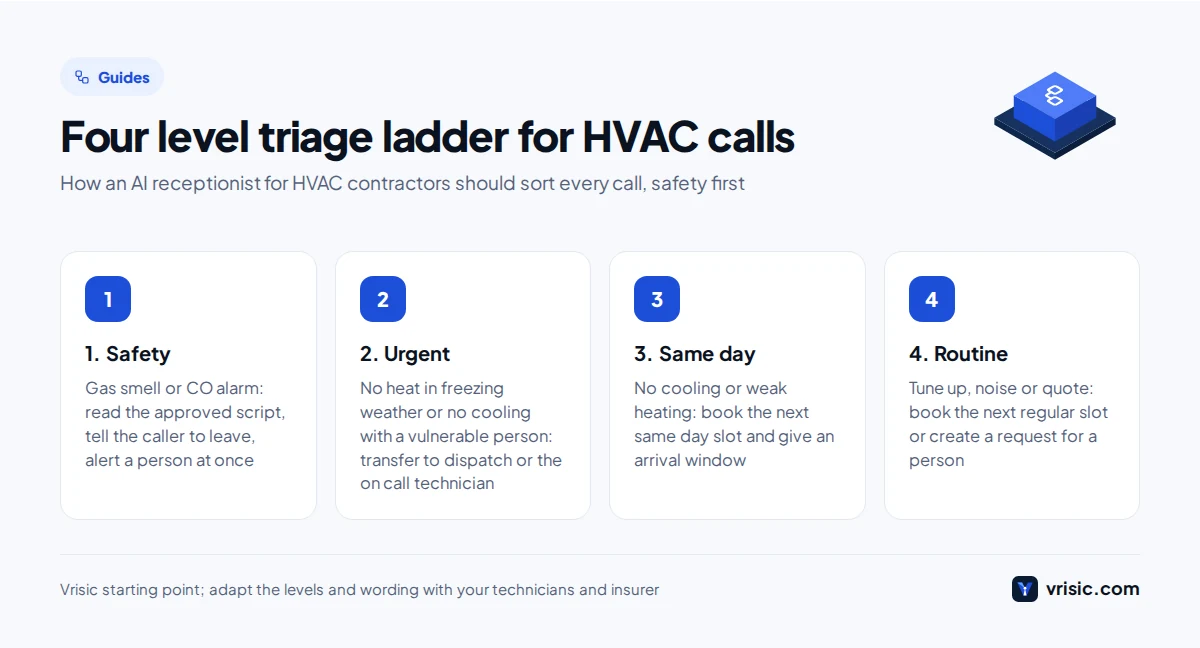
It should follow a written ladder that you approve, with the safety rung first and no improvisation. The AI does not diagnose; it classifies, captures the address and number, and routes. Here is a ladder we would start from, to be changed for your market and your technicians.
| Level | What the caller says | What the receptionist does |
|---|---|---|
| 1. Safety | Gas smell, carbon monoxide alarm, smoke, sparks, burning smell from equipment | Reads your approved safety script, tells the caller to leave the building and contact emergency services or the gas utility, then alerts a person at once. It does not book a visit first. |
| 2. Urgent | No heat in freezing weather, no cooling with a baby, an older person or a medical condition at home, water leaking from equipment | Captures the address and the vulnerable person detail, then transfers to your dispatcher or on call technician and texts the same summary. |
| 3. Same day | No cooling or weak heating, no vulnerable person | Books the next same day slot your software offers and tells the caller the arrival window. |
| 4. Routine | Tune up, noise, thermostat question, quote for a new system | Books the next regular slot or creates a request for a person to price. |
On the safety rung, the US Centers for Disease Control and Prevention advises: leave your home immediately and call 911 if your carbon monoxide alarm sounds, and have heating systems and other fuel burning appliances serviced by a qualified technician every year. Your AI should never tell a caller a gas smell is probably fine. Have your insurer or a safety adviser review the exact words.
Products differ in control. Jobber’s Receptionist lets you choose urgent keywords such as no heat, then transfers the call or texts you. Housecall Pro says emergency handling is always on and you only choose how you are notified. ServiceTitan says its agent routes emergencies to an on call dispatcher on keywords such as no heat or gas smell. Keywords miss callers who describe the problem in their own words, so test for that.
How should an AI receptionist handle maintenance plans and renewals?
It should recognise members, book their visits first, and raise a renewal or an enrolment only at the right moment. Maintenance agreements are the steady income that carries an HVAC business through the quiet months, and the phone is where many of them are won or lost.
- Recognise members. Match the caller’s number to your records, confirm their plan and treat a breakdown as higher priority.
- Book tune ups. ServiceTitan says its virtual agent can book maintenance jobs as recurring services under a member profile. Ask any vendor whether it can, or only creates one off appointments.
- Renewals. Outbound renewal calls bring consent and calling time rules, so take legal advice and start with inbound only.
Which field service software can an AI receptionist book into?
It depends on the platform. Some vendors offer their own AI receptionist inside the product, and others expose an API that outside tools, including a custom build, can use. Here is what each vendor’s own pages say as of October 2026.
| Platform | Built in AI receptionist | Outside access for a custom build |
|---|---|---|
| ServiceTitan | AI Virtual Agent in Contact Center Pro; books to the dispatch board using real time availability; price not published; setup said to take about 20 minutes | A Leads Integration Platform for strategic partners to pass bookings into a customer account; needs client credentials from a ServiceTitan Partner Manager and account pairing |
| Jobber | Receptionist: included on the Plus plan, or $29 a month on select plans for 30 conversations, then $0.79 each; needs a Jobber dedicated phone number | Public GraphQL API for clients, requests, jobs and visits; custom integrations need no review unless they connect to more than 5 paying Jobber accounts |
| Housecall Pro | CSR AI: answers calls 24/7, books onto the calendar if you allow it; price not published; some features marked as coming soon | Not confirmed in the pages we read |
| FieldEdge | Not confirmed in the pages we read | API access for integrated partners; the page does not state approval terms, so ask FieldEdge |
As of October 2026 from the linked vendor pages. Housecall Pro lists texting, Spanish and job inbox integration as coming soon, so read its current help page.
Two practical points follow. First, if you already pay for one of these platforms, test its own receptionist before anything else, because it is usually the least work to set up. Second, a custom build is only as good as the access the vendor gives it: ServiceTitan’s partner route needs credentials and account pairing, so allow time. If neither route fits, a small AI integration that sends a clean booking request for staff to confirm may be the cheaper path.
How do you route calls across HVAC, electrical, handyman and home inspection work?
You route by trade first, then by urgency, then by who is available. A firm that sells more than one trade needs the receptionist to ask one early question (what is the problem?) and send the call down the right path. The same caller can need different handling depending on the trade.
| Trade | What matters on the call | Typical routing rule |
|---|---|---|
| HVAC | Urgency, vulnerable people, equipment age and brand, member status | Four level ladder above; members first |
| Electrical | Safety first: burning smell, sparks, tripped breaker that will not reset, power out to part of the home | Treat burning smells and sparks as level 1 safety calls; otherwise same day or routine |
| Handyman | Scope, photos, access, flexible timing | Capture a description and photos by text link, then book a visit or quote slot; rarely an emergency |
| Home inspection | Property address, buyer deadlines, agent contact, access to the property | Capture the address, requested date and agent details, then offer the next open inspection slot or flag a fixed deadline for a person |
The hard part is keeping each trade’s rules separate on one phone number. Subscription products usually take one set of instructions for the whole business, which gets muddy with four trades. A custom AI agent can hold a separate flow per trade and per service area, for example when a request on one side of Portland should go to a different crew. See our home services AI page.
Should you use an AI receptionist or an on call technician after hours?
Use both. The AI answers, sorts and writes up the call; the on call technician or dispatcher decides what to do about a real emergency.
- Without AI, every after hours call wakes your on call person, including tune up enquiries and wrong numbers.
- With AI, only level 1 and 2 calls transfer. Levels 3 and 4 become booked appointments or morning tasks.
- Plan for a transfer nobody answers. Jobber’s documentation requires an escalation contact whose number differs from your business line, and Housecall Pro’s says the escalation number should not match the forwarding number, to avoid a loop. Add a second number and a text alert.
ServiceTitan advises starting with after hours calls, then weekends, holidays and peak season overflow. We agree.
What does an AI receptionist for an HVAC contractor cost in 2026?
It costs from about $25 a month for a basic subscription up to $10,000 to $75,000 for a custom build, and the cheapest option is often the one already inside your field service software. Here are the figures we could verify as of October 2026.
| Option | Price | Notes |
|---|---|---|
| Jobber Receptionist | $29 a month add on for 30 conversations; $0.79 per extra conversation; included on the Plus plan | Needs Jobber; spam does not count as a conversation |
| Upfirst | $24.95 for 30 calls; $59.95 for 90; $159.95 for 300; $299 for 600 | Overage $1.50 to $0.70 per call; spam and calls under 15 seconds are not billed |
| ServiceTitan AI Virtual Agent | Not published | Sold with Contact Center Pro; ask for a quote |
| Housecall Pro CSR AI | Not published | Free trial offered; ask for a quote |
| Vrisic custom voice AI receptionist | $10,000 to $30,000 single line; $30,000 to $75,000 integrated; usage about 8 to 25 US cents a minute | Fixed price in writing; you own the code and data; runs in your own cloud account |
US dollars as of October 2026 from the linked vendor pages. Our own prices are typical ranges, confirmed in writing after a free scoping call. Vrisic has no commercial relationship with any vendor named here.
Ask every vendor what counts as a billable call, whether transferred calls keep counting, and what happens at the limit. Jobber’s help page says that when paused at its limit, Receptionist stops responding, cannot book and can only take messages. A paused receptionist in a heat wave is the worst case, so set the cap high.
Worked example: what could a peak season month recover?
This is an illustration built from stated assumptions, not a client result. Change every number to match your own call log.
Assumptions
- A residential HVAC firm with six technicians.
- Peak months (three summer and three winter months): 160 calls a month that nobody answers, taken from a rate near the 27% Invoca figure on roughly 600 inbound calls. Other months: 60 unanswered calls.
- Half of unanswered calls are real service requests; the AI books 60% of those.
- Average ticket: $350. Gross margin on those jobs: 40%.
- Half of the booked jobs would have been won anyway through call backs, so only half count as new.
- Each call lasts 3 minutes. The custom build costs $20,000 and usage runs 8 to 25 US cents a minute.
Jobs and margin
- Peak month: 160 × 50% = 80 requests; 80 × 60% = 48 booked jobs; 48 × $350 = $16,800.
- Other month: 60 × 50% = 30 requests; 30 × 60% = 18 jobs; 18 × $350 = $6,300.
- Year: (6 × $16,800) + (6 × $6,300) = $100,800 + $37,800 = $138,600.
- New business only: $138,600 × 50% = $69,300. At 40% margin: $27,720.
Costs
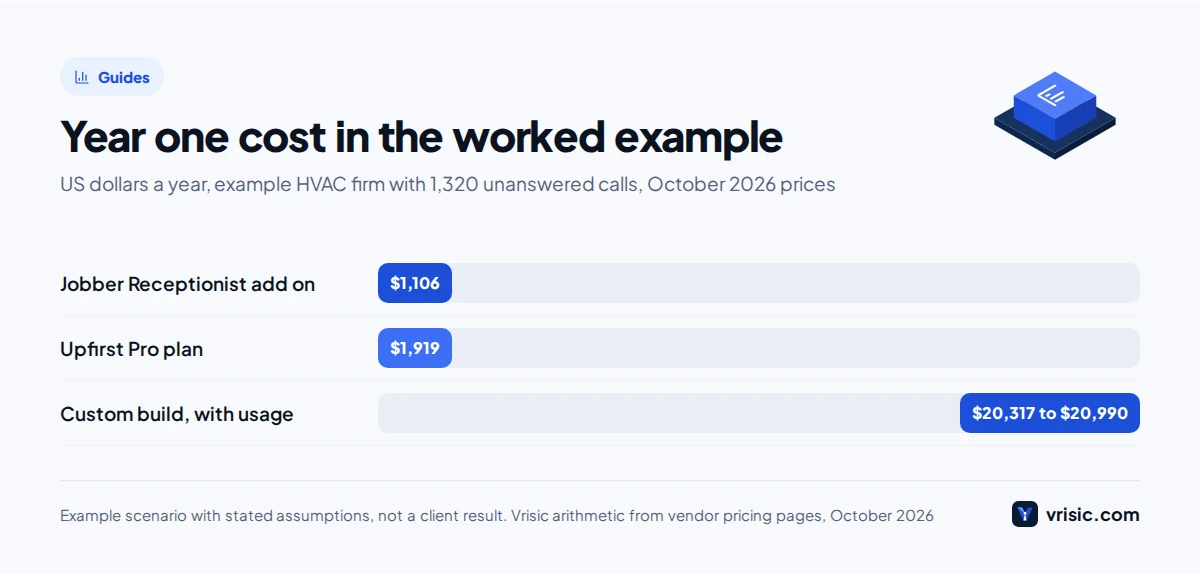
- Jobber add on: peak month $29 + (130 extra × $0.79 = $102.70) = $131.70; other month $29 + (30 extra × $0.79 = $23.70) = $52.70. Year: (6 × $131.70) + (6 × $52.70) = $790.20 + $316.20 = $1,106.40.
- Upfirst Pro: $159.95 × 12 = $1,919.40, since 160 calls fits inside 300.
- Custom build: calls in the year = (6 × 160) + (6 × 60) = 1,320; minutes = 1,320 × 3 = 3,960; usage = 3,960 × $0.08 to $0.25 = $317 to $990. With the $20,000 build, year one is $20,317 to $20,990.
Result
Margin of $27,720 less the Jobber add on is about $26,600 in year one. Less Upfirst, about $25,800. Less a custom build, about $6,700 to $7,400. A subscription wins year one clearly. A custom build makes sense only if a subscription cannot do something you need, such as booking into a platform with no supported receptionist, routing four trades, or handling several languages. Year two then costs only usage of about $317 to $990 plus support. Our AI ROI calculator lets you run your own version.
How do you test an HVAC AI receptionist before it takes real calls?
Call it yourself with your worst calls, not your easiest. Use a free trial or a demo line, and write down what happened on each call.
- Ring from a noisy place, such as a van with the radio on.
- Describe the problem in your own words. Say “the house is freezing and the baby is sick” without any keyword. Does it still reach level 2?
- Test the safety rung. Say “I smell gas”. It should give your approved script and alert a person, never offer an appointment first.
- Give a hard address, including a unit number and a zip code outside your area, then check the booking record.
- Interrupt, change your mind, then ask for a person, and check what the person receiving the transfer sees.
Score every call against what you said. One wrong address or missed safety call is a failure to fix before launch. Our AI Pilot includes this testing on recorded sample calls from your business.
How should the receptionist hand a call to a human?
A good handoff does three things: it transfers fast, it passes on a summary so the caller does not repeat themselves, and it has a fallback if nobody answers. Write the rules down before you build.
- Transfer level 1 and 2 calls, anyone who asks for a person, anyone the AI cannot understand after two tries, and accounts you name.
- Pass a summary: name, number, address, the problem in one sentence, urgency level and member status.
- Have a fallback: if the first person does not answer, try a second, then text and promise a call back within a stated time.
- Disclose that the caller is speaking with an AI, as ServiceTitan’s article recommends.
ServiceTitan’s page quotes one customer, Northwinds Services Group, reporting an 80% to 85% booking rate. That is a vendor published testimonial, not a benchmark, so measure your own rates for the first 30 days.
When is a subscription product the better choice?
Choose a subscription, usually the one inside your field service software, when you run one trade in one area and your emergency rules fit a keyword list and a transfer number. For many small HVAC firms a build adds cost with no extra result. Skip AI for now if a dispatcher already answers nearly every call.
A custom build earns its place when your software has no supported receptionist, four trades share one number, branches need different flows, callers need another language, or records must stay in your own cloud account. Our build vs buy guide sets out the wider test, and the voice agent platforms review compares the tools a build would use.
How Vrisic can help
We build custom voice AI receptionists for home service firms that have outgrown the built in options, connect them to the systems they already use, and hand you the code and the data. We are a senior remote team in India covering US, UK and UAE hours, so we work with you by video and phone rather than on site. If a subscription fits your calls, we will say so on the scoping call and save you the build cost. We serve US clients from India; details are on our USA page.
The low risk way to start is the AI Pilot: $1,500 (£1,200, AED 5,500) for a working version on your own data in 10 business days, fully credited to the build if you continue within 60 days. Or send us your call volumes and trade list.
Sources
- ServiceTitan, AI Voice Agents in HVAC, March 2026
- ServiceTitan, Contact Center Pro voice agents, as of October 2026
- ServiceTitan Help, Leads Integration Platform, as of October 2026
- Jobber pricing, as of October 2026
- Jobber Help, Receptionist powered by Jobber AI, as of October 2026
- Jobber, Receptionist feature page, as of October 2026
- Jobber Developer Center, as of October 2026
- Housecall Pro pricing, as of October 2026
- Housecall Pro Help, CSR AI overview, as of October 2026
- Housecall Pro, CSR AI feature page, as of October 2026
- FieldEdge API documentation, as of October 2026
- Upfirst pricing, as of October 2026
- Invoca, how much missed sales calls cost home services businesses, May 2024
- Invoca Home Services Lead Conversion Benchmarks Report 2026, July 2026
- US Centers for Disease Control and Prevention, carbon monoxide poisoning guidance, 2018 release