AI Legacy System Modernization: When to Wrap, Rebuild in Stages or Replace
How to modernize a legacy system with AI: wrap, stage or replace, where AI helps with code and data, the risks, a phased plan and cost ranges.

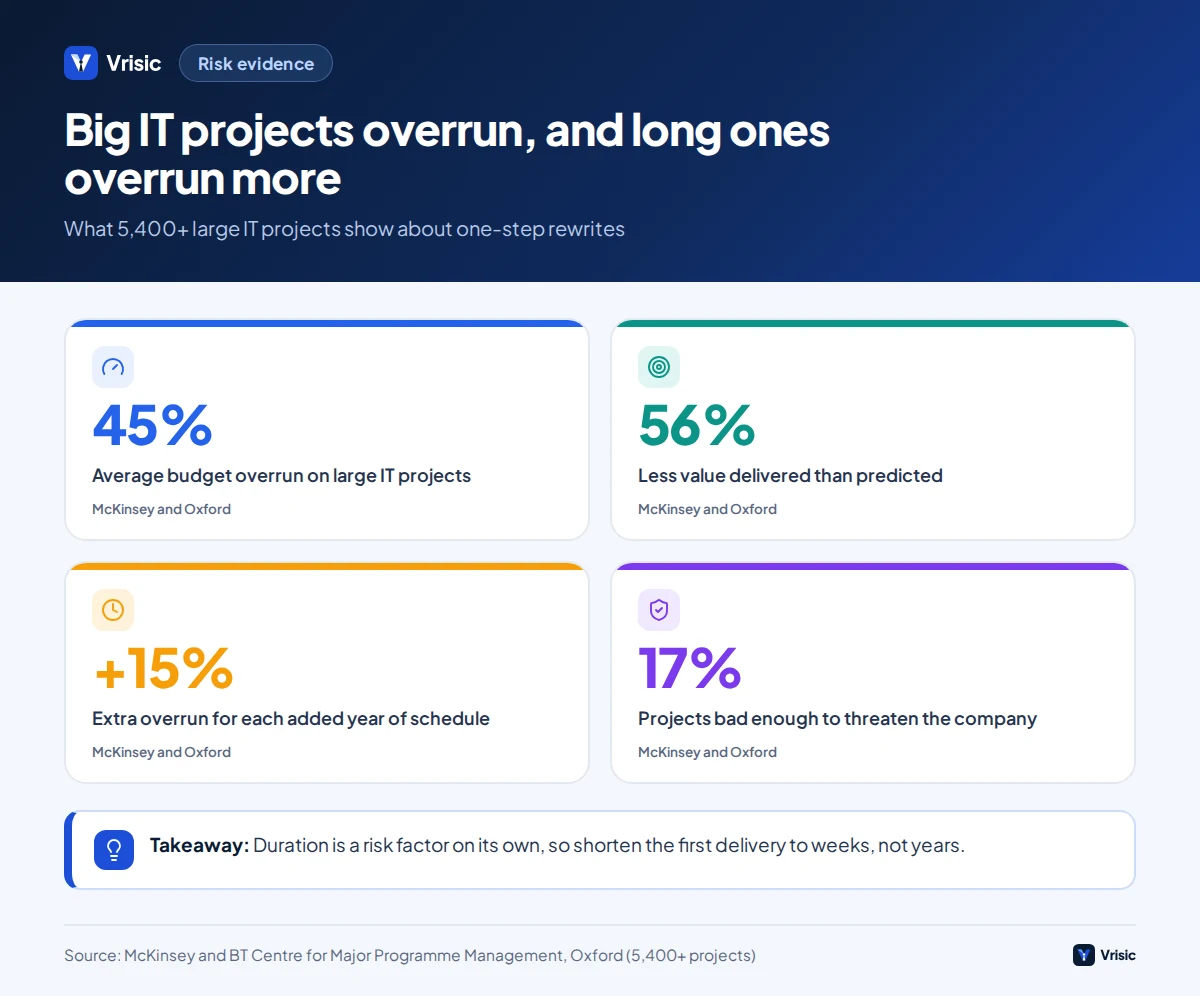
Short answer: Use AI to understand and test the old system first, wrap it behind an API second, and replace it one slice at a time third. Large IT projects run 45% over budget on average and deliver 56% less value than planned (McKinsey and Oxford), so one big rewrite is the option to avoid. In our estimate a wrapper plus a first AI helper costs $25,000 to $60,000 and takes 6 to 10 weeks; staged rebuilds of larger systems run $60,000 to $150,000 or more.
In this guide
- Why big rewrites fail
- Wrap, rebuild in stages or replace
- A triage test for each system
- Where AI helps and where it does not
- Step one: understand the system
- Step two: pin behaviour with tests
- Step three: wrap it with an API
- Step four: replace slice by slice
- Data migration is its own project
- Illustrative example with numbers
- A phased plan with timings
- Failure modes we plan for
- What it costs
- How Vrisic can help
- Sources
Legacy systems survive because they work. They become a problem because few people understand them, they resist change and the vendor, language or hardware underneath is ageing. The US Government Accountability Office looked at the ten most critical federal legacy systems, which cost about $337 million a year to run and range from about 8 to 51 years old. Several used COBOL, ran unsupported hardware and software and had known security vulnerabilities (GAO-23-106821). Your system is probably smaller, but the shape of the problem is the same.
AI has changed what is cheap in this work. Reading code, writing documentation, drafting tests and reading the documents that feed the old system are now tasks a model can do in hours. What AI has not changed is that a modernization is a risk management exercise. This guide covers how to use AI for the cheap parts, and how to keep the expensive parts from hurting you. For how we scope this work, see our AI legacy modernization service.
Why do big rewrites fail?
Big rewrites fail because the old system holds years of undocumented decisions, and a rewrite has to rediscover every one of them before it can go live. The longer the project, the more the business changes underneath it.
McKinsey and the BT Centre for Major Programme Management at Oxford studied more than 5,400 IT projects. Large projects (initial price above $15 million) ran 45% over budget and 7% over schedule on average and delivered 56% less value than predicted. Each extra year of scheduled duration added about 15% to the overrun, and 17% of projects went so badly they threatened the existence of the company (McKinsey). Most mid-market modernizations are far smaller, but the duration effect applies at any size.
The best documented UK example of the big bang approach is TSB. In April 2018 it moved about five million customer records to a new platform over one weekend. The independent review by Slaughter and May blamed the single-event migration, weak testing before go-live and gaps in the board’s understanding of the platform’s scope. Customers had trouble reaching their accounts for days, and fraud attempts rose to about 70 times normal levels at their peak. The review noted that a single-event migration can be the fastest and cheapest route, but only when its risks are understood and the system is thoroughly tested first (ITPro summary of the review). TSB disputes parts of the report, so treat it as one reading of one case, not a law.
The lesson is not that rewrites never work. It is that a rewrite needs a way to prove, before the switch, that the new system does what the old one did. AI helps most with exactly that proof.
Wrap, rebuild in stages or replace: what are the real options?
There are four honest options, and many systems end up using two of them in sequence.
| Option | What it means | Best when | Main risk | Typical time to first value |
|---|---|---|---|---|
| Leave and fence | Keep as is; stop adding features; document and monitor | Stable, low change, low risk, nothing depends on new data | Knowledge loss when the last expert leaves | Immediate |
| Wrap | Keep the core; add an API, event feed or AI layer around it | The system works but is closed off from new tools | Old limits and old hosting stay | 4 to 10 weeks |
| Rebuild in stages | Replace one module or workflow at a time behind a routing layer | Some parts are painful, others are fine | Two systems to run for a while | 8 to 16 weeks per slice |
| Replace | Move to a commercial product or a new custom system | The system is failing, unsupported or fundamentally wrong for the business | Migration and adoption risk | 6 to 18 months |
Timings are Vrisic’s planning assumptions for mid-market systems, not industry statistics. Your numbers depend on code size, documentation and how many integrations the system has.
Replacing with a commercial product is often the right answer when the process is standard. A 20-year-old in-house HR or accounting system rarely contains anything a modern SaaS product does not do better. Custom software earns its place where the logic is yours alone. Our build vs buy guide gives the decision rules.
How do you decide what to do with each system?
Score each system on four questions before choosing an option. Do this per system, not per company, because most estates are a mix.
- Business criticality. What stops if it stops, and how fast does it hurt? A reporting tool that runs monthly is different from an order system that runs every minute.
- Rate of change. How often do you need to change it? Code you touch twice a year does not justify a rebuild. Code you need to change every month and cannot is the first candidate.
- Knowledge risk. How many people can safely change it today? One person, or none, means documentation and tests come before everything else.
- Technical dead end. Is the language, database or hosting out of support, or blocked by security policy?
| Pattern | Usually points to |
|---|---|
| Stable, rarely changed, understood by two or more people | Leave and fence |
| Works well, but needs to feed new tools, portals or AI | Wrap |
| Critical, changing often, one person knows it | Understand and test first, then staged rebuild |
| Standard process, unsupported platform | Replace with a product |
| Unique logic, unsupported platform, high change | Staged rebuild, with a strangler layer |
Where does AI help in legacy modernization, and where does it not?
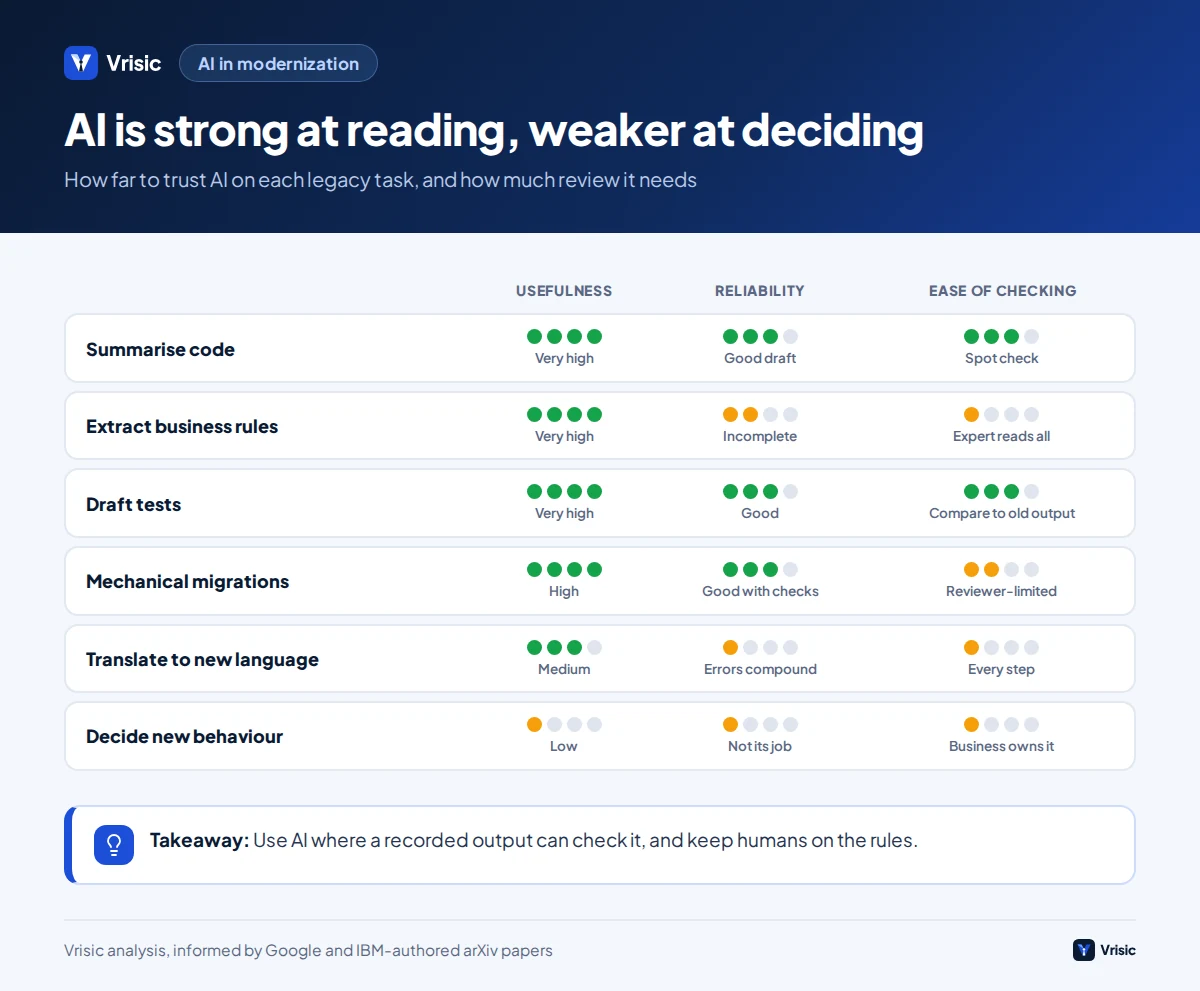
AI is strongest at reading and drafting, and weakest at being trusted without a check. Every use below needs a person who can tell right from wrong, and a test that can.
| Task | How AI helps | How much to trust it |
|---|---|---|
| Summarising code in plain language | Explains modules, data flows and call graphs to people who do not read the language | Good starting point; verify against behaviour |
| Extracting business rules | Lists conditions, thresholds and exceptions found in code, forms and reports | Useful draft; experts must confirm each rule |
| Writing tests | Drafts characterization tests and test data from real inputs and outputs | Good; the recorded outputs, not the AI, are the oracle |
| Mechanical migrations | Upgrades libraries, changes types, converts test frameworks | Good with automated checks and review |
| Translating code to a new language | Produces a first draft of the new code | Medium; needs compile, test and review at every step |
| Reading documents that feed the system | Extracts orders, invoices and forms so people stop re-keying | Good with validation rules and exception handling |
| Answering staff questions about the system | Searches docs, tickets and code comments | Good when it cites its sources |
| Deciding what the new system should do | Can list options | Low; this is a business decision |
What the evidence says about AI migrations
Google published how it uses language models for internal code migrations. In one migration of identifiers in its ads code, about 80% of the code changes that landed were fully written by AI, and engineers estimated a 50% cut in total migration time. A test framework upgrade changed more than 149,000 lines across 5,359 files in three months, and about 87% of the AI-generated code was committed without change. The authors also report that simple prompting only worked for the simplest cases, that humans had to revert some model changes and that reviewer time was the bottleneck. Their fix was to combine the model with deterministic tools that check syntax and structure (Google researchers, arXiv).
Translation between languages is harder than it looks. A paper evaluating IBM’s watsonx Code Assistant for Z COBOL to Java translation makes the compounding problem concrete: if each of ten paragraphs is translated with 90% accuracy, the chance that a whole program is correct is only about 34%. It also found that no single checker caught every injected fault, including a language model used as a judge, and concluded that a combination of checks works best (Quality Evaluation of COBOL to Java Code Transformation, arXiv).
Cloud vendors now sell this as a product. AWS Transform for mainframe covers code analysis, generated documentation, business rule extraction, decomposition into domains and test planning. Its own documentation says documentation and rule extraction work only for COBOL and JCL, that code which fails to compile is saved as an incomplete file for a person to compare, and that test data and test cases must still be built by you from the guidance provided (AWS documentation). Even the vendors treat AI as an accelerator for people, not a replacement.
Step one: how do you understand a system nobody understands?
Start by producing a map the business can read. A useful map has five parts, and AI can draft all five from the code, schema and documents you already have.
- Inventory. Modules, size, languages, last change date, who touches them, and what each one reads and writes.
- Dependencies. What calls what, which jobs run on a schedule, which files are dropped in folders, which other systems read the database directly.
- Data dictionary. Every table and column with a plain meaning, an owner and notes on odd values such as “status 7 means manual override”.
- Rule register. Each business rule written as a sentence, with the code location it came from and the person who confirmed it.
- Risk list. Hard-coded credentials, unsupported libraries, single points of failure and anything with no backup owner.
The rule register is the part to protect. Ask the model to extract rules, then have the person who runs the process read each one aloud. In our experience in this kind of work the extracted draft is valuable mostly for the questions it raises: “why is there a special case for customer code 4417?” Nobody in the room can answer until someone checks, and that is the knowledge you are trying to capture before it leaves.
Do not paste proprietary source code into a public chat tool to do this. Run the analysis with a model under an enterprise or API agreement that does not train on your data, or in a private environment. See our guide to private and self-hosted LLMs for when that is worth the cost.
Step two: how do you prove the new thing behaves like the old thing?
You pin the old behaviour with characterization tests before you change anything. A characterization test, a term coined by Michael Feathers, does not check that behaviour is correct. It records what the code does now and fails if that changes, so you find out about unintended differences immediately (Wikipedia: Characterization test).
This is where AI pays for itself. Writing hundreds of input and output cases by hand is the reason most teams skip this step. A practical routine:
- Collect real inputs from production logs, with personal data removed or masked: orders, invoices, API calls, batch files.
- Run each through the old system and record outputs: database changes, files, messages, screen values.
- Have the model group inputs into scenarios and add edge cases it finds in the code: zero quantities, leap days, currency rounding, empty fields.
- Freeze the results as the reference. When a recorded output is clearly a bug, mark it and decide whether to keep it, because other systems may depend on it.
- Run the same inputs through the wrapper or the new module and compare field by field.
The oracle is the old system’s recorded output, never the model’s opinion. If AI generates both the new code and the expected results, a shared misunderstanding passes silently. Keep those two sources independent.
Plan to compare in shadow mode before anything goes live: the new path processes real traffic in parallel and only its results are logged, not acted on. Differences fall into three buckets: the new code is wrong, the old code is wrong and everyone relied on it, or the data differs for a harmless reason. Sorting them is slow and is where most of the real learning happens.
Step three: what does wrapping a legacy system look like?
Wrapping means putting a stable interface in front of the old system so that new software never touches its internals. It is the lowest-risk way to deliver value early, because nothing in the old system has to change.
Common wrapper techniques, from least to most invasive:
- API over the existing database or service. Read-only first. A thin service exposes “get customer”, “list open orders” and similar calls, with its own tests.
- Event feed. Change data capture or a scheduled export publishes changes so other tools can react without polling the old system.
- Screen or file integration. For systems with no API and no database access, a controlled automation reads files or drives the user interface. This is brittle and should be a stopgap.
- Write path. Only after the read path is proven: a service that creates or updates records through the same routes a person would use, so existing validations still apply.
With a wrapper in place, AI features become straightforward integration work: an assistant that answers questions from the system’s data, a document reader that creates orders, an agent that drafts quotes for a person to approve. The old system stays the system of record.
The limit of wrapping is that you keep the old hosting, the old licence costs and the old constraints. If the platform itself is the dead end, wrapping buys time but does not solve the problem. That is when you move to the next step.
Step four: how do you replace a system slice by slice?
The standard pattern is the strangler fig. You place a routing layer (a facade or proxy) in front of the old system. It sends most requests to the old system at first, and as each slice of functionality is rebuilt and proven, you switch that slice to the new code. When nothing is routed to the old system, you retire it (Microsoft Azure Architecture Center).
Microsoft’s guidance also lists when not to use it, which we repeat because it is rarely mentioned in sales material:
- Requests to the back end cannot be intercepted.
- You cannot modify the legacy system at all, for example no source access and no integration point such as its database.
- The system is small enough that replacing it outright is simple.
- You need to decommission the original quickly.
Other considerations from the same guidance apply in practice. New and old systems will share data for a while, so plan which one owns each table. Use an anti-corruption layer so old naming and quirks do not leak into the new design. And keep the facade healthy: it must not become a single point of failure.
How to choose the first slice
Pick a slice that is valuable, bounded and reversible. A good first slice has a clear input and output, a business owner who wants it, and a rollback that takes minutes. Customer-facing quote generation or an internal approval flow usually qualifies. Core posting logic in a ledger does not. The first slice also proves your test method and your deployment pipeline, so its learning value matters as much as its business value.
Why is data migration its own project?
Data is where hidden problems surface, because old systems accept things new ones reject. Plan data work as a parallel track with its own owner and its own dates.
- Profile before you map. Count nulls, duplicates, impossible dates, free-text values in coded fields and orphaned records. AI is good at proposing categories for messy text and at flagging likely duplicates, but a person approves merges.
- Decide what not to migrate. Ten years of closed records may belong in an archive, not the new database.
- Reconcile with totals. Row counts and money totals by period must match between old and new before cutover. Sample records are not enough.
- Keep sync until you are sure. Microsoft’s database variant of the strangler pattern loads history, keeps it in sync with change data capture, validates consistency and treats removing the old tables as a deliberate final step because rollback is simple until then.
- Respect data law. Moving personal data to a new region or vendor can trigger GDPR or contractual duties. Check before you pick a hosting region.
Illustrative example: wrapping an order system and adding an AI helper
This is an illustrative example with assumed numbers, not a client project. Swap in your own.
The business. A wholesale distributor runs a 15-year-old order management application: about 400,000 lines of Java and database procedures, hosted on two on-premise servers, no API. One developer knows it well. Customers email purchase orders as PDFs, and three clerks re-key about 120 of them a day into the system.
The plan. Do not touch the core. Build a read-only API over the database for product and customer lookups, then a document-reading service that extracts each PO, validates it against customer and price data, and creates an order through the application’s existing import route. Orders the service is unsure about go to a clerk with the reason shown.
| Line | Today | After six months |
|---|---|---|
| Orders per working day | 120 | 120 |
| Handled with no human edit | 0% | 60% (1.5 minutes spot check each) |
| Others (40%) | 8 minutes each | 5 minutes each, prefilled |
| Clerk time per day | 16.0 hours (120 x 8 min) | 5.8 hours (120 x (0.6 x 1.5 + 0.4 x 5) min) |
| Clerk time per month (21 days) | 336 hours | about 122 hours |
| Cost at $28 an hour | about $9,400 | about $3,400 |
That is roughly 214 hours and $6,000 a month saved. Against an assumed build price of $40,000, payback is about 6.7 months, before running costs of perhaps $300 to $600 a month for hosting and model use. Two further benefits are not in the arithmetic: the read-only API and test suite lower the knowledge risk around the one developer, and they become the first slice of any later staged rebuild.
The honest caveat: if the distributor’s suppliers could send orders through an EDI or portal route, or the application vendor sold a supported connector, that would beat custom work. Check before you build. Our AI ROI calculator lets you run the same arithmetic with your volumes.
What does a phased plan look like?
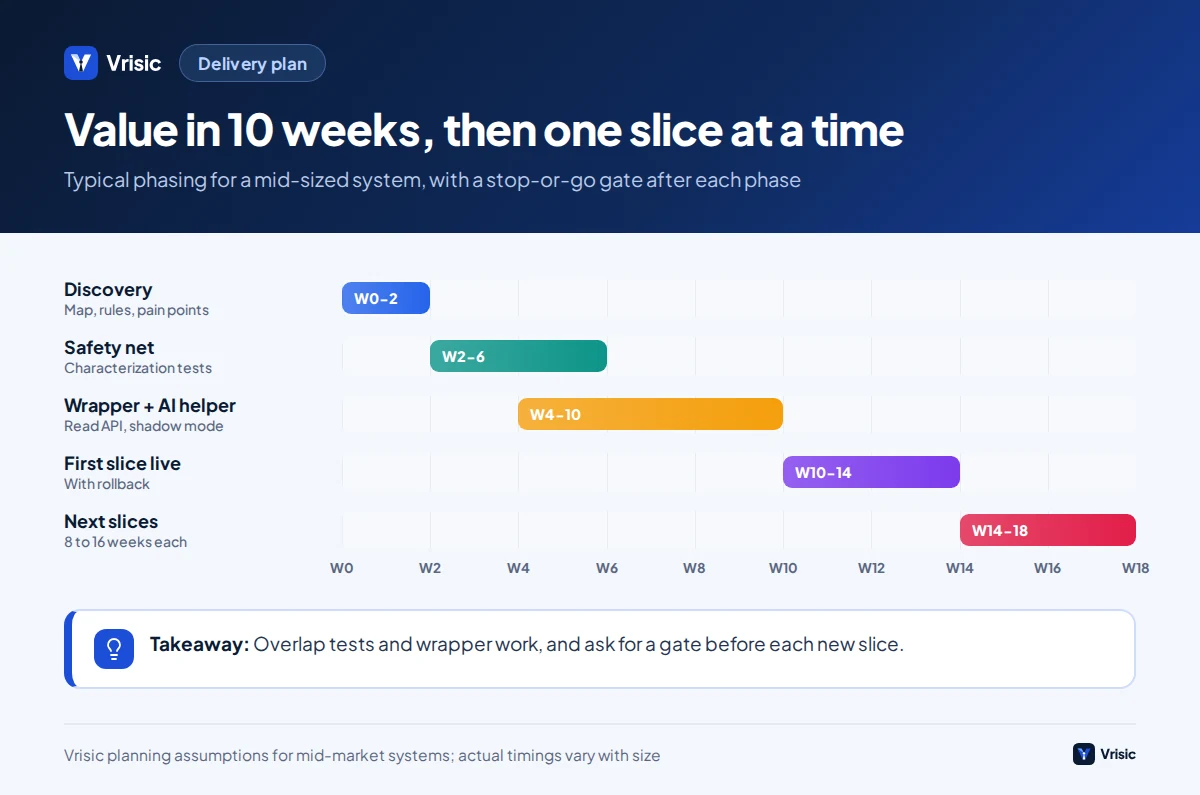
A phased plan delivers something useful at the end of every phase and lets you stop at any gate. These are typical durations for a mid-sized system; yours will vary.
| Phase | Weeks | Output | Gate to continue |
|---|---|---|---|
| 1. Discovery | 1 to 2 | System map, rule register draft, top three pain points ranked by cost | Business owner agrees the pain points and the target |
| 2. Safety net | 2 to 4 | Characterization tests on the core flows, access to a safe test environment | Tests pass repeatedly on the old system |
| 3. Wrapper and first AI helper | 3 to 6 | Read API, one AI feature in shadow mode | Shadow results match the reference to the agreed tolerance |
| 4. Go live on one slice | 2 to 4 | One workflow served by new code, with rollback | Measured time or error savings against baseline |
| 5. Repeat | 8 to 16 per slice | Next slice; old modules switched off when idle | Decided slice by slice |
Which failure modes should you plan for?
- Hidden rules. The special case that exists because of one customer contract in 2014. Mitigation: the rule register, shadow mode and a long tail of real inputs.
- Confident wrong output. AI-written code or documentation that reads well but is wrong. Mitigation: independent tests, review by someone who knows the process, and small steps. Google’s team found humans still had to revert changes.
- Review bottleneck. AI can produce changes faster than people can review them. Limit the batch size to what reviewers can check in a day.
- Data surprises. Bad data blocks cutover late. Mitigation: profile in the first month.
- Two systems, double the work. Staff enter data twice or reconcile by hand. Mitigation: define which system owns each record and automate the sync.
- Security of the old system. A wrapper can expose old weaknesses to the internet. Mitigation: authentication, rate limits and network isolation on the new layer, and a review of what the old system trusts.
- Adoption. Staff who were not asked will route around the new path. Involve the people who use the system in the rule review and in shadow mode.
- Vendor dependence. A modernization that traps you in a new proprietary tool has swapped one legacy for another. Ask who owns the code, the prompts and the tests.
What does AI legacy modernization cost?
Cost depends on size, documentation, test coverage and the number of integrations, so treat these as Vrisic’s typical ranges and expect a fixed price after a free scoping call.
| Scope | USD | Timeline |
|---|---|---|
| Discovery: system map, rule register, test plan | $5,000 to $12,000 | 1 to 3 weeks |
| Wrapper plus one AI helper (single task) | $8,000 to $25,000 | 3 to 6 weeks |
| Wrapper with integrated AI agent and write path | $25,000 to $60,000 | 6 to 10 weeks |
| Staged rebuild of a larger system, several slices | $60,000 to $150,000 or more | 10 to 16 weeks per phase |
Running costs are usually small next to build costs: hosting often $150 to $500 a month, and model usage depends on volume. Compare these to the licence, support and risk costs of the old system, including the hours your one expert spends firefighting. Our AI development cost guide explains how budgets are built.
A final decision rule: if the modernization cannot be tied to a number you can measure within six months, such as hours saved, errors avoided, a licence cancelled or a feature that was impossible before, shrink the scope until it can.
How Vrisic can help
We are a small remote team in India working US, UK and UAE hours. For legacy work we usually start with discovery and a test harness, then build a wrapper and the first AI feature. Price is fixed after a free scoping call. The system runs in your cloud account with your own model keys, and you own the code, prompts and test data, with no per-seat fees. Read how we work or see the legacy modernization service.
To test the idea first, our AI Pilot costs $1,500 (£1,200, AED 5,500), takes 10 business days and is credited in full against a build started within 60 days. Message us on WhatsApp at +91 63777 67206 or book a free scoping call.
Sources
- GAO-23-106821, report on critical federal legacy IT systems (US Government Accountability Office, May 2023)
- Delivering large-scale IT projects on time, on budget, and on value (McKinsey with the BT Centre for Major Programme Management, University of Oxford)
- TSB’s IT disaster pinned on big bang approach to migration (ITPro, reporting the Slaughter and May independent review)
- How is Google using AI for internal code migrations? (Google, arXiv)
- Quality Evaluation of COBOL to Java Code Transformation (IBM authors, arXiv)
- Transformation of mainframe applications, AWS Transform (Amazon Web Services documentation)
- Strangler Fig pattern (Microsoft Azure Architecture Center)
- Characterization test (Wikipedia)
Sources were checked in October 2026. Cost ranges, timings and the worked example are Vrisic estimates and assumptions, not benchmarks.